

IMira.1
Visitor II
August 4, 2021
Question

STM32CubeMX STM32F7- "Error Downloading the following files: crdb_full.zip (Cannot unzipped)"

  • August 4, 2021
  • 11 replies
  • 16173 views

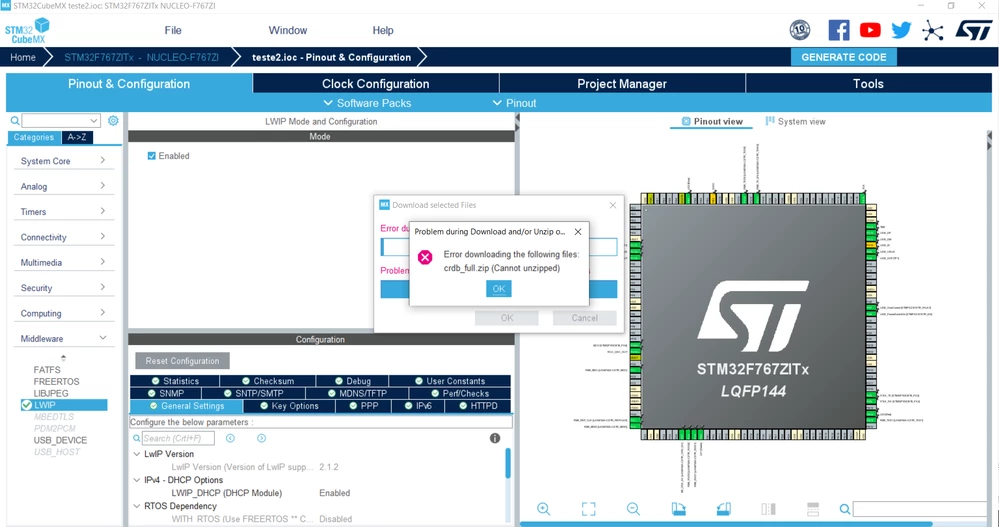
Hi everyone, I'm currently working with one NUCLEO-F767ZI board and everytime I create a new project on STM32CubeMX this "Error Downloading the following files: crdb_full.zip (Cannot unzipped)" appears.

I already tried to reinstall the STM32CubeMX and delete the crdb_full.zip file at <userfolder>\.stmcufinder\plugins\mcufinder\mcu\cs as suggested in another post.

I attempted unzipping the crdb_full.zip manually but it seems that there is an error with the file itself.

Is there any solutuion or workaround to solve this problem? Is this affecting the build?0693W00000D1Yc8QAF.png
11 replies

Visitor II
August 18, 2025

Guys and Ladies I fixed this problem. I’m explaining it step by step.

I was also experiencing the same problem along with the issue of the main.c file not being generated.

STEP 1 : “Error downloading the following files:” :

Firstly, Close the IDE.

Open hotspot on your mobile phone.

Connect to hotspot on your PC

Open the IDE

New Project ....

That will fix your problem.


STEP 2 : main.c and other files were not created. Just seeing .ioc and main project files.

First, you must setup manually.

go to https://www.st.com/en/embedded-software#tools-software

find your board or mcu software

Download latest

Go to the STM32Cube repository directory.

example: C:\Users\user\STM32Cube\Repository

open the zip file and copy the under file

paste to Repository

open the IDE and new project ....

That's will be fix your problem.


Burak Koç,

Best Regards.