

COSEBE
Senior
June 11, 2024
Solved

STM32H730ZB - SDRAM BANK1 wrong address

  • June 11, 2024
  • 5 replies
  • 4131 views

Hi,


I create a new project with STM32CubeIde 1.15.1 (but same with 1.10.1)

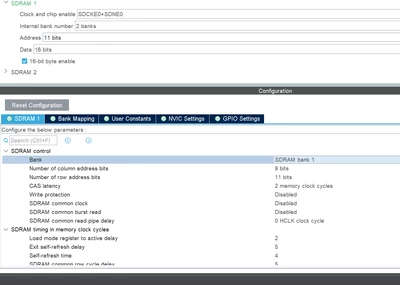
I add SDRAM 1 - BANK 1
COSEBE_0-1718065782758.png

When I debug this project, after HAL_SDRAM_Init function in MX_FMC_Init(), I can wath the memory in MEMORY BROWSER at address 0x60000000.

But on reference manual, SDRAM should be at 0xC0000000.
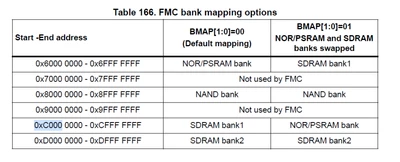
COSEBE_2-1718066108988.png

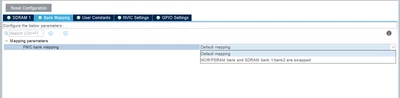
I select Default mapping in Bank Mapping :
COSEBE_3-1718066173657.png


If I select bank swapped, I have my datas at 0xC0000000.

Is it a bug of STM32CubeIDE ?


5 replies

KDJEM.1
Technical Moderator
June 12, 2024

Hello @COSEBE ,


Thank you for bringing this issue to our attention.

I reported internally.

The internal ticket 184015 (not accessible by community users) has been opened to confirm and fix the issue.

Thank you for your contribution in STCommunity.


Kaouthar

To give better visibility on the answered topics, please click on Accept as Solution on the reply which solved your issue or answered your question.
COSEBE
COSEBEAuthor
Senior
June 12, 2024

Hi Kaouthar,

Did you manage to reproduce the problem?

Is it a known problem?

Should I continu to investigate the problem?


KDJEM.1
Technical Moderator
June 12, 2024

Hi @COSEBE ,


I reproduced the problem and I reported internally to our STM32CubeMx team for confirmation and fix.

Also, I checked FMC_SDRAM  example and it works correctly. For that, I recommend you to start with this example.

I think that SDRAM Initialization sequence shared in this FAQ How to set up the FMC peripheral to interface with... - STMicroelectronics Community can help you. 

I will come back to you for more details as soon as possible.

Thank you.

Kaouthar


To give better visibility on the answered topics, please click on Accept as Solution on the reply which solved your issue or answered your question.
Tesla DeLorean
Guru
June 12, 2024

Honestly I think this problem is compounded because the Hardware has 0 / 1 signal designations, and then you refer to SDRAM Bank 1 and Bank 2, and the SDRAM chip itself has it's own understanding of "banks", with BA0 / BA1

ie

SDNE0 / SDCKE0 -> SDRAM1 aka BANK 1 -> 0xC0000000

SDNE1 / SDCKE1 -> SDRAM2 aka BANK 2 -> 0xD0000000

Given how systemic this has become, going to hard to rationalize it now..

Tips, Buy me a coffee, or three.. PayPal VenmoUp vote any posts that you find helpful, it shows what's working..
COSEBE
COSEBEAuthor
Senior
June 12, 2024

Well, if that, It should be on every STM32H7, but it woks with STM32H7B3.

If that, I should have wrong address 0xC0000000 / 0xD0000000 but not 0xC0000000 / 0x60000000

Tesla DeLorean
Guru
June 12, 2024

Well this gets into another set of issues where the H7 family has at least 3 different die and they all behave differently, have different speeds and peripherals and occasionally have incompatible AF Mux settings.

H74x/H75x

H72x/H73x

H7Ax/H7Bx

Tips, Buy me a coffee, or three.. PayPal VenmoUp vote any posts that you find helpful, it shows what's working..
COSEBE
COSEBEAuthor
Senior
June 18, 2024

On example project you mentioned :

https://github.com/STMicroelectronics/STM32CubeH7/tree/master/Projects/STM32H743I-EVAL/Examples/FMC/FMC_SDRAM

Without modify anything, in the main file, juste after 

if(HAL_SDRAM_Init(&hsdram, &SDRAM_Timing) != HAL_OK) ==> line 118

I can access at address 0x60000000 instead of 0xD0000000 on memory window of STM32CubeIde 1.15.1

0x60000000 have data

0xD0000000 still have ????????? on memory

Tesla DeLorean
Tesla DeLoreanBest answer
Guru
June 18, 2024
Tips, Buy me a coffee, or three.. PayPal VenmoUp vote any posts that you find helpful, it shows what's working..