Rodo
Senior
March 19, 2025
Question

STM32H7A3 enabling SAI1 with I2S_CLKIN error?

  • March 19, 2025
  • 5 replies
  • 834 views

Hi all,

I just upgraded cubeIDE from 1.17.0 to 1.18.0. 

I had set up a project in 1.17.0 without any issues. I was reading here some posts and I read that there is a dedicated I2S_CLKIN pin that I had missed. I was trying to figure out a clock source that would give me the 44.1kHz sampling and I figure 11.2896 MHz would do but is an odd frequency for the rest of the system. 

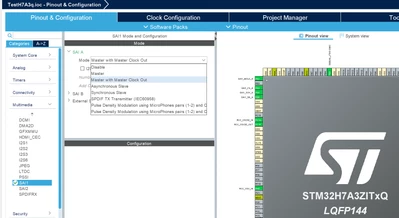
Anyhow... I enabled the I2S_CLKIN pin and set it for 11.2896 MHz. But when I save the code I keep getting an error that there is something wrong with SAI1 ... but I don't see what? I'm probably missing something basic but I can't see it so in my frustration I erased all projects and made I new one ... I still get the same error.  The zip file of the project is here but SAI1 is disabled. You need to set it to master or master with clock output and save it to see the error I get. There is no code from me just cubeMX (the version built-in cubeIDE 1.18.0). 

What am I missing? Thanks.
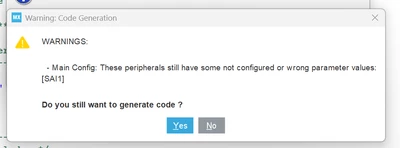
cubeIDE SAI1 error.png


cubeIDE SAI1 cfg.png


5 replies

KDJEM.1
Technical Moderator
March 19, 2025

Hello @Rodo;


Similar issue is reported here.

This issue has been raised internally to dev team for fix.

Internal ticket number: 204851 (This is an internal tracking number and is not accessible or usable by customers).


Thank you.

Kaouthar


To give better visibility on the answered topics, please click on Accept as Solution on the reply which solved your issue or answered your question.
Rodo
RodoAuthor
Senior
March 19, 2025

How do I find out when a solution is made available? Thanks

KDJEM.1
Technical Moderator
March 21, 2025

Hello @Rodo,


I'll let you know when the issue is solved in STM32CubeMX.

I apologize for any inconvenience.


Thank you.

Kaouthar

To give better visibility on the answered topics, please click on Accept as Solution on the reply which solved your issue or answered your question.
KDJEM.1
Technical Moderator
April 14, 2025

Hello @Rodo,


Could you please try to use the latest STM32CubeMX 6.14.1 version and/or STM32CubeIDE1.18.1 version.

The SAI tab configuration issue is fixed as mentioned in STM32CubeMx 6.14.1 released.

KDJEM1_0-1744644830970.png


Please let me know if the issue is solved or not?

Thank you.

Kaouthar

To give better visibility on the answered topics, please click on Accept as Solution on the reply which solved your issue or answered your question.
Rodo
RodoAuthor
Senior
April 14, 2025

I removed cubeIDE v1.18.0 and installed v1.17.0 again. I don't think I'm gonna try v1.18.1 at this point. Thanks for the heads up though.