

BJX
Associate II
November 6, 2025
Solved

The demonstration program generated by cubemx for the NUCLEO-H563ZI cannot be run

  • November 6, 2025
  • 1 reply
  • 345 views

Hello!
As the title suggests, the demonstration program is generated from the options shown in the following figure.

BJX_0-1762417190844.png
After the program is burned onto the board, it won't run. It enters the debug mode and stops at the "SystemInit" point. After clicking continuously several times, it will then enter the "main" section.
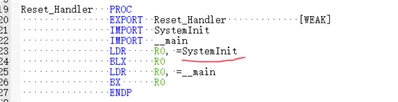
BJX_1-1762417404264.png

Any help would be appreciated as I am losing hair over this haha.
 

Best answer by Ghofrane GSOURI

Hello @BJX 

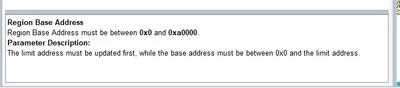
Please try to modify the Limit address field first then the base address

GhofraneGSOURI_0-1762507837576.png

THX

Ghofrane

1 reply

Ghofrane GSOURI
Technical Moderator
November 6, 2025

Hello @BJX 

Make sure you are using the latest version of STM32CubeMX (version 6.15.0 ).

Additionally, configure STM32CubeIDE so that the debugger starts at the main function instead of stopping at SystemInit. To do this, open your project's debug configuration in STM32CubeIDE, navigate to the Startup  tab, and enable the option labeled "Set breakpoint at main". This will ensure the debugger automatically halts at the beginning of your main application code

GhofraneGSOURI_0-1762434952885.png

THX

Ghofrane

To give better visibility on the answered topics, please click on Accept as Solution on the reply which solved your issue or answered your question.
BJX
BJXAuthor
Associate II
November 7, 2025

Hello.@Ghofrane

I am using version 6.15, but the IDE is Keil.

BJX_0-1762479826758.png

Keil also selected the relevant options, but it had no effect.

BJX_1-1762479896793.png

I used the MCU option of Cubemx to create a simple LED blinking project for H563ZI, and there were no issues at all.

I'm not sure where the problem lies with the demonstration program. Thank you for your response.

Love me in the eye.
Ghofrane GSOURI
Technical Moderator
November 7, 2025

Hello @BJX 

Could you please attach your project? I will review your settings to ensure everything is configured correctly.

THX

Ghofrane

To give better visibility on the answered topics, please click on Accept as Solution on the reply which solved your issue or answered your question.