User_bug13
Associate II
March 30, 2025
Solved

Threadx support missing for F4 and F7?

  • March 30, 2025
  • 1 reply
  • 376 views

Hi guys

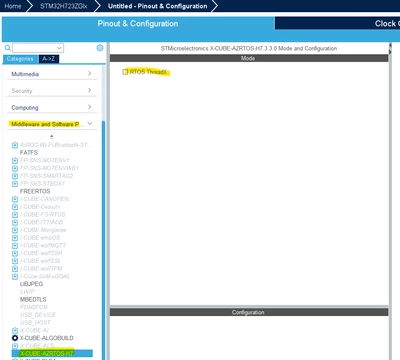
I can't find threadx support for F4, F7 and H7, it's only available for C0 series. According to this post, and my google. It should support most stm32 MCUs. 

What can I do to enable threadx support for these MCUs?

User_bug13_0-1743374497493.png


Best answer by KDJEM.1

Hello @User_bug13 ,


You can enable ThreadX with

- STM32F4 devices by installing X-CUBE-AZRTOS-F4

- STM32F7 devices by installing X-CUBE-AZRTOS-F7

- STM32H7 devices by installing X-CUBE-AZRTOS-H7

To use ThreadX with STM32H723 device for example, you can follow these steps:

- Start project using STM32CubeMx 6.14.0 toolchain and choose STM32H723MCU.

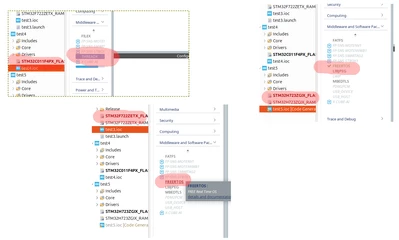
- Then click on "Software Packs"-> "Select Components"

KDJEM1_0-1744284488048.png


- Click on "Install" to install "STMicroelectronics X-CUBE-AZRTOS-H7" 

- Select ThreadX option 
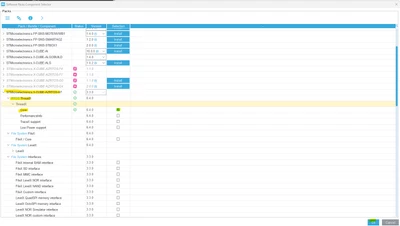
KDJEM1_1-1744284570247.png

- You can enable "RTOS ThreadX"

KDJEM1_2-1744284689474.png


I hope this help you.


Thank you.

Kaouthar

1 reply

KDJEM.1
KDJEM.1Best answer
Technical Moderator
April 10, 2025

Hello @User_bug13 ,


You can enable ThreadX with

- STM32F4 devices by installing X-CUBE-AZRTOS-F4

- STM32F7 devices by installing X-CUBE-AZRTOS-F7

- STM32H7 devices by installing X-CUBE-AZRTOS-H7

To use ThreadX with STM32H723 device for example, you can follow these steps:

- Start project using STM32CubeMx 6.14.0 toolchain and choose STM32H723MCU.

- Then click on "Software Packs"-> "Select Components"

KDJEM1_0-1744284488048.png


- Click on "Install" to install "STMicroelectronics X-CUBE-AZRTOS-H7" 

- Select ThreadX option 

KDJEM1_1-1744284570247.png

- You can enable "RTOS ThreadX"

KDJEM1_2-1744284689474.png


I hope this help you.


Thank you.

Kaouthar

To give better visibility on the answered topics, please click on Accept as Solution on the reply which solved your issue or answered your question.