
Associate
September 18, 2025
Question

Unable to download any MCU package from the STM32U3 Series via STM32CubeIDE

  • September 18, 2025
  • 4 replies
  • 482 views

Hey everyone,

I'm currently trying to work with the NUCLEO-U386RG-Q development board.

When I try to download the latest available MCU package (1.2.0) via STM32CubeIDE, I only get an error message stating that the requested MCU package is not available. This is obviously incorrect, as I can manually download and install it from the ST website.
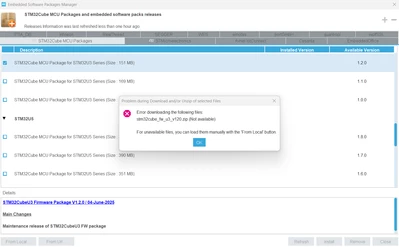
MaxM1_1-1758179928252.png


When I try to install one of the previous releases, the connection is established, but the download is extremely slow for some reason.
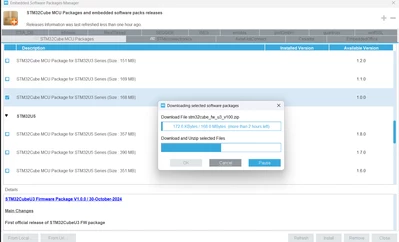
MaxM1_0-1758179894373.png


Other MCU packages, like those for the STM32U5 series, download without any issues and complete within seconds.
I'm using STM32CubeIDE version 1.19 and have already completely reinstalled it. A refresh of the package list also doesn't solve the problem.


Is anyone else experiencing this or knows how to fix it?
Best regards,
Max


4 replies

mƎALLEm
Technical Moderator
September 18, 2025

Hello @MaxM1 and welcome to the ST community

Were you able to download that package with the standalone STM32CubeMx tool?

"To give better visibility on the answered topics, please click on ""Accept as Solution"" on the reply which solved your issue or answered your question."
MaxM1Author
Associate
September 18, 2025

Hey @mƎALLEm ,

thank you for your quick reply, no i tried it right now but i get nearly the same behaviour. 

In STM32CubeMx, the MCU-Package versions V1.2.0 and v1.0.0 throw an error when i try to download them : 

MaxM1_0-1758189139698.pngMaxM1_1-1758189166538.png

Version 1.1.0 therefore tries to unzip something for some reason and exits after a while with the same error message type: 

MaxM1_3-1758189368804.pngMaxM1_2-1758189347441.png


Other MCU-Packages like the ones for STM32U5 work without any problems as described above. 

The only thing i can do to install the STM32U3-Package i need, is to download it direct on 

https://www.st.com/en/embedded-software/stm32cubeu3.html

and install it manually. 


Best regards

Max


TDK
Super User
September 18, 2025

Works for me here, now.

Sometimes the software site is down.

Could also be something on your computer causing havoc such as antivirus.

"If you feel a post has answered your question, please click ""Accept as Solution""."
MaxM1Author
Associate
September 18, 2025

I get your point @TDK — that was actually the first thing I thought of as well.

But the thing is: I can download other MCU packages without any issues. If the software site were down or my antivirus (firewall is disabled) were blocking the request, none of the packages should work. It's specifically the STM32U3 package that can't be downloaded.

mƎALLEm
Technical Moderator
September 18, 2025

I just tested U3 MCU package (1.2.0) download using the stand alone CubeMx and there is no problem.

Could you please do the test again? may be if possible to try with another machine (PC/Laptop)?

"To give better visibility on the answered topics, please click on ""Accept as Solution"" on the reply which solved your issue or answered your question."
MaxM1Author
Associate
September 19, 2025

Hi @mƎALLEm, Hi @TDK 

I have a strong suspicion about what's causing the issue.

I just tested the setup on another machine to verify whether the problem is specific to my original workstation – and indeed, it is. On the second machine, everything works flawlessly: I can download any MCU package version without issues.

Back on the original machine, I refreshed the MCU package list, and suddenly version 1.2.1 of the STM32U3 package appeared – even though I had tried this multiple times yesterday without success. I attempted to install it, but again it got stuck or reported that the package was unavailable, just like before.

As far as I know, no firewall or antivirus is actively intercepting the download.

However, Skyhigh Secure Web Gateway is running on the original machine. It frequently intercepts downloads, scans them for threats, and only releases them after a delay. This process runs through the company’s proxy infrastructure, so there’s no way to bypass it locally.

Here’s what I suspect is happening:

  • The package manager initiates a download.
  • Skyhigh intercepts the file and begins scanning it.
  • From the package manager’s perspective, the file is not yet available, which causes the download to fail or timeout.

This is just an assumption – I can’t confirm it without talking to the system administrator, which may take some time.

You could really help me by providing a list of:

  • Domains and ports used by STM32CubeIDE and its package manager for downloading updates and firmware.
  • Any URLs or endpoints that should be whitelisted to ensure smooth operation.

This would allow me to request the necessary exceptions from IT so that development tools can function properly.

Thanks in advance!