Associate III
April 15, 2025
Question

Update STM32CubeMX and STM32Cube MCU Packages

  • April 15, 2025
  • 2 replies
  • 731 views

Hello,


I want to update STM32CubeMX and STM32Cube MCU Packages, but I can't do because of the error.

I tried to run STM32CubeMX in admin mode, but the error occured again.

1. How do you solve this error?

2. Is 'STM32Cube Updater' a real file?


# Error Text : "A 'STM32Cube Updater' (or another 'STM32CubeMX') software is downloading to the Repository folder. Please wait for the download to complete and retry"
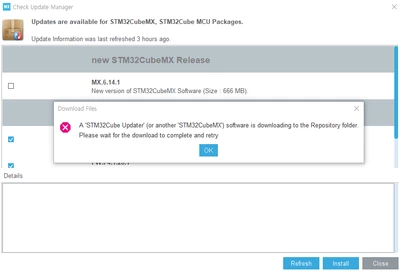
StrangeTau_0-1744693629582.png

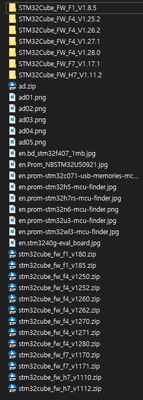
# In the Repository folder

StrangeTau_1-1744693678480.png What file is being downloaded?


2 replies

Ghofrane GSOURI
Technical Moderator
April 15, 2025

Hello @StrangeTau 

First let me thank you posting.

Make sure that you are connected .Go to Help --> Connection and Updates then follow the steps mentioned in UM1718 :3.4.2 Updater configuration.

Next go to Help and press "Refresh data".

Finally click on "Help "--> Check for updates --> MX 6.14.1 --> install

GhofraneGSOURI_0-1744705926201.pngGhofraneGSOURI_1-1744705945844.png

GhofraneGSOURI_2-1744706383522.png


THX

Ghofrane

To give better visibility on the answered topics, please click on Accept as Solution on the reply which solved your issue or answered your question.
Associate III
April 16, 2025

Hello @Ghofrane GSOURI 

Thank you for your prompt response.


I'm refering to UM1718 file and the link below.

When I set 'Network Connections' in STM32CubeIDE, do I set 'Active Provider' to 'manual', and freely enter Host and Port?

and then, Do I enter them to 'Updater Settings' in STM32CubeMX?


# The link

https://community.st.com/t5/stm32-mcus/how-to-set-the-network-connection-parameters-for-stm32cubeide/ta-p/585694

# Proxy HTTP and Port Settings

StrangeTau_2-1744766376916.pngStrangeTau_1-1744764310207.png


TDK
Super User
April 15, 2025

Sounds like you have multiple programs open trying to update. Close them all and retry.

"If you feel a post has answered your question, please click ""Accept as Solution""."