
Associate III
December 5, 2023
Solved

Why does CubeMX configure B1_Pin?

  • December 5, 2023
  • 2 replies
  • 2357 views

Beginner's question here. I have Nucleo-L476RG board and trying to learn more about the code CubeMX generates. To this end I started a new project and answered 'no' to setting up the peripherals, to make it as simple as possible.

As part of MX_GPIO_Init() the B1_Pin is configured. I can't find any reason for this. The pin does not get a mention in the pinout view or the system view, and I can't find any reference to it in the generated code following its configuration.

Here is the relevant code:

__HAL_RCC_GPIOB_CLK_ENABLE();

followed by:

/*Configure GPIO pin : B1_Pin */

GPIO_InitStruct.Pin = B1_Pin;

GPIO_InitStruct.Mode = GPIO_MODE_IT_FALLING;

GPIO_InitStruct.Pull = GPIO_NOPULL;

HAL_GPIO_Init(B1_GPIO_Port, &GPIO_InitStruct);
 

This topic has been closed for replies.
Best answer by TDK

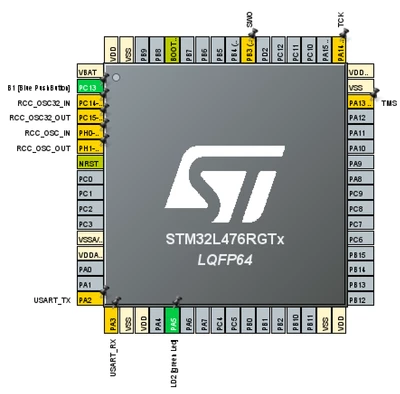
Clicking "no" to set up peripherals will leave your chip configured in the following state, with B1 and LD2 defined:

TDK_0-1701785271218.png

If you want absolutely nothing configured, start with the chip itself instead of the board or un-define those pins.


2 replies

LCE
Principal II
December 5, 2023

Maybe that's the "button 1" pin which is not connected anywhere else, and starting with a Nucleo board so CubeMX knows that.

Search the source files to find the defines for B1_Pin and B1_GPIO_Port, the compare to the schematics.

TDK
TDKBest answer
Super User
December 5, 2023

Clicking "no" to set up peripherals will leave your chip configured in the following state, with B1 and LD2 defined:

TDK_0-1701785271218.png

If you want absolutely nothing configured, start with the chip itself instead of the board or un-define those pins.


"If you feel a post has answered your question, please click ""Accept as Solution""."
DabboAuthor
Associate III
December 5, 2023

Ok my stupidity. I confused B1 (the blue user button) with PB1. Now it’s clear. Thanks