

A.Kalv.1
Associate
June 5, 2023
Solved

autokit

  • June 5, 2023
  • 5 replies
  • 7925 views

Dear

I installed AutoDevkitstudio yesterday.As I can see I should go to this web site"hightec-rt.com/en/" and get a license but in this site there is not any form that I fill it and get a license. Pleas help me more for getting license!. Thank you
This topic has been closed for replies.
Best answer by A.Kalv.1

Hello Oliver,

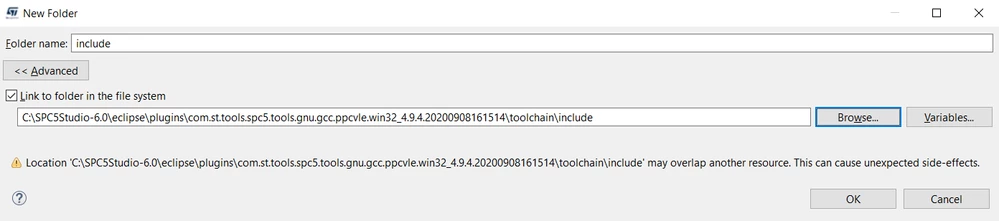
I add this folder and it seems it works correctly!.. ;)


_legacyfs_online_stmicro_images_0693W00000dDN8AQAW.png But I do not know why HIGHTEC does not answer emails!

You can call me Arash too  .

5 replies

ODOUV.1
ST Employee
June 5, 2023

Hello,

Sorry we do not deliver licenses nor licenses support.

Please contact our partner HIGHTEC to have support on their product.

Best regards.

A.Kalv.1
A.Kalv.1Author
Associate
June 6, 2023

Dear Sir or Madam

Thank you for your response.

I write a message for HIGHTEC and I am waiting for their response. I have another question.

After opening the main.c and compile it the message "Type uint32_t could not be resolved" has been appeared. Obviously, a header file is not attached and I do not know how I can add this header library file to the project. Can you send this file for me if my guess is correct .

Kindly regards

ODOUV.1
ST Employee
June 6, 2023

Hello,

to resolve includes in SPC5Studio,

right click on your project and select properties:


_legacyfs_online_stmicro_images_0693W00000bVhaCQAS.pnggo in menu C/C++ General->Paths and Symbols,

Source Location, click on Link Folder:


_legacyfs_online_stmicro_images_0693W00000bVhbPQAS.pngselect your needed include folder and click "OK", then click "apply and close"

-Best regards,

Sir Olivier 

A.Kalv.1
A.Kalv.1Author
Associate
June 6, 2023

Thank you for your guidance. That problem was solved, in addition I let that "C/C++ indexer " to be 100%.after that this problem about "syntax error" is appeared :
_legacyfs_online_stmicro_images_0693W00000bVjYrQAK.pngHow I could solve it too!?))

I addition I am going to buy "SPC56 DISCOVERY PLUS" board. I do not know whether I can run this board without AutoDevKitStudio or not because HIGHTEC  do not answer my question to get a license for AutoDevKitStudio !

Regards

A.Kalv.1
A.Kalv.1Author
Associate
June 7, 2023

Dear Sir

my second question was related to "syntax error". why this error is appeared and what is the solution for it?

Thank you

ODOUV.1
ST Employee
June 7, 2023

Dear Customer,

Tesla DeLorean is probably right.

You probably included as link a folder that is for windows, and not for gcc.

You can see that your compilation is withour errors nor warnings.

this means your makefile/toolchain is based on right include

But the eclipse C/C++ analyzer (which provides the syntax error) is based on the folder you linked, it should not be the good one.

You have to remove this one and add the good one.

Best regards,

-Olivier (Just call me Oliver ;-))

A.Kalv.1
A.Kalv.1AuthorBest answer
Associate
June 8, 2023

Hello Oliver,

I add this folder and it seems it works correctly!.. ;)


_legacyfs_online_stmicro_images_0693W00000dDN8AQAW.png But I do not know why HIGHTEC does not answer emails!

You can call me Arash too  .

ODOUV.1
ST Employee
June 8, 2023

Thank you for your reply Arash.

Have a nice day !

-Olivier

A.Kalv.1
A.Kalv.1Author
Associate
June 8, 2023

Dear Olivier:

I am a beginner and I would like to work with pins and GPIOs! :))

There are many great samples about peripherals but not about GPIOs. I would like to ask that there is any example(s) about GPIOs in SPC5STUDIO WIZARD!

Thank you.

ODOUV.1
ST Employee
June 9, 2023

Dear Arash,

in your project :"SPC56ELxx_RLA DSPI Test Application for DiscoveryPlus"

you have a GPIO configured in OUPTUT to blink a LED:


_legacyfs_online_stmicro_images_0693W00000dDT4iQAG.pngit can be easily configured using the pinmap editor:


_legacyfs_online_stmicro_images_0693W00000dDT5HQAW.pngthen in your main function you have the code to call gpio driver to blink the LED:

  pal_lld_clearpad(PORT_A, PA_LED5);       /* LED ON.         */

  osalThreadDelayMilliseconds(300); /* WAIT 300 ms */

  pal_lld_setpad(PORT_A, PA_LED5);        /* LED OFF.        */

put you mouse pointer on the function pal_lld_setpad and do <CTRL>-left click to navigate in your code.

Best Regards,

-Olivier

A.Kalv.1
A.Kalv.1Author
Associate
June 9, 2023

Thank you Dear Oliver

I plan to to buy a SPC57xx EVB.

I would like to know that I can use these codes with a SPC57xx family too !