Associate III
September 6, 2024
Solved

led blinking

  • September 6, 2024
  • 2 replies
  • 3953 views

good morning

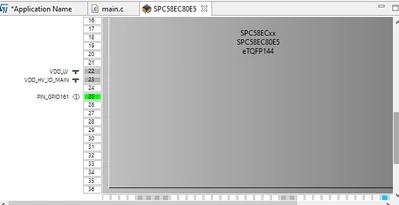
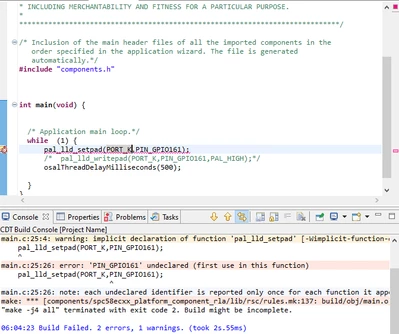
i want to create a simple led blinking code. for that, i got the path of the led 8 of my aek-mcu-c4mlit1. it is pk1gpio1 and is connected to the branch 25. i connected it on the gui and wanted to code in my main. unfortunately, C recognizes port k but not the pin that i just pinned and the function that makes it blinks. so my 2 questions are: how to make it recognize the pin and how to get functions that work 

kind regards
Jad_0-1725628089535.png

Jad_1-1725628126891.png


Best answer by ATROI

Hi Jad,


in my copy and paste there was an error.

Pls replace the line:

siul_lld_readpad(PORT_PIN_GPIO36, PIN_GPIO36);rqIsrEnable();

with 

siul_lld_readpad(PORT_PIN_GPIO36, PIN_GPIO36);

now it should work.

Thanks,

AutoDevKit Team

P.S.

if you open the welcome page in AutoDevKit, see the image below, you can find the same tutorial that can help.

ATROI_0-1725639132726.png


2 replies

ATROI
ST Employee
September 6, 2024

Hi Jad,

After you set a pin in the Pin Map Editor you have to:

- Save and close the Pin Map Editor.
- Save the project.
- Generate the code (click on the following icon).

ATROI_0-1725630287073.png


After this step, you will see that the tool recognizes the PIN Name as a variable.

In your case, if the name of the PIN is PIN_GPIO161, the function you are using wants as a parameter (PORT_PIN_GPIO0161, PIN_GPIO0161).


Thanks,

AutoDevKit Team

JadAuthor
Associate III
September 6, 2024

thank you very muh for the quick response. neverless, i still  have the same error messages and now my pinmap editor has completly changed and there is no more gpio 161 at branch 25. the number of branch ha reduced and is no more le the number on my data sheet

Jad_0-1725630673230.png

kind regards

ATROI
ST Employee
September 6, 2024

Hi Jad, 

pls. start from scratch, crate new project and follow 

the steps I suggested before, it should work.

Thanks,

AutoDevKit Team. 

ATROI
ATROIBest answer
ST Employee
September 6, 2024

Hi Jad,


in my copy and paste there was an error.

Pls replace the line:

siul_lld_readpad(PORT_PIN_GPIO36, PIN_GPIO36);rqIsrEnable();

with 

siul_lld_readpad(PORT_PIN_GPIO36, PIN_GPIO36);

now it should work.

Thanks,

AutoDevKit Team

P.S.

if you open the welcome page in AutoDevKit, see the image below, you can find the same tutorial that can help.

ATROI_0-1725639132726.png


JadAuthor
Associate III
September 7, 2024

thank you for your response. in fact i already saw those videos but i wanted to use the leds tht are already deirectly on my oard. i wondered if there are also tutorials for the management of interruptions, the clock and the use of the librarys.