
Associate II
January 17, 2024
Solved

SPC5 Studio

  • January 17, 2024
  • 2 replies
  • 2870 views

I recently installed SPC5 studio and I'm referring to example codes. The example code is building without errors but there are problems indicating,

Description Resource Path Location Type
Symbol 'NULL' could not be resolved main.c /SPC582Bxx_RLA FreeRTOS SERIAL Test Application for Discovery line 85 Semantic Error
Symbol 'uint16_t' could not be resolved main.c /SPC582Bxx_RLA FreeRTOS SERIAL Test Application for Discovery line 33 Semantic Error
Type 'uint8_t' could not be resolved main.c /SPC582Bxx_RLA FreeRTOS SERIAL Test Application for Discovery line 23 Semantic Error

I tried to include the libraries such as <stdlib.h> and <stdint.h>, but the IDE giving the error as follows while building without any errors,

Unresolved inclusion: <stdlib.h>


How do I resolve this error?
Best answer by Max VIZZINI

Hi,


You do not need the standard libraries in the code like <stdlib.h>.

In Eclipse and consequently in SPC5Studio, there is a pre-processor for the code compiling called CDT.

The issue is that the built-in CDT ''preprocessor" does not find the include PATH of the gcc compiler. It is just a preprocessor issue but does not affect the compilation.

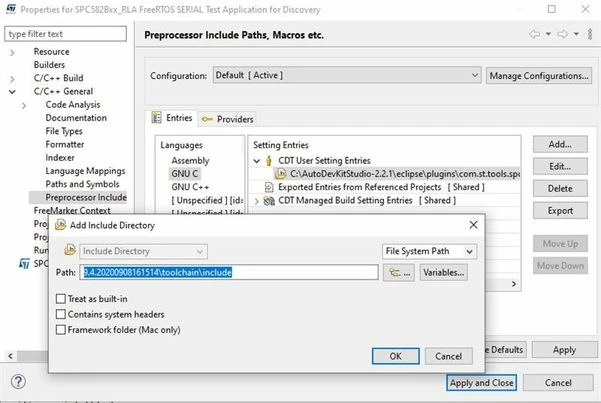
If you want to remove these errors in C/C++ general ==> Preprocessor Include ==> CDT USER Setting Entries

enter:

C:\AutoDevKitStudio-2.2.1\eclipse\plugins\com.st.tools.spc5.tools.gnu.gcc.ppcvle.win32_4.9.4.20200908161514\toolchain\include

or equivalent path for your installation like C:\SPC5Studio....\eclipse\plugins\....

MaxVIZZINI_0-1705571948134.jpeg

This should solve your issue.

Best Regards,

AutoDevKit Team


2 replies

Associate III
January 17, 2024

Just ignore it, welcome to ST. 
Many before you tried to solve it, none succeded.

But at least it compiles hence the warnings

Max VIZZINI
Max VIZZINIBest answer
Technical Moderator
January 18, 2024

Hi,


You do not need the standard libraries in the code like <stdlib.h>.

In Eclipse and consequently in SPC5Studio, there is a pre-processor for the code compiling called CDT.

The issue is that the built-in CDT ''preprocessor" does not find the include PATH of the gcc compiler. It is just a preprocessor issue but does not affect the compilation.

If you want to remove these errors in C/C++ general ==> Preprocessor Include ==> CDT USER Setting Entries

enter:

C:\AutoDevKitStudio-2.2.1\eclipse\plugins\com.st.tools.spc5.tools.gnu.gcc.ppcvle.win32_4.9.4.20200908161514\toolchain\include

or equivalent path for your installation like C:\SPC5Studio....\eclipse\plugins\....

MaxVIZZINI_0-1705571948134.jpeg

This should solve your issue.

Best Regards,

AutoDevKit Team


Associate II
August 20, 2024

Did not work with the latest SPC5 Studio 6.