Associate III
November 13, 2025
Question

FMC + LCD STM32H7S7L8 issue

  • November 13, 2025
  • 5 replies
  • 276 views

Hello,

I'm working on a custom STM32H7S7L8 board with this display 

https://newhavendisplay.com/fr/2-4-tft-lcd-ips-high-brightness-display/
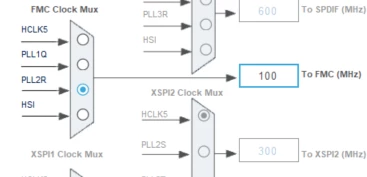
Here the schematic of the connection in 8 bit mode and clock three 
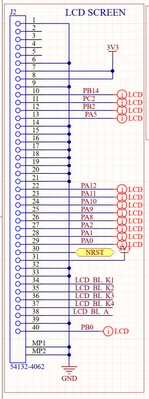
Hamady_0-1763028731446.png

Hamady_1-1763028880560.png

The backlight and display are working but I get a glitch image when i try to fill the display. 
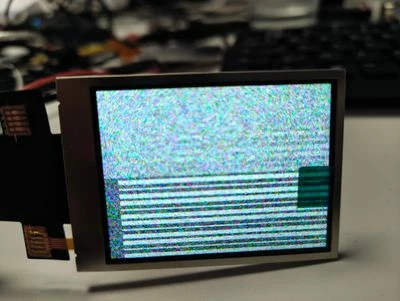
Hamady_2-1763028964282.jpeg

with this code i can see the display turning off and on so the command are working 
Below the whole project zip 

	 LCD_Fill(0xFFFF, 0, 0, 10, 10);
	 HAL_Delay(1000);
	 ST7789H2_DisplayOff();
	 LCD_Fill(0xFFFF, 0, 0, 10, 10);
	 HAL_Delay(1000);
	 ST7789H2_DisplayOn();


Does someone have a idea to make this work 


Thanks 

5 replies

mƎALLEm
Technical Moderator
November 13, 2025

Hello,

Did you modify this line in MPU config or it was generated by CubeMx:

 MPU_InitStruct.SubRegionDisable = 0x0;

 Normally it should be 0x87 not 0x0!

"To give better visibility on the answered topics, please click on ""Accept as Solution"" on the reply which solved your issue or answered your question."
mƎALLEm
Technical Moderator
November 13, 2025

Also these lines?:

 MPU_InitStruct.AccessPermission = MPU_REGION_FULL_ACCESS;
 MPU_InitStruct.DisableExec = MPU_INSTRUCTION_ACCESS_ENABLE;


"To give better visibility on the answered topics, please click on ""Accept as Solution"" on the reply which solved your issue or answered your question."
HamadyAuthor
Associate III
November 13, 2025

@mƎALLEm Thanks for the response 
It was generated by cube MX to test if the issue was MPU usage but even without the MPU it doesn't work 

Hamady_0-1763036063526.png


mƎALLEm
Technical Moderator
November 13, 2025

Did you change the default MPU config in CubeMx?

"To give better visibility on the answered topics, please click on ""Accept as Solution"" on the reply which solved your issue or answered your question."
HamadyAuthor
Associate III
November 13, 2025

Yeah i made the test without MPU and after enabled MPU that give permsission to the whole chip

mƎALLEm
Technical Moderator
November 13, 2025

You should not modify that MPU region, keep it as is.

You need to add another MPU config for the LCD region and you should disable the cacheability for that region. You need also to enable the cache.

"To give better visibility on the answered topics, please click on ""Accept as Solution"" on the reply which solved your issue or answered your question."
HamadyAuthor
Associate III
November 13, 2025

@mƎALLEm 


thanks for the response 

I've done it like this but nothing has changed 

static void MPU_Config(void)
{
 MPU_Region_InitTypeDef MPU_InitStruct = {0};

 /* Disables the MPU */
 HAL_MPU_Disable();

 /** Initializes and configures the Region and the memory to be protected
 */
 MPU_InitStruct.Enable = MPU_REGION_ENABLE;
 MPU_InitStruct.Number = MPU_REGION_NUMBER0;
 MPU_InitStruct.BaseAddress = 0x0;
 MPU_InitStruct.Size = MPU_REGION_SIZE_4GB;
 MPU_InitStruct.SubRegionDisable = 0x0;
 MPU_InitStruct.TypeExtField = MPU_TEX_LEVEL0;
 MPU_InitStruct.AccessPermission = MPU_REGION_FULL_ACCESS;
 MPU_InitStruct.DisableExec = MPU_INSTRUCTION_ACCESS_ENABLE;
 MPU_InitStruct.IsShareable = MPU_ACCESS_SHAREABLE;
 MPU_InitStruct.IsCacheable = MPU_ACCESS_CACHEABLE;
 MPU_InitStruct.IsBufferable = MPU_ACCESS_BUFFERABLE;

 HAL_MPU_ConfigRegion(&MPU_InitStruct);

 /** Initializes and configures the Region and the memory to be protected
 */
 MPU_InitStruct.Number = MPU_REGION_NUMBER1;
 MPU_InitStruct.BaseAddress = 0x60000000;
 MPU_InitStruct.Size = MPU_REGION_SIZE_128KB;
 MPU_InitStruct.IsCacheable = MPU_ACCESS_NOT_CACHEABLE;

 HAL_MPU_ConfigRegion(&MPU_InitStruct);
 /* Enables the MPU */
 HAL_MPU_Enable(MPU_PRIVILEGED_DEFAULT);

}
HamadyAuthor
Associate III
November 13, 2025

Okay I understand it,

So i changed as you said 

Thanks !