

Question
header file included but not found
Hello, I am getting started with STM32F429 touch screen. I generated code using STM32CubeMX and then copied the touch screen project from the reference source code. I created a source folder and put all the libraries of the reference source code into it. When I build the project, some header file cannot be found although pressing Ctrl and clicking on the file name in the include lines still opens that missing file in source folder
Here is my project directory tree and the error I got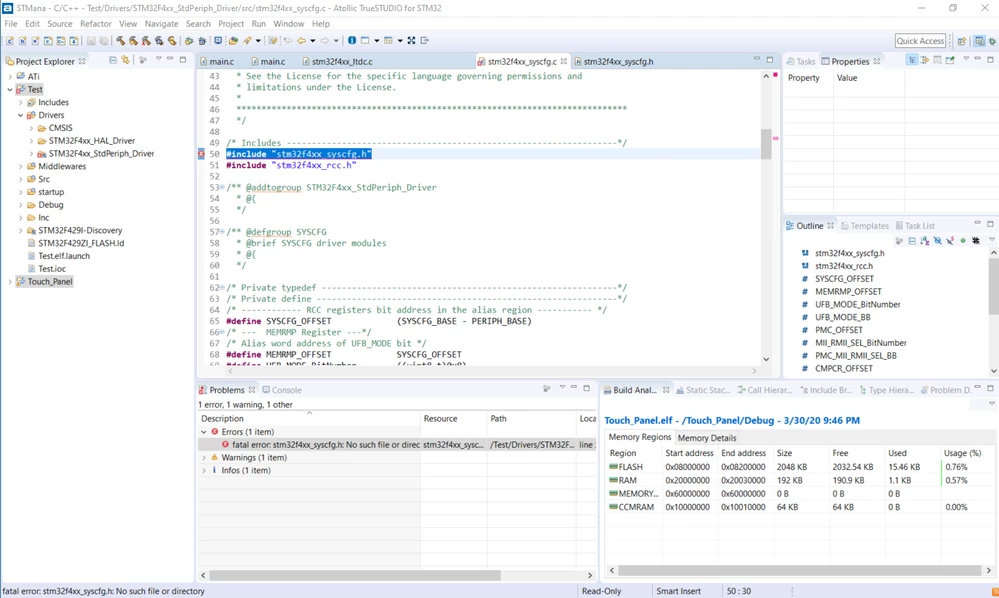
Link to download reference project that I used
https://www.st.com/en/embedded-software/stsw-stm32138.html#overview
console
arm-atollic-eabi-gcc -c -mthumb -mcpu=cortex-m4 -mfloat-abi=hard -mfpu=fpv4-sp-d16 -std=gnu11 -DUSE_HAL_DRIVER -DSTM32F429xx -I../Inc -I../Drivers/STM32F4xx_HAL_Driver/Inc -I../Drivers/STM32F4xx_HAL_Driver/Inc/Legacy -I../Middlewares/Third_Party/FreeRTOS/Source/include -I../Middlewares/Third_Party/FreeRTOS/Source/CMSIS_RTOS -I../Middlewares/Third_Party/FreeRTOS/Source/portable/GCC/ARM_CM4F -I../Middlewares/ST/STM32_USB_Host_Library/Core/Inc -I../Middlewares/ST/STM32_USB_Host_Library/Class/CDC/Inc -I../Drivers/CMSIS/Device/ST/STM32F4xx/Include -I../Drivers/CMSIS/Include -Os -ffunction-sections -fdata-sections -g -fstack-usage -Wall -specs=nano.specs -o Drivers\STM32F4xx_StdPeriph_Driver\src\stm32f4xx_usart.o ..\..\..\en.stsw-stm32138\STM32F429I-Discovery_FW_V1.0.1\Libraries\STM32F4xx_StdPeriph_Driver\src\stm32f4xx_usart.c
..\..\..\en.stsw-stm32138\STM32F429I-Discovery_FW_V1.0.1\Libraries\STM32F4xx_StdPeriph_Driver\src\stm32f4xx_usart.c:92:29: fatal error: stm32f4xx_usart.h: No such file or directory
 #include "stm32f4xx_usart.h"