

DKarc
Associate III
March 27, 2020
Solved

How to change ST-LINK settings in SW4STM32 IDE

  • March 27, 2020
  • 2 replies
  • 2291 views

Hello,

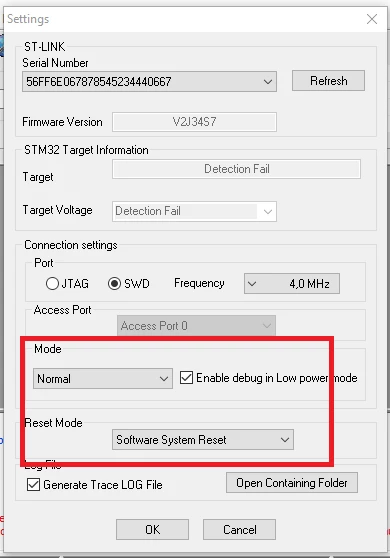
I have a probably simple question: Where I can change ST-LINK Settings in System Workbench IDE. For example in ST-LINK Utility in Settings I can change Reset Mode to Software System Reset,
0693W000000UtjVQAS.png

and I don't know where I can find this setting in IDE.

I have this problem without this setting changed:

0693W000000UtkdQAC.png

BR, Daniel

This topic has been closed for replies.
Best answer by Bob S

Click on the project name in the "Project Explorer" window on the left edge. Then go to the "Run" menu and select "Debug Configurations". In the dialog that comes up, on the left side under "Ac6 STM32 Debugging" click on the profile you want to change. In the right side, click on the "Debugger" tab. Look in the "Configuration Script" section. If "Automated Generation" is selected, then click on the "Show generator options" button. You should be able to change the reset mode there.

2 replies

Bob S
Bob SBest answer
Super User
March 27, 2020

Click on the project name in the "Project Explorer" window on the left edge. Then go to the "Run" menu and select "Debug Configurations". In the dialog that comes up, on the left side under "Ac6 STM32 Debugging" click on the profile you want to change. In the right side, click on the "Debugger" tab. Look in the "Configuration Script" section. If "Automated Generation" is selected, then click on the "Show generator options" button. You should be able to change the reset mode there.

DKarc
DKarcAuthor
Associate III
March 27, 2020

Dear Bob S,

thank you very much. Everything is there like you said, and for me is working well now.

Best regards, Daniel