Associate III
February 28, 2024
Solved

KEIL uVision5 Registers cannot be viewed in debug mode

  • February 28, 2024
  • 2 replies
  • 3199 views

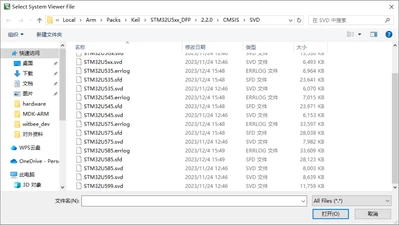
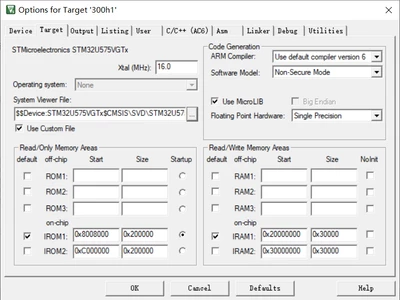
I couldn't look at the registers while using Keil. The chip model is STM32U575VGT6. I remember the wrong package to install stm32U5, he said there was a file error, but I could still compile the U5 series chips. Is it because of this? now how do I install the package correctly. Attached are some picture descriptions
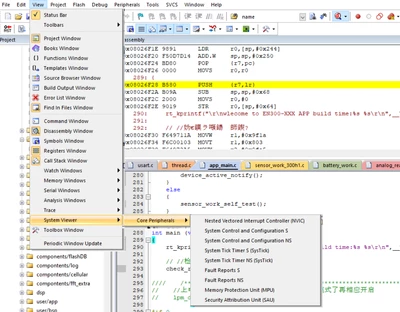
debug register.png

packs svd.png

target.png

Best answer by KDJEM.1

Hello @Alpha_Lee ,

I recommend you to take a look at this FAQ How to add or update the SVD file in different toolchains: An example using NUCLEO-U575ZI-Q board and to follow the steps shared in section 3.3 Add SVD file in Keil® to add or to update the SVD file in a project

Please let me know if the issue is solved or not?

Thank you.

Kaouthar

2 replies

KDJEM.1
KDJEM.1Best answer
Technical Moderator
February 28, 2024

Hello @Alpha_Lee ,

I recommend you to take a look at this FAQ How to add or update the SVD file in different toolchains: An example using NUCLEO-U575ZI-Q board and to follow the steps shared in section 3.3 Add SVD file in Keil® to add or to update the SVD file in a project

Please let me know if the issue is solved or not?

Thank you.

Kaouthar

To give better visibility on the answered topics, please click on Accept as Solution on the reply which solved your issue or answered your question.
Alpha_LeeAuthor
Associate III
February 28, 2024

The command "SVDConv STM32U575.svd --generate=sfr" produced an error. 

sfd error.png

KDJEM.1
Technical Moderator
February 28, 2024

Hi @Alpha_Lee ,

Glad to know that the issue is solved.

Thank you for you contribution in STCommunity :).

Kaouthar

To give better visibility on the answered topics, please click on Accept as Solution on the reply which solved your issue or answered your question.