Associate
September 14, 2025
Question

St7735 with an STM32F401CCU6

  • September 14, 2025
  • 2 replies
  • 347 views
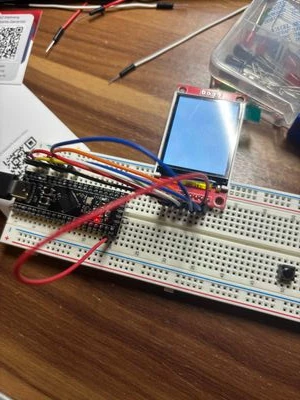
  • Hello, I could use your help. I wanted to start a small project where an ST7735 display with an STM32F401CCU6 simply writes text. For some reason, I started with the wrong library, namely Adafruit_ILI9341, which resulted in the first photo. When I finally realized that I was using the wrong library, I switched to Adafruit_ST7735, but here I have the problem that it doesn’t get through the initialization (that’s my assumption). I’ve already tried the different initR variants. I’m happy about any help!


Best regards,

Michael

#include <Adafruit_GFX.h>
#include <Adafruit_ST7735.h>

#define TFT_CS PB10
#define TFT_RST PB0
#define TFT_DC PB1
#define LED_PIN PC13

Adafruit_ST7735 tft = Adafruit_ST7735(TFT_CS, TFT_DC, TFT_RST);

void setup() {

 delay(200); // kurz warten, bis das Display Strom hat
 pinMode(LED_PIN, OUTPUT); 

 tft.initR(INITR_BLACKTAB);
 tft.fillScreen(ST77XX_RED); // Bildschirm rot füllen
 delay(1000);
 tft.fillScreen(ST77XX_GREEN); // Bildschirm grün füllen
 delay(1000);
 tft.fillScreen(ST77XX_BLUE); // Bildschirm blau füllen
}


void loop(){
 digitalWrite(LED_PIN, LOW); // LED an (bei STM32 oft invertiert!)
 delay(500); // 500 ms warten
 digitalWrite(LED_PIN, HIGH); // LED aus
 delay(500);

}
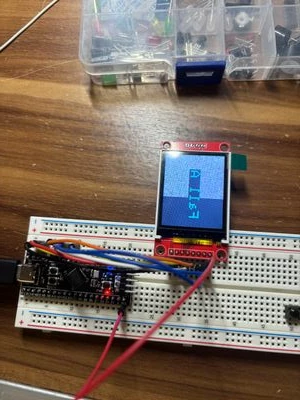
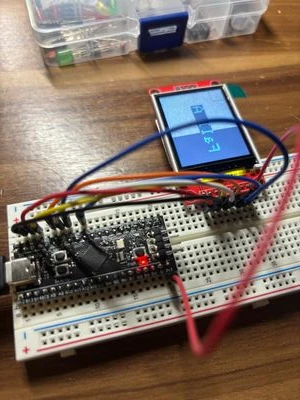
IMG_0378.jpeg

IMG_0379.jpeg

IMG_0380.jpeg


2 replies

AScha.3
Super User
September 14, 2025

Hi,

if you want , can try my lib... --- no. I just see: your on Arduino... i use the STM32CubeIDE , different.


But Miss Adafruit's Lib should work fine.


Just try : init green tab (as your tft seems to have a green tab ! )

not

 tft.initR(INITR_BLACKTAB);


"If you feel a post has answered your question, please click ""Accept as Solution""."
ZeckaAuthor
Associate
September 15, 2025

Hi,

thanks for the help, I already tried red, green and blue tab. I also tried to use the CubeID but to be honest it was a bit overwhelming. But i would like to give it a second try with your library because i couldn't find an F4 library without any mistakes in it.


AScha.3
Super User
September 15, 2025

ok, but its used with/in CubeIDE , so...try with this.

+

You have to edit here the pin + spi numbers, to fit your connections:

void spiwrite(unsigned int8 spidata){
 #ifndef TFT_SPI_HARDWARE
 int8 ss;
 for(ss = 0x80; ss; ss >>= 1) {
 if (spidata & ss) output_high(TFT_DATA);
 else output_low(TFT_DATA);
 output_high(TFT_CLK);
 output_low(TFT_CLK);}
 #else
 SPI1->DR = spidata; //spi_write(spidata); HAL_SPI_Transmit(&hspi1, &spidata, 1, 1); hspi1.Instance->DR = spidata;
 #endif
}


void write_command(unsigned int8 cmd_){
	GPIOB->BRR = 0x00C0; 				//GPIO_PIN_6;//HAL_GPIO_WritePin(GPIOB, GPIO_PIN_6, GPIO_PIN_RESET); //output_low(TFT_DC);
										//	GPIOB->BRR = GPIO_PIN_7;//HAL_GPIO_WritePin(GPIOB, GPIO_PIN_7, GPIO_PIN_RESET); //output_low(TFT_CS);
	SPI1->DR = cmd_; 					// spiwrite(cmd_);hspi1.Instance->DR = cmd_;HAL_SPI_Transmit(&hspi1, &cmd_, 1, 1);
	HAL_GPIO_WritePin(GPIOB, GPIO_PIN_7, GPIO_PIN_RESET); // als 720ns delay für spi
	GPIOB->BSRR = GPIO_PIN_7;			//HAL_GPIO_WritePin(GPIOB, GPIO_PIN_7, GPIO_PIN_SET); //output_high(TFT_CS);
}


void write_data(unsigned int8 data_){
	GPIOB->BSRR = 0x00800040 ;			//GPIO_PIN_6;//HAL_GPIO_WritePin(GPIOB,GPIO_PIN_6, GPIO_PIN_SET); //output_high(TFT_DC);
										//	GPIOB->BRR = GPIO_PIN_7;//HAL_GPIO_WritePin(GPIOB, GPIO_PIN_7, GPIO_PIN_RESET); //output_low(TFT_CS);
	SPI1->DR = data_; 					//hspi1.Instance->DR = data_;spiwrite(data_);HAL_SPI_Transmit(&hspi1, &data_, 1, 1);
	HAL_GPIO_WritePin(GPIOB, GPIO_PIN_7, GPIO_PIN_RESET);	// als 720ns delay für spi
	GPIOB->BSRR = GPIO_PIN_7;			//HAL_GPIO_WritePin(GPIOB, GPIO_PIN_7, GPIO_PIN_SET); //output_high(TFT_CS);
}

- the comments contain variants, using only HAL call etc. ; so change and use this, if its better working for you.

+

in main:

/* USER CODE BEGIN Includes */
#include <stdlib.h>
#include <string.h>
#include "math.h"
#include <st7735.h>
#include <stdio.h>
/* USER CODE END Includes */
......
in main :
 /* USER CODE BEGIN 2 */

 TFT_GreenTab_Initialize();
 
 clearScreen(0x0); // clear screen

 drawText(2, 28, "Test ", CYAN , 0, 1);

+

then....

AScha3_0-1757937971441.png


"If you feel a post has answered your question, please click ""Accept as Solution""."
ZeckaAuthor
Associate
September 24, 2025

Gonna try this on the weekend! Ofc greentab didn't work :)