

arnold_w
Senior II
January 29, 2024
Solved

Unable to connect to STM32F407-DISC1 with STM32 ST-LINK Utility and STM32CubeProgrammer

  • January 29, 2024
  • 3 replies
  • 2696 views

I'm unable to connect to STM32F407-DISC1. STM32 ST-LINK Utility gives "No ST-LINK detected" and STM32CubeProgrammer gives "Error: No debug probe detected". I run Windows 10 Business on a Lenovo ThinkPad P1 Gen 3 computer and I have tried with 2 different STM32F407-DISC1 boards, 2 different USB-cables and with both STM32 ST-LINK Utility versions 4.1.0 and 4.6.0. When I plug in my board, an additional "USB Composite Device" shows up under "Universal Serial Bus Controllers" in the Device Manager, but it won't let me manually update the driver to the one inside the en.stsw-link009-folder. I have tried to uninstall STM32 ST-LINK Utility, reboot my computer and install STM32 ST-LINK Utility again, but to no avail. Can someone please help me?
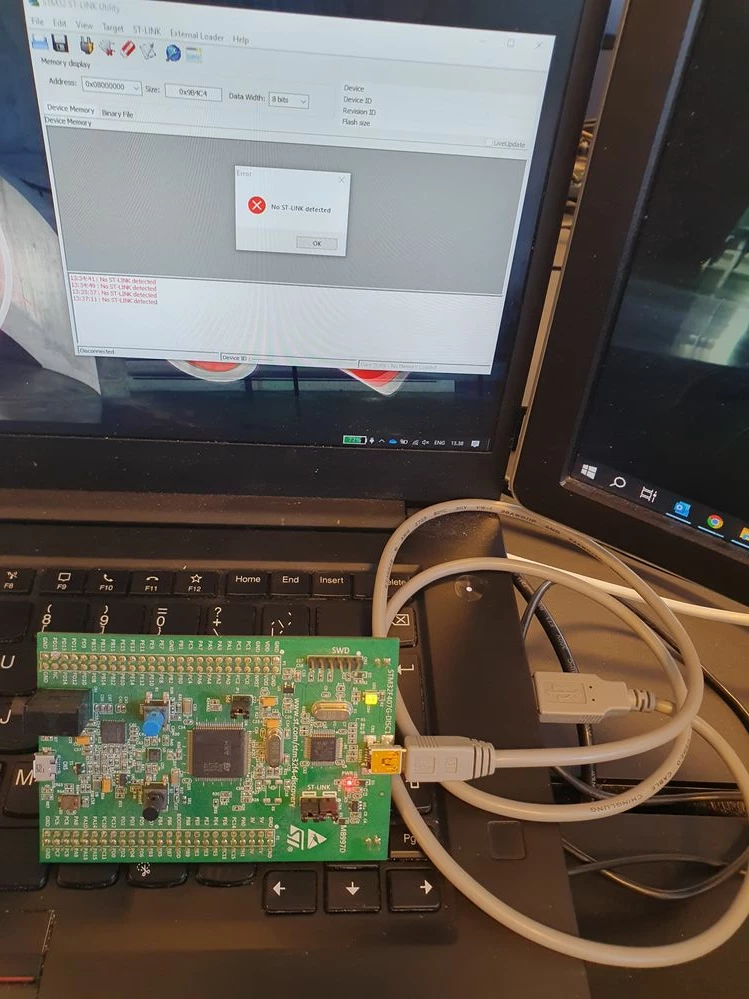
STLiink.jpg

Best answer by Tesla DeLorean

Do you get the Windows Ding-Dong sound when attaching?

Does the device show up in Device Manager? If not it's not going to be found by ST's tools.

Get the right driver loaded. Make sure to use a suitable cable. The charging cables with just power wired will not work, data wires needed.

3 replies

mƎALLEm
Technical Moderator
January 29, 2024

Hello,

Could you try with another USB port on you PC? moreover try with another PC/Laptop

"To give better visibility on the answered topics, please click on ""Accept as Solution"" on the reply which solved your issue or answered your question."
arnold_w
arnold_wAuthor
Senior II
January 29, 2024

I tried it on my colleague's laptop with STM32CubeProgrammer and got: "Error: No STM32 target found! If your product embeds Debug Authentication, please perform a discovery using Debug Authentication"

mƎALLEm
Technical Moderator
January 29, 2024

Did you connect to these boards previously or it's the first time you're doing it?

Are you sure the boards are not broken?

"To give better visibility on the answered topics, please click on ""Accept as Solution"" on the reply which solved your issue or answered your question."
arnold_w
arnold_wAuthor
Senior II
January 29, 2024

Did you connect to these boards previously or it's the first time you're doing it? We used them many years ago

Are you sure the boards are not broken? But 2 boards with the same problem?

mƎALLEm
Technical Moderator
January 29, 2024

Ok but are they new? Are they yours originally? 

It could be broken and thrown by their original owner.. Who knows ..

"To give better visibility on the answered topics, please click on ""Accept as Solution"" on the reply which solved your issue or answered your question."
Tesla DeLorean
Tesla DeLoreanBest answer
Guru
January 29, 2024

Do you get the Windows Ding-Dong sound when attaching?

Does the device show up in Device Manager? If not it's not going to be found by ST's tools.

Get the right driver loaded. Make sure to use a suitable cable. The charging cables with just power wired will not work, data wires needed.

Tips, Buy me a coffee, or three.. PayPal VenmoUp vote any posts that you find helpful, it shows what's working..