

WSpar.1
Associate III
August 23, 2021
Solved

Undefined reference in EEPROM emulation package

  • August 23, 2021
  • 7 replies
  • 3551 views

Hi all,

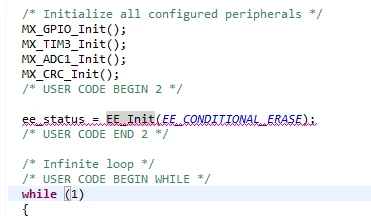
I'm trying to implement manually the ST EEPROM emulation package.

But I got stuck at a undefined reference:
0693W00000Dq7pRQAR.png 

I included in the right build paths and in the IDE I can perfectly jump to the EE_Init() function.

So the IDE does know where to look, but my compiler doesn't

What can be the problem here?

This topic has been closed for replies.
Best answer by TDK

You need to add all directories with source files in them to the source folders.

Project properties -> C/C++ General -> Paths and Symbols -> Source Location

7 replies

Tesla DeLorean
Guru
August 23, 2021

What's complaining? The Compiler or the Linker?

The include file tells the compiler what the interface expectations are.

The Linker expects the source files or the libraries containing the actual functions to be part of the project.

Tips, Buy me a coffee, or three.. PayPal VenmoUp vote any posts that you find helpful, it shows what's working..
WSpar.1
WSpar.1Author
Associate III
August 23, 2021

collect2.exe: error: ld returned 1 exit status

this is the linker right?

Tesla DeLorean
Guru
August 23, 2021

ld is the linker yes, still don't see the complete messaging

But, if the linker is complaining you need to add the Eeprom Emulation source code into the project, or the precompiled library.

Tips, Buy me a coffee, or three.. PayPal VenmoUp vote any posts that you find helpful, it shows what's working..
TDK
Super User
August 23, 2021

Ensure the header file declaring EE_Init is included in the include path, and also included prior to using the function in each source file it's used.

"If you feel a post has answered your question, please click ""Accept as Solution""."
WSpar.1
WSpar.1Author
Associate III
August 23, 2021

0693W00000Dq9a9QAB.png 

This is the current situation.

Included paths top of the list

Included the header file where EE_Init() is in in the main file

Maybe HAL_init doesn't know yet some parts that er needed?

The EEPROM emulator examples ST provided are not made with an .ioc file for CubeIDE Device configuration tool

WSpar.1
WSpar.1Author
Associate III
August 25, 2021

Is there maybe an easy way to implement the x-cube-eeprom package?

https://www.st.com/en/embedded-software/x-cube-eeprom.html

It seems that it is not importable into the CubeIDE as a package.

I tried to import the package zip file, but it is missing files.

Maybe it is for an old CubeIDE?

Grant Bt
Associate III
August 25, 2021

That eeprom_emul.c doesn't appear to be part of the build. The folder and/or C file need to have an icon with a little blue thing or else it's ignored. Right->click -> Resource Configurations -> make sure it's not excluded from the build (which it is).

WSpar.1
WSpar.1Author
Associate III
August 25, 2021

So the C and H in the icon should be a blue solid letter?

I pasted the whole Middlewares folder into my project

When I build the project, the IDE showed the Middlewares folder in the project tree.

When I right click on eeprom_emul.c > Resource Configurations there is no marking in front of Exclude build

Grant Bt
Associate III
August 25, 2021

Go to the folder right above and right-click on that. By default the stuff shows in the tree but it not part of the build process.

TDK
TDKBest answer
Super User
August 25, 2021

You need to add all directories with source files in them to the source folders.

Project properties -> C/C++ General -> Paths and Symbols -> Source Location

"If you feel a post has answered your question, please click ""Accept as Solution""."
WSpar.1
WSpar.1Author
Associate III
August 26, 2021

Thanks, that solved my problem.

Probably better to just select the project parent folder.