

MHo
Associate II
August 1, 2021
Solved

Cannot use ST25R3911B-disco GUI on windows 10

  • August 1, 2021
  • 4 replies
  • 1165 views

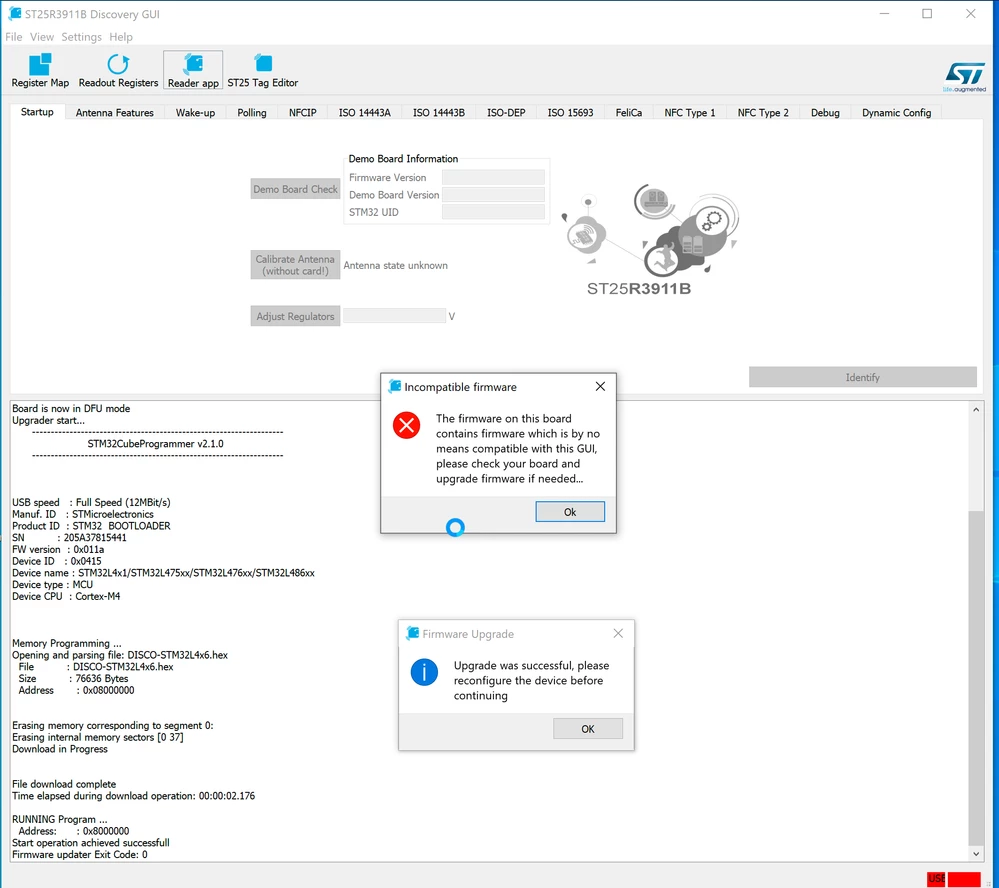
I tried to run the test tool on my Win10 VM. I kept getting error message even after a required firmware update. How can I make it work again on my Win10 VM?

GUI version: 1.2.12.0.0693W00000D1CP7QAN.png 
Thank you,

Min-Ching Ho

This topic has been closed for replies.
Best answer by Ulysses HERNIOSUS

Hi Min-Ching Ho,

we have seen such issues when performing a firmware update (re-connect taking too long on a VM and then the GUI timing out). Typically this gets cured by simply connecting to host and then back to VM.

If it doesn't then please share what you see in non-firmware-upgrade mode.

Best Regards, Ulysses

4 replies

Ulysses HERNIOSUS
Technical Moderator
August 2, 2021

Hi Min-Ching Ho,

we have seen such issues when performing a firmware update (re-connect taking too long on a VM and then the GUI timing out). Typically this gets cured by simply connecting to host and then back to VM.

If it doesn't then please share what you see in non-firmware-upgrade mode.

Best Regards, Ulysses

MHo
MHoAuthor
Associate II
August 2, 2021

Hi,

The firmware update seems working fine. The screenshot shows 2 events in it. I first get the upgrade success message and couple seconds later I saw the error message that firmware is not compatible. The error message always happens with or without firmware update. Can you please check it again for me?

Min-Ching Ho

Ulysses HERNIOSUS
Technical Moderator
August 3, 2021

Hi,

I tried on our Vmware, Win10 VM on Win10 host: It worked using the 1.2.12.

BR, Ulysses

MHo
MHoAuthor
Associate II
September 27, 2021

It turns out the broad is broken. After I switch to another one, it works right away.

Min-Ching