
Solved

Hi VColi.1,
If you want to bypass the Tag detection at demo boot you will have to comment some code and rebuild the firmware.
Commenting these lines in the main.c should do the trick :
 if( ST25DV_pwm == 0 )
 {
 ST25_RETRY(BSP_NFCTAG_Init(BSP_NFCTAG_INSTANCE));
 }
 else
 {
 ST25DV_Scope_Start( );
 }
and these lines in Menu_definition.c:
 ST25_RETRY( BSP_NFCTAG_ReadUID(BSP_NFCTAG_INSTANCE, &uid) );
 ProductRef = (uid.MsbUid & 0xFF00) >> 8;
 if( ST25DV_AM_I_OPEN_DRAIN(ProductRef))
 {
 /* GPO Open drain => 8 pins package, so remove the LPD demo */
 memcpy(&ST25DVStatesMenuItems[2],&ST25DVStatesMenuItems[3],sizeof(struct sMenuItem));
 ST25DVStatesMenu.nItems--;
 }
and last ones in st25dv_features_demo.c (function EnergyHarvesting line 191 and 255);
...
ST25_RETRY(BSP_NFCTAG_SetEHENMode_Dyn(BSP_NFCTAG_INSTANCE));
...
ST25_RETRY(BSP_NFCTAG_ResetEHENMode_Dyn(BSP_NFCTAG_INSTANCE));
...
Another way to proceed (modifying the hardware only), is to keep the daughter board connected.
Remove R4 to disconnect EH from daughter board's tag:
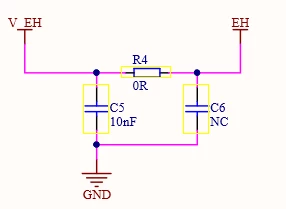
And link your tag's EH pin to the EH pin on the daugther board (ST1-3 or ST3-2)
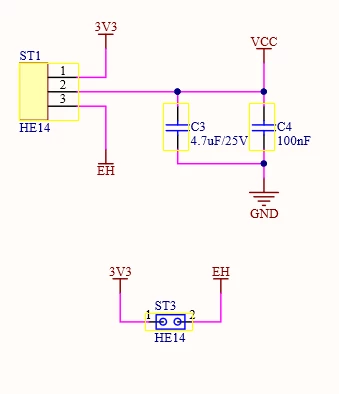
Doing this should allow you to start the demo without the error message and measure the EH from your other tag.
Last point you can find an update of the firmware 1.2.0 in the following link:
https://www.st.com/en/embedded-software/stsw-st25dv001.html
I hope this can help you.
Kind Regards.
Enter your E-mail address. We'll send you an e-mail with instructions to reset your password.