
Associate
October 13, 2025
Solved

Problem with STEVAL-D25R16B and STSW-ST25R010

  • October 13, 2025
  • 3 replies
  • 413 views

I was trying to setup the software (ST25R010) for NFC reader, and not only was I unable to setup the software but I realized the board malfunctioned at some point. The board initially worked fine but now it shows a reversed error message and I cannot reset the board.

In terms of setting up the software, I was trying to update the firmware as instructed in 1.3 of the user manual. I am using windows 11 laptop with x64 architecture. I tried following Method 1 at user manual 1.3.1 but I could not find the STM32 Bootloader, so I moved on to method 2. I downloaded and installed ST Link Driver from https://www.st.com/en/development-tools/stsw-link009.html

and moved the firmware file to MB1396 (the board I connected to my laptop using usb). I think this might have caused the board to show error screen but I'm not sure.

Can I please get some help with 1. resetting the board/removing the error in the board, 2. Setting up the GUI software on my laptop?
This topic has been closed for replies.
Best answer by Brian TIDAL

Hi,

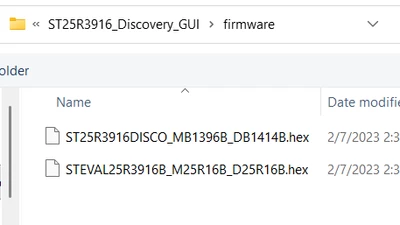
I assume you have installed the STSW-ST25R010 not for all users (as this requires the admin rights) but only for the current user. In that case, the board firmwares are located in <your_home_dir>\AppData\Local\Programs\STMicroelectronics\ST25R3916_Discovery_GUI\firmware:

BrianTIDAL_0-1760392351268.png

Make sure to select the correct one (it should be STEVAL25R3916B_M25R16B_D25R16B if using the STEVAL-25R3916B) and download the appropriate FW with the STM32CubeProgrammer (the board should be connected with the STLink USB).

This should fix the reverse display issue. 

Now, make sure to have the board connected with the user USB (i.e. not with the ST-Link USB)

Once the FW has properly started, press the blue button and the reset button. Release the reset button while keeping the blue button pressed. The board should then start in PC USB mode. The GUI should be able to connect to the board. If not, you may need to restart your PC. 


See also https://community.st.com/t5/st25-nfc-rfid-tags-and-readers/st25r3916-discovery-board-dfu-not-found-and-st-link-showed-on/td-p/669312 for a similar issue and for checking whether the USB device is properly enumerated.

Rgds

BT


3 replies

Brian TIDAL
Brian TIDALBest answer
Technical Moderator
October 13, 2025

Hi,

I assume you have installed the STSW-ST25R010 not for all users (as this requires the admin rights) but only for the current user. In that case, the board firmwares are located in <your_home_dir>\AppData\Local\Programs\STMicroelectronics\ST25R3916_Discovery_GUI\firmware:

BrianTIDAL_0-1760392351268.png

Make sure to select the correct one (it should be STEVAL25R3916B_M25R16B_D25R16B if using the STEVAL-25R3916B) and download the appropriate FW with the STM32CubeProgrammer (the board should be connected with the STLink USB).

This should fix the reverse display issue. 

Now, make sure to have the board connected with the user USB (i.e. not with the ST-Link USB)

Once the FW has properly started, press the blue button and the reset button. Release the reset button while keeping the blue button pressed. The board should then start in PC USB mode. The GUI should be able to connect to the board. If not, you may need to restart your PC. 


See also https://community.st.com/t5/st25-nfc-rfid-tags-and-readers/st25r3916-discovery-board-dfu-not-found-and-st-link-showed-on/td-p/669312 for a similar issue and for checking whether the USB device is properly enumerated.

Rgds

BT


In order to give better visibility on the answered topics, please click on Accept as Solution on the reply which solved your issue or answered your question.
EtixAuthor
Associate
October 14, 2025

Hello Brian,
How do you download the FW using the programmer? Also, I pressed erased full chip flash memory in the cubeprogrammer, and the board doesn't show anything anymore. Did I accidentally delete the software in the chip? I didn't expect it to be able to be erased so easily. 

EtixAuthor
Associate
October 14, 2025

Ok I fixed it by downloading firmware D25R16B and comparing memory. The screen is fixed now thanks.