This topic has been closed for replies.
Best answer by Ulysses HERNIOSUS

Hi Jorgsala,


@jorgsala wrote:

When we double-clicking the exe the sw working normally, but we need to use the task scheduler 


That info would have been helpful if immediately provided!

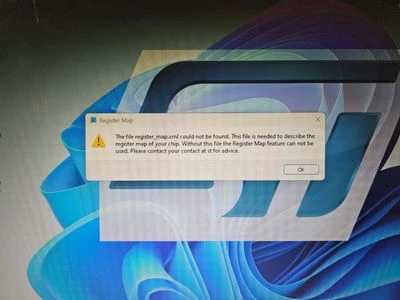
I am suspecting that you need to set the environment properly. My first thinking goes towards setting the current working directory to the location of the executable as the register_map.xml is expected in the current working dir.

If still not working you can may describe how you create this in Task Scheduler. I tried and I didn't get ad hoc any window, only a running process.

BR, Ulrich

2 replies

Ulysses HERNIOSUS
Technical Moderator
July 18, 2024

Hello Jorgsala,

the register_map.xml should be in the same folder as the executable.

3911_register_map.xml.png

Please check that it is there an accessible. The one you sent is intact. Maybe checking access rights? Copying complete folder to a user folder and execute from there? Re-install the GUI?

Regards, Ulysses

jorgsala
jorgsalaAuthor
Associate
July 19, 2024

Hi Ulysses

I tried the different recommendations but it doesn't work.
Any another recommendation?

Ulysses HERNIOSUS
Technical Moderator
July 22, 2024

Hi Jorgsala,

not really... 

The GUI should open and be operational even without the file, correct? The effect should only be that you have an empty register map and no easy access to all the registers.

Could you 7zip the folder and attach it, please?

BR, Ulysses

jorgsala
jorgsalaAuthor
Associate
July 23, 2024

Hello,

We using task scheduler to open the .exe file 

When we double-clicking the exe the sw working normally, but we need to use the task scheduler 

Ulysses HERNIOSUS
Technical Moderator
July 24, 2024

Hi Jorgsala,


@jorgsala wrote:

When we double-clicking the exe the sw working normally, but we need to use the task scheduler 


That info would have been helpful if immediately provided!

I am suspecting that you need to set the environment properly. My first thinking goes towards setting the current working directory to the location of the executable as the register_map.xml is expected in the current working dir.

If still not working you can may describe how you create this in Task Scheduler. I tried and I didn't get ad hoc any window, only a running process.

BR, Ulrich