
Associate III
July 17, 2025
Solved

STSW-ST25PC002 run as Java Application loads the application and closes after a second.

  • July 17, 2025
  • 2 replies
  • 272 views

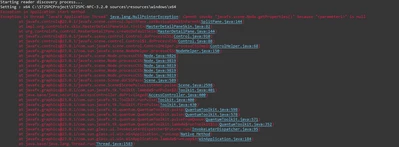
I have downloaded the source code of ST25PC-NFC (STSW-ST25PC002) and tried running it as it is. I am running JDK 23.0.1 and also downloaded and extracted JavaFX 23.0.1. Every time I run the MainApp, it loads the application for a second before it gets closed. I get the following exceptions (screenshot attached).
error_screenshot.png


This topic has been closed for replies.
Best answer by Damien G.

Hello shahbaz,

Could you please perform those checks in the Eclipse Run configurations?

  1. Open the "Arguments" tab and make sure the VM arguments are set to:
    --module-path "C:\path\to\javafx-sdk-23.0.2\lib" --add-modules=javafx.controls,javafx.fxml,javafx.base,javafx.graphics,javafx.media,javafx.web,,javafx.swing
    (Where you correctly set the path to the JavaFX sdk)
  2. Open the JRE tab and make sure the correct jdk is selected (jdk-23.0.1)
  3. Open the Environment tab and add "path" entry with value:
    ${project_loc:ST25PC-NFC}\resources\windows\x64\;${env_var:path}

Thank you,

Damien

2 replies

Damien G.Best answer
ST Employee
July 25, 2025

Hello shahbaz,

Could you please perform those checks in the Eclipse Run configurations?

  1. Open the "Arguments" tab and make sure the VM arguments are set to:
    --module-path "C:\path\to\javafx-sdk-23.0.2\lib" --add-modules=javafx.controls,javafx.fxml,javafx.base,javafx.graphics,javafx.media,javafx.web,,javafx.swing
    (Where you correctly set the path to the JavaFX sdk)
  2. Open the JRE tab and make sure the correct jdk is selected (jdk-23.0.1)
  3. Open the Environment tab and add "path" entry with value:
    ${project_loc:ST25PC-NFC}\resources\windows\x64\;${env_var:path}

Thank you,

Damien

shahbazAuthor
Associate III
July 27, 2025

Hi Damien,

That works. Thank you for the help.

Regards,

Shahbaz.