
Help starting testing STM32H747I-DISCO on MacOS / Apple Silicon
Hello,
I've just received my fresh new SMT32H747I-DISCO dev board and I wanted to try some samples.
I have some experience deveolping on embedded Liuxes, but this is my second MCU (the first one was a Raspberry PICO, don't know if this counts). I am using a MacBookPro with Apple silicon (M3) and MacOS 14.4
What I have done:
read the specs, configured the board to get power and STLink from CN2 (as is by factory)
installed every tool available:
- STM32CubeProgrammer
- STM32CubeIDE (which also installed a SMTLink server nstall ,st-stlink-server.2.1.1-2, installed successfully )
- even STM32CubeMX
connected the board to a USB-C port on my Mac via a USB-C to USB-B mini cable
2 times out of three the main led (LD10?) starts red, then flashes red/green then stays green. The other times the board LED stays red. In either case, nothing on the LCD display. to me the board seems waiting.
On the former occurrences, MacOS then asks me for permission to connect
but that's it. I wanted to install the Tutti Fruit demo (whose binary I downlaoded) but the first thing is to "connect" STM32CubeProgrammer to the board, and I cannot. When I press the green Connect button in the top right area (whtth this config), i got
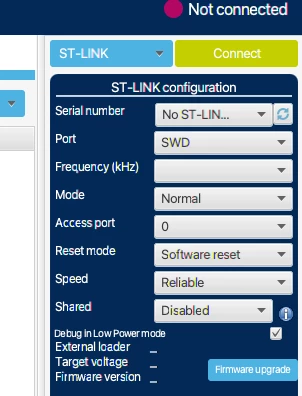
18:13:44 : ST-LINK error (DEV_CONNECT_ERR)
18:13:44 : Error: Problem occured while trying to connect
I've tried to search the internet and this board, but I don't seem to do anything particular (a part from running on a Mac with M3). So I don't know if this is blocking or what.
Or maybe I need to connect in another way?
Thanks for any help on this newbie question,
best regards
WG