Associate II
September 6, 2024
Solved

How do I drive the Nucleo_F722ZE board with the STLINK board removed?

  • September 6, 2024
  • 2 replies
  • 2078 views

Hi, everyone.

I cut the stlink board from my Nucleo-F722ZE board.

And I supplied 5V power through E5V of CN11 And JP3 was set to E5V.

I confirmed that the PWR LED was on.

But the embedded program did not run.

I confirmed that this Nucleo-F722ZE board receives MCO input from the STlink board. But now there is no stlink board on my Nucleo.

So, I decided to use the HSI clock rather than the HSE clock.

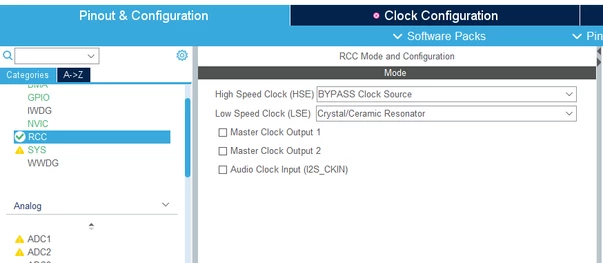
I set "HSE not used" according to the manual.


- SB148 and SB163 ON

-SB112 and SB149(MCO) OFF

-SB8 and SB9 removed


And  I enabled HSI in cubeIDE's clock setting.
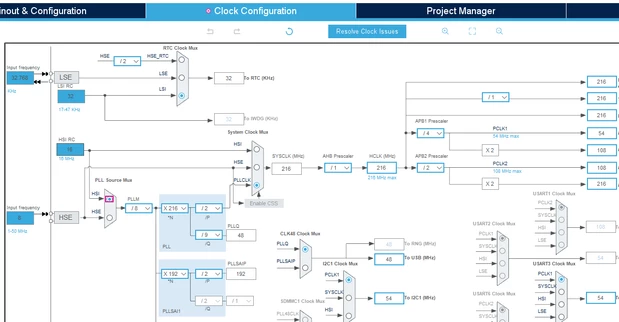
chulhoolimnnftech_0-1725608565996.png

chulhoolimnnftech_1-1725608601626.png


My embedded program on my nucleo runs. But it stops at HAL_Delay().

What part is the problem?

Is the way I did it correct?
Best answer by mƎALLEm

Thanks,

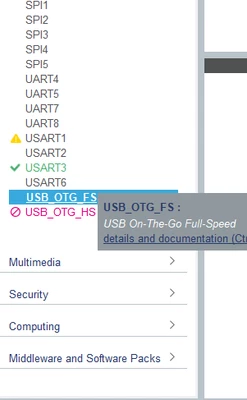
Just disable USB and all goes fine.

SofLit_0-1725614172277.png

PS: USB needs to use HSE with an external crystal. That's why you are having this message.

2 replies

mƎALLEm
Technical Moderator
September 6, 2024

Hello @chulhoolim-nnftech and welcome to the community.

According to the image you shared there is something going wrong in your RCC config. You have an error in the configuration:

SofLit_1-1725612474224.png

What message do you get when you pass the mouse cursor on the red square of HSI selection?

"To give better visibility on the answered topics, please click on ""Accept as Solution"" on the reply which solved your issue or answered your question."
Associate II
September 6, 2024


chulhoolimnnftech_0-1725613096467.png


Thank you for your reply.

The message is "PLL Mux should have HSE as input"

But My nucleo board doesn't have an input oscillator. 

 Can't I use that "HSE not used"?

mƎALLEm
Technical Moderator
September 6, 2024

Could you please share your ioc file?

"To give better visibility on the answered topics, please click on ""Accept as Solution"" on the reply which solved your issue or answered your question."
Associate II
September 6, 2024

Ah. I pressed wrong " Accept as Solution" button. Sorry. 

Anyway Thank you very much!