
How to set a NUCLEO G491RE into DFU(Device Firmware Update) mode?
Hi STM Community,
I’m currently working with the NUCLEO-G491RE board and need some guidance regarding DFU (Device Firmware Update) mode.
According to the documentation, CN2 is marked as the DFU connector. Based on that, I have soldered 4 pins on CN2. I also have a USB Type-C female breakout board, and I’d like to connect it properly to CN2.
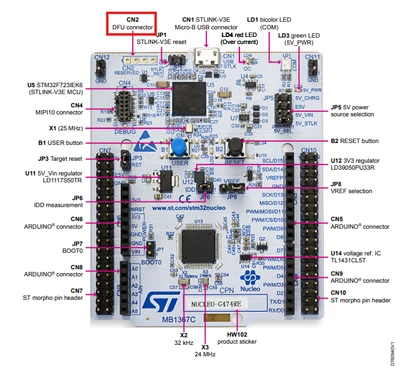
USB Type-C Female Breakout Board.
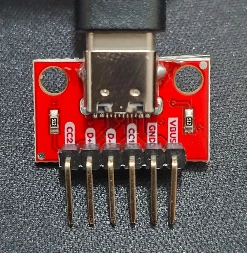
However, I’m a bit confused about the following points:
-
CN2 pin mapping
-
Which pin on CN2 corresponds to GND, D+, D-, and 3.3V / VBUS?
-
-
Entering DFU mode
-
What are the exact steps to put the NUCLEO-G491RE into DFU (Device Firmware Update) mode?
-
Do I need to configure BOOT0, jumpers, or any CubeMX settings for this?
-
At the moment, when I connect the board to my PC using the USB breakout, the device is detected as an “Unknown USB Device”, so I assume I’m missing something in either the wiring or configuration.
I would really appreciate it if someone could:
-
Clarify the CN2 pinout, and
-
Explain the correct procedure to enable DFU mode on the NUCLEO-G491RE.
Thanks a lot in advance for your help and support!
Looking forward to your guidance.