
Associate II
September 4, 2024
Solved

I2C clock incorrect
  • September 4, 2024
  • 2 replies
  • 1131 views

Screenshot (91).png

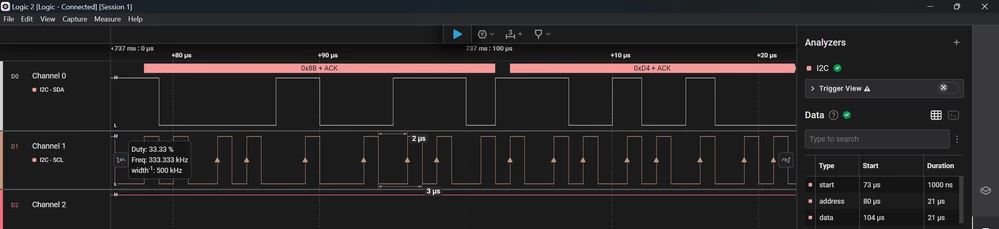
Im using the stm32f407 discovery to run I2C in fastmode (400kHz), using the equation given in the datasheet, I choose the system clock to be 120Mhz, so I have 30Mhz pclk for I2C. duty cycle T_low/T_high = 2, so CCR is 25d, T_rise is 300ns so that would result in 10d. But the clock doesn't be 400kHz, it keep changing at 333kHz or 500kHz. sorry for my bad english, appreciate for any help.

Best answer by TDK

Increase your logic analyzer sampling rate. It appears to be 1 Msps which is not enough to get the resolution you want. This is an artifact of the logic analyzer, not an STM32 problem.

2 replies

Karl Yamashita
Principal
September 4, 2024

If you are using CubeMX or STM32CubeIDE, attach your IOC file

If a reply has proven helpful, click on Accept as Solution so that it'll show at top of the post.CAN Jammer an open source CAN bus hacking toolCANableV3 Open Source
TDK
TDKBest answer
Super User
September 4, 2024

Increase your logic analyzer sampling rate. It appears to be 1 Msps which is not enough to get the resolution you want. This is an artifact of the logic analyzer, not an STM32 problem.

"If you feel a post has answered your question, please click ""Accept as Solution""."
NoNamedAuthor
Associate II
September 4, 2024

Thanks so much, after changing the sampling rate, the SCL show perfect 400kHz. Hope you all have a great day

Screenshot (92).png