
Associate III
December 16, 2024
Solved

Is there any way to measure the current on STM32U575ZI-Q board

  • December 16, 2024
  • 4 replies
  • 1225 views

Hi,

I am having STM32U575ZI-Q development board. I have implemented a firmware with FreeRTOS with low power support where the firmware goes to the low power mode and unless there is an external interrupt, it stays in a low power mode.

Now, I want to measure the current ocnsumption when the MCU goes to the sleep mode (STOP2 mode specifically). Is there anyway I can measure the current from the STM32Cube IDE or any addtional board that can be interfaced with the development board?
Best answer by krotti42

Hi @mdalal !


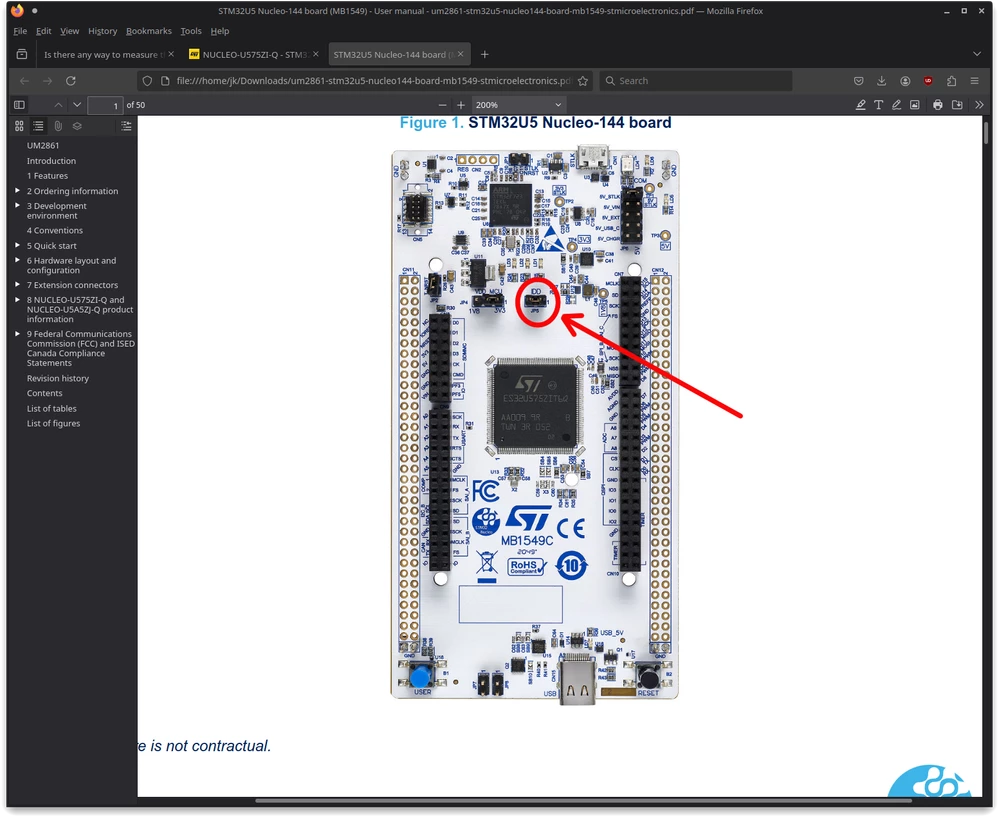
Not possible for you to measure the current from the MCU through jumper JP5 with a DMM?

JP5JP5

4 replies

krotti42Best answer
Associate II
December 16, 2024

Hi @mdalal !


Not possible for you to measure the current from the MCU through jumper JP5 with a DMM?

JP5JP5

mdalalAuthor
Associate III
December 16, 2024

Oh, do you mean that if I connect the DMM across this jumper pins, the job is done? What precision of DMM is required.

mdalalAuthor
Associate III
December 16, 2024

I am assuming that the DMM is in current measurement mode.

Associate II
December 16, 2024

@mdalal wrote:

I am assuming that the DMM is in current measurement mode.


Yes, of course.


@mdalal wrote:

Oh, do you mean that if I connect the DMM across this jumper pins, the job is done? What precision of DMM is required.


Yes. The precision of the DMM depends on your requirements. Personally I would prefer a DMM with you can at least measure 1µA.


The possible power consumption from the MCU in different situations are also described in the device datasheet.  Here is a screenshot:

current.png

mdalalAuthor
Associate III
December 16, 2024

Great. I will try to get such DMM within and will let you know. You can close the ticket meanwhile.

Mike_ST
Technical Moderator
December 19, 2024

Hello,

>> You can close the ticket meanwhile.

You can do that by clicking on the "Accept as Solution" button in the answer that helped you the most.