

zzolio
Visitor II
September 2, 2020
Question

MCO Clock issue in ST-link firmware V2.J37.M26

  • September 2, 2020
  • 4 replies
  • 2640 views

I am experiencing a bug in the ST-Link FW V2.J37.M26

setup

Nucleo-F446RE power from E5V

it takes a long time to "boot" or start to execute code. some code will never start running. the problem goes away if the ST-Link is power from USB before E5V is turn on

I have captured the problem on the scope. The MCO clock from ST-Link stops for about 2sek when power from E5V.

Nucleo-F446RE power from E5V ST-Link FW V2.J37.M26
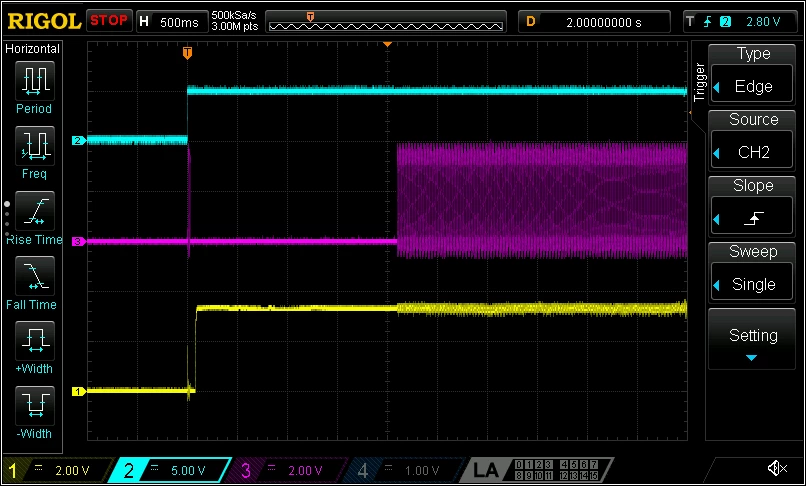
0693W000003QYOpQAO.pngBlu E5V

Yellow T_NRST

Pink MCO

Nucleo-F446RE power from USB ST-Link FW V2.J37.M26
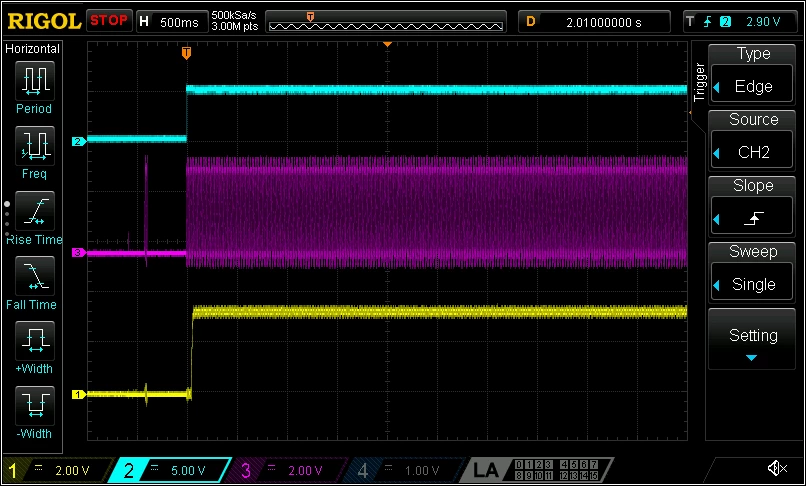
0693W000003QYP9QAO.png

Blu E5V

Yellow T_NRST

Pink MCO

Nucleo-F446RE power from E5V ST-Link FW V2.J34.M25
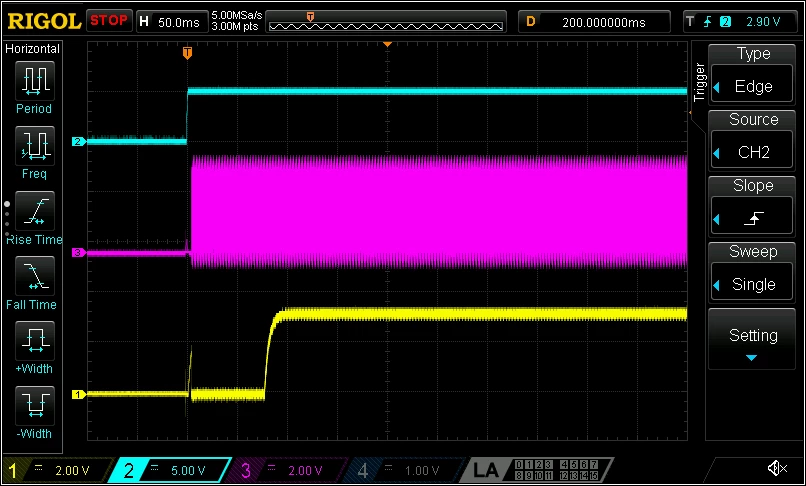
0693W000003QYPiQAO.png

Blu E5V

Yellow T_NRST

Pink MCO

Note the the time division is different

The following FW versions are bug free

V2.J33.M25

V2.J34.M25

V2.J35.M26

I am curious

Why have ST chosen to gennerat the clock from the ST-Link MCU?

Best regards

Martin

4 replies

Tesla DeLorean
Guru
September 2, 2020

>>I am curious. Why have ST chosen to generate the clock from the ST-Link MCU?

To save a crystal in the design.

You can add one if you want, or equally chose to use the HSI source rather than the HSE

Tips, Buy me a coffee, or three.. PayPal VenmoUp vote any posts that you find helpful, it shows what's working..
Visitor II
August 30, 2024

Hi Tesla, if I choose to use the HSI source instead of HSE, will I avoid taking the clock from the ST-Link board? How should I do it? If I decide to remove the ST-link board by separating it from the F429 nucleo-144  board will I loose the clock signal?    Thank you very much.    Where can I learn this easily?

RConf.1
Associate
May 19, 2021

I have a Nucleo-F207ZG board and I am facing the same problem: if you power the board from E5V or VIN, MCO starts to oscillate after approx 2 seconds when NRST signal is already high. Because of this wrong start-up sequence, most of codes will never start to run. The only solution is to manually reset the board after 2 seconds from power-up.

This problem doesn't happen if you power the board from the USB connector of the ST-LINK.

In addition to the original post, also the following FW versions have this bug:

V2.37.27

V2.38.27

Please, let us know if you implement a solution in the future ST-LINK firmware releases.

Thanks.

Regards,

Riccardo

ASevi.1
Associate
September 23, 2022

Good day, do you know of any link to download the st-link with firmware V2.J34.M25 or V2.J35.M26? Greetings.

Tesla DeLorean
Guru
September 23, 2022
helioz
Associate
February 16, 2025

Nearly 5 years on and the same problem still persists!

This is a Nucleo F446RE development board with the STLINK/V2.1 interface.

The firmware is V2J45M30.

DS1Z_QuickPrint1.png

Yellow = E5V

Blue = MCO output from STLINK/V2.1

The problem can be solved by choosing HSI instead of HSE, however, my application relies on accurate timing and HSI has great variations which make is useless for my application.

The obvious solution is to fit X3 and associated components but that completely defeats the purpose of having a crystal derived [accurate] MCO available without any additional components.