
Visitor II
December 17, 2025
Question

NUCLEO-H755ZI: ST-LINK detected but “No STM32 target found / Unable to get core ID”

  • December 17, 2025
  • 3 replies
  • 819 views

Hello STM32 Community,

I am a newbie and facing an issue with my NUCLEO-STM32H755ZI board.

I am unable to connect to the STM32H755 target using STM32CubeProgrammer, even though the ST-LINK appears to be working correctly,

Hardware

  • Board: NUCLEO-STM32H755ZI

  • Debugger: On-board ST-LINK

  • USB connection: CN1 (USB-A to Micro-B).

    Software

  • STM32CubeProgrammer: v2.21.0

  • OS: Windows

  • Connection mode: ST-LINK / SWD

  • Observed Behavior

    • ST-LINK is detected correctly by Windows

    • ST-LINK Virtual COM Port is visible in Device Manager

    • Target voltage ~3.27 V is shown in Cube programmer.

    • Green power LED (LD3) is

    • Red ST-LINK LED is blinking
    • Error: No STM32 target found!
      Unable to get core ID
      If your product embeds Debug Authentication,
      please perform a discovery using Debug Authentication
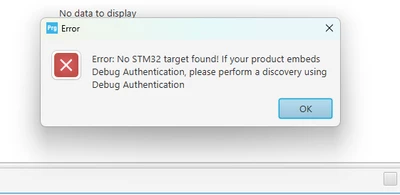
      Screenshot 2025-12-17 105326.png

3 replies

AScha.3
Super User
December 17, 2025

Hi,

Did it work before? Did you flash anything?

Try connecting with setting: hardware reset.

Did you change/set the power supply setting?

Maybe then need start the bootloader by setting the boot0 high and then power up with dfu mode to recover to a working state.

"If you feel a post has answered your question, please click ""Accept as Solution""."
Andrew Neil
Super User
December 17, 2025

@AScha.3 wrote:

Did you change/set the power supply setting?


@Renee - see: How to unbrick an STM32H7 after setting the wrong power mode.


Also, for general debugger connection issues:

How to solve connection errors when connecting and programming the STM32 target board.

How to solve debugger connection issues.

A complex system that works is invariably found to have evolved from a simple system that worked.A complex system designed from scratch never works and cannot be patched up to make it work.
Christophe VRIGNAUD
ST Employee
December 18, 2025

Hello @Renee,

Try to connect to the bootloader and make a full erase of the flash.

1. Power off the board.

2. put a wire between pin 7 and pin 5 of CN11 => BOOT0 pin linked to VDD.

NUCLEO-H755_BOOT0.jpg

3. Power on the board.

If you haven't changed the default boot addresses defined in the option bytes, the STM32H7 will run the bootloader. You shall be able to connect with STM32CubeProgrammer.

2. Make a full chip erase.

ChristopheVRIGNAUD_0-1766064077495.png

3. Remove the wire => BOOT0 = 0 (Pull down resistor on the board => c.f. the board schematics)

4. Power off/on the board.

Now you should be able to connect and see the memory content as 0xFF => flash erased.

TDK
Super User
December 18, 2025

Make sure you are using a USB cable with data lines. Your results are consistent with a power-only USB cable.

"If you feel a post has answered your question, please click ""Accept as Solution""."
Andrew Neil
Super User
December 18, 2025

@TDK wrote:

Your results are consistent with a power-only USB cable.


I don't think so:


@Renee wrote:
  • ST-LINK is detected correctly by Windows

  • ST-LINK Virtual COM Port is visible in Device Manager

  • Target voltage ~3.27 V is shown in Cube programmer.


all of which indicates a data connection is present ?


A complex system that works is invariably found to have evolved from a simple system that worked.A complex system designed from scratch never works and cannot be patched up to make it work.
TDK
Super User
December 18, 2025

Hmm, that's valid, but looking again, that doesn't really like up with:

> Red ST-LINK LED is blinking

which indicates enumeration failed. I'm probably misinterpreting.


If you programmed something on the board, it could be a power setting issue. You'll have to boot into the bootloader to recover.

How can I recover my STM32H7/STM32H7RS board after... - STMicroelectronics Community


"If you feel a post has answered your question, please click ""Accept as Solution""."