
Associate II
May 18, 2025
Question

NUCLEO-H7S3L8 stuck in While Loop __HAL_SPI_GET_FLAG

  • May 18, 2025
  • 5 replies
  • 1095 views

Trying to get SPI1 to work on the NUCLEO-H7S3L8.

Starting a new project from the Board Selector works with no problem, however starting from the MCU Selector, the HAL_SPI_Transmit gets stuck at in stm32h7rsxx_hal_spi.c in the while loop at line 4008.
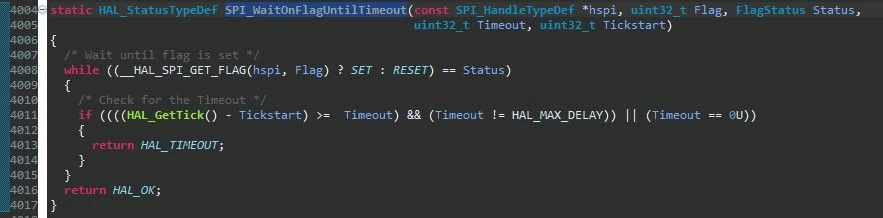
Screenshot 2025-05-17 180221.jpg

Eventually we will be using a custom board, so need to figure this out. Any ideas?

Thanks,

:)

5 replies

TDK
Super User
May 18, 2025

Ensure pin speed is set to very high.

"If you feel a post has answered your question, please click ""Accept as Solution""."
Associate II
May 18, 2025

Hello TDK!

Yes, they are set to Very High. Still no luck. Also, using the Arduino header pins D10 to D13, just as in the example project SPI_EEPROM

TDK
Super User
May 20, 2025

Can you look at the signals on a scope or logic analyzer? Are the pins you're using free to use on the board? Check the schematic. What flag is it waiting for? Do the SPI example projects work correctly?

"If you feel a post has answered your question, please click ""Accept as Solution""."
Associate II
May 21, 2025

Hello TDK,

The pins are free and the example projects do work correctly.


The issue appears to be that CubeMX is not setting things up correctly. It seems like extra setup is needed, but I dont see this info in the example documentation or anywhere. I hooked it up to a scope, but there is no clock produced. I believe the SPI_FLAG_EOT is the one that is not being set.

Thanks

TDK
Super User
May 21, 2025

With no clock, makes sense that EOT isn't getting set.

Might need to provide more info. Attach IOC file and project code. Hard to debug through a keyhole.

"If you feel a post has answered your question, please click ""Accept as Solution""."
Associate II
May 21, 2025

Hello TDK,


I am attaching the IOC file and the main appli and boot.


Thank you!


TDK
Super User
May 22, 2025

Can't see anything wrong with the code. Maybe initialize the pin as GPIO output and toggle and verify on a scope that it's working. Perhaps disconnect whatever external board you have connected for this check.

Missing something but not sure what it is.


Pin frequencies are set to HIGH, not VERY HIGH, but that should be sufficient for the clock rate.

"If you feel a post has answered your question, please click ""Accept as Solution""."
Associate II
May 22, 2025

Hi TDK,

Thanks for looking into it though!