

cbarb2747
Associate III
April 16, 2026
Solved

ST-Link Error With Riverdi Display And STM32H757XIH6

  • April 16, 2026
  • 2 replies
  • 231 views

I have this Riverdi board with a STM32H757XIH6 microcontroller. I have been using it consistently and loading touchgfx programs on it.  Today I was trying to use the 40 pin header and program one of the gpio pins on it to act as a gpio output. I put an led on a ground and the PA4 pin, which was the pin I was using on the 40 pin header, to verify the toggling code was working.  Nothing happened and so I tried to load a basic program onto the board using stmcubeMX and selecting the  STM32H757XIH6 microcontroller.   I selected the PA4 pin on the .ioc file and generated the code.  However, when trying to run the program I get this error,
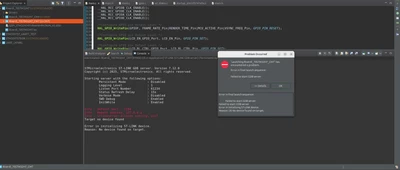
Screenshot from 2026-04-15 21-13-28.png.

Not sure if it was that program or touching the multi meter to certain pins that cause a hard fault or something.  I would not think a multi meter could do anything like that, but I'm trying to figure out why all of a sudden I am unable to upload a program to the board when I have been consistently.   

I also tried to reset the mc with the stmcubeprogrammer, but I can not connect to it.  The programmer recognizes the st-link is connected
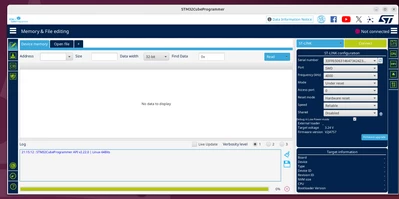
Screenshot from 2026-04-15 21-15-31.png

But when I try to connect to it, I get this error. 
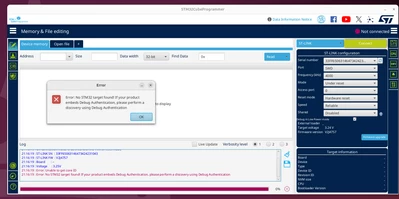
 

Screenshot from 2026-04-15 21-16-26.png

I have tried to hold the reset button and plug in the st link to trigger dfu mode.  I was able to upload a new firmware, but that did not do anything either.  I tried a software and a hardware reset.  Please help.  


Best answer by mƎALLEm

Hello,

Hard to tell what the problem is.

Check the power configuration you set for the board. 

What power configuration that Reverdi board has on the hardware? LDO or SMPS?

Your application needs to follow the same power configuration on the HW.

If you miss-configured the power config and you've broken your board, you can recover it. Please read the following articles:

How can I recover my STM32H7/STM32H7RS board after facing a power configuration deadlock? 

How to unbrick an STM32H7 after setting the wrong power mode


2 replies

mƎALLEm
mƎALLEmBest answer
Technical Moderator
April 16, 2026

Hello,

Hard to tell what the problem is.

Check the power configuration you set for the board. 

What power configuration that Reverdi board has on the hardware? LDO or SMPS?

Your application needs to follow the same power configuration on the HW.

If you miss-configured the power config and you've broken your board, you can recover it. Please read the following articles:

How can I recover my STM32H7/STM32H7RS board after facing a power configuration deadlock? 

How to unbrick an STM32H7 after setting the wrong power mode


"To give better visibility on the answered topics, please click on ""Accept as Solution"" on the reply which solved your issue or answered your question."
Andrew Neil
Super User
April 16, 2026
A complex system that works is invariably found to have evolved from a simple system that worked.A complex system designed from scratch never works and cannot be patched up to make it work.
mƎALLEm
Technical Moderator
April 16, 2026
"To give better visibility on the answered topics, please click on ""Accept as Solution"" on the reply which solved your issue or answered your question."
Andrew Neil
Super User
April 16, 2026
A complex system that works is invariably found to have evolved from a simple system that worked.A complex system designed from scratch never works and cannot be patched up to make it work.