Karl Yamashita
Principal
October 1, 2024
Solved

STM32C0116-DK has I2C pinout discrepancy

  • October 1, 2024
  • 1 reply
  • 1184 views


I am currently ordering the STM32C0116-DK to start developing some FW before getting the shipment. I've also sent the pinout to the EE team so they can start the schematic and laying out the PCB 


I started the project using the Board Selector. I've set up the UART and I2C which the pinout is shown below. The I2C peripheral is using PA9 and PA10
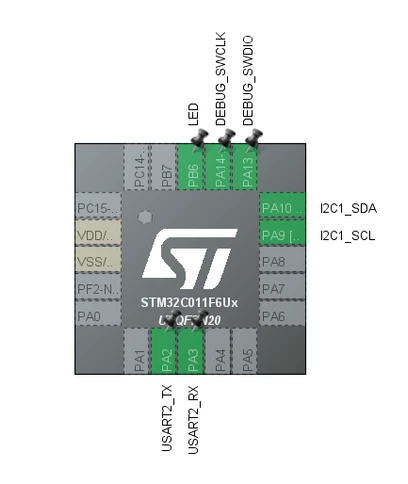
KarlYamashita_0-1727748659848.png


However, when I set up a new project using the MCU selector, the I2C peripheral are on other pins. I am selecting the same MCU where it shows the STM32C0116-DK as the development board to use.

KarlYamashita_2-1727749211922.png


But when I set up the I2C peripheral, it uses PB7 and PC14
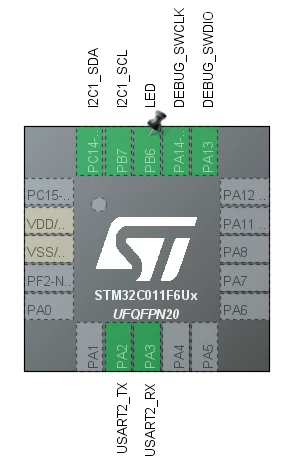
KarlYamashita_5-1727749461949.png

I thought I could maybe remap the pins but there is no option for I2C on PA12 pin as shown below.
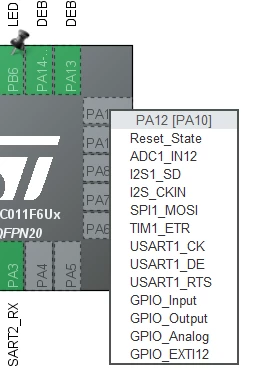
KarlYamashita_6-1727749648972.png


So which pinout is correct? Or are they actually 2 different MCU's? 
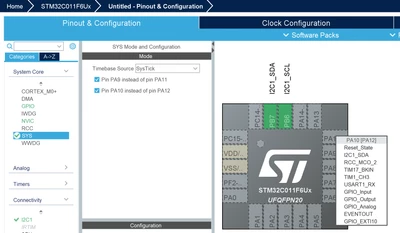


Best answer by TDK

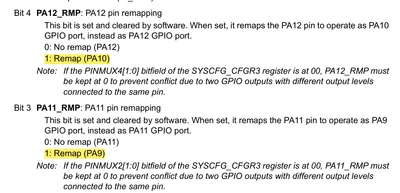
Same chip. In the SYS tab, remap the pins to PA9/PA10. After that, you can select the I2C1 functions for the pins.

TDK_0-1727751108061.png


TDK_1-1727751224191.png


1 reply

TDK
TDKBest answer
Super User
October 1, 2024

Same chip. In the SYS tab, remap the pins to PA9/PA10. After that, you can select the I2C1 functions for the pins.

TDK_0-1727751108061.png


TDK_1-1727751224191.png


"If you feel a post has answered your question, please click ""Accept as Solution""."
Karl Yamashita
Principal
October 1, 2024

Ahh! That's the first time seeing swapping pins using check box. Or maybe I've just never noticed.

Thanks TDK!


If a reply has proven helpful, click on Accept as Solution so that it'll show at top of the post.CAN Jammer an open source CAN bus hacking toolCANableV3 Open Source