
Visitor II
November 10, 2024
Solved

STM32H755ZI-Q Nucleo programming succeeds, but the code does not work
  • November 10, 2024
  • 3 replies
  • 1000 views

STM_for_beginners_0-1731203198865.png

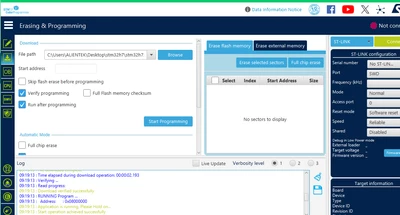
这是我烧录成功的画面,连接上stlink后板子的LD4是红绿交替闪烁的。烧录成功也是一样,板子没任何变化。程序是没有问题的。串口没任何输出。

This is the picture of my successful burning, and the LD4 of the board flashes red and green alternately after connecting to ST-Link. The same is true for successful burning, and there is no change in the board. There is no problem with the procedure. The serial port does not have any output.


Translated using Google Translate by Community team. 

Best answer by mƎALLEm

Hello @STM_for_beginners ,

The issue is not clear.

But first, as you are using STM32H755ZI-Q Nucleo board, what is the power configuration you set in your application? SMPS or LDO?

If you set it to LDO, you've broken your board and you need to recover it. The board is hardwired in SMPS power config. Please review this thread: https://community.st.com/t5/stm32-mcus/how-can-i-recover-my-stm32h7-board-after-facing-a-power/ta-p/49579

3 replies

Andrew Neil
Super User
November 11, 2024

So have you used the debugger to see what's happening inside the STM32?

https://www.youtube.com/playlist?list=PLnMKNibPkDnFCosVVv98U5dCulE6T3Iy8


A complex system that works is invariably found to have evolved from a simple system that worked.A complex system designed from scratch never works and cannot be patched up to make it work.
mƎALLEm
mƎALLEmBest answer
Technical Moderator
November 11, 2024

Hello @STM_for_beginners ,

The issue is not clear.

But first, as you are using STM32H755ZI-Q Nucleo board, what is the power configuration you set in your application? SMPS or LDO?

If you set it to LDO, you've broken your board and you need to recover it. The board is hardwired in SMPS power config. Please review this thread: https://community.st.com/t5/stm32-mcus/how-can-i-recover-my-stm32h7-board-after-facing-a-power/ta-p/49579

"To give better visibility on the answered topics, please click on ""Accept as Solution"" on the reply which solved your issue or answered your question."
mƎALLEm
Technical Moderator
November 13, 2024

Hello @STM_for_beginners ,

Were you able to solve your issue and how?

"To give better visibility on the answered topics, please click on ""Accept as Solution"" on the reply which solved your issue or answered your question."