
Associate III
January 20, 2025
Question

STM32U5G9J-DK1 demo project

  • January 20, 2025
  • 3 replies
  • 2257 views

I plugged in the microB cable only to power demo board STM32U5G9J-DK1. Now the LCD on it display different images in certain sequence. Firmware package STM32Cube_FW_U5_V1.7.0 has been downloaded.  I assume the demo project is the DSI example folder.   \STM32Cube_FW_U5_V1.7.0\Projects\STM32U5x9J-DK\Examples\DSI

There are two examples. Which one should be the one that was loaded into the demo board? 
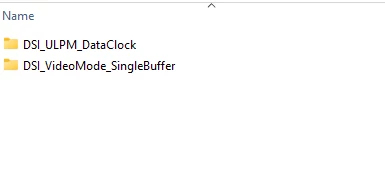
Kelly3_0-1737390684314.png

My application is to send videos through the USB C port and display the video on the LCD display. In this case, if there is an example firmware and example software to evaluate, it would be very helpful.

Thank you.

Kelly


3 replies

Kelly3Author
Associate III
January 20, 2025

I tried to create a new STM32 project that will implement USB device and LTDC base on MCU chip STM32U5G9ZJJ6Q, the 10mm x 10mm option of U5G. Yet, when I am not able to configure u5G to be high speed usb device. The option is in grey color. Please see screen shot below. 


Kelly3_1-1737409525856.png

I don't  use many IOs. USB high speed port,  DSI one lane and I2C for touch panel and addition 4 I/O signals are needed only. 

Please let me why I can't configure the USB.

Thank you.

Kelly


Technical Moderator
January 21, 2025

Hello @Kelly3 

You can enable USBX device HS, when USB_OTG_HS is configured (in device mode or DRD mode).

Also, HSE clock source must be enabled.

ImenD_1-1737449769757.png


"When your question is answered, please close this topic by clicking ""Accept as Solution"".ThanksImen"
Kelly3Author
Associate III
January 21, 2025
Imen, thank you for your answer. Can you also help me with first question: where is the source code for the demo application running on the STM32U5G9J-DK1 I received? The demo application uses micro B bus power and changing various pictures continuously. The QAn on packaging box is: Z4A48001.
Kelly3Author
Associate III
January 21, 2025

Imen,

In the Device Class Hs list, there is "Video" option. Is this for U5G to receive video from host, or is it for send video to host? 

Kelly3_0-1737479045193.png


If it means to send video to host, which device class is better choice for application that receives video from host and forward received video to LCD display?

Thank you very much.

Regards,

Kelly


Thanks,

Kelly


Technical Moderator
January 27, 2025

Hi @Kelly3 

Your config is correct as you need to configure your target in Device Video mode, and you should select video class in USBX stack.

"When your question is answered, please close this topic by clicking ""Accept as Solution"".ThanksImen"
Kelly3Author
Associate III
January 27, 2025
Imen, thank you for your reply. So, USBX device video mode means host will send video to STM32U5G9. Is there an example of this device video mode? Thank you