Associate II
April 22, 2026
Question

Target No Device Found: SWDIO (PA13) at 0V on STM32L073CZT Custom Board

  • April 22, 2026
  • 3 replies
  • 275 views

Hello STM32 Community,

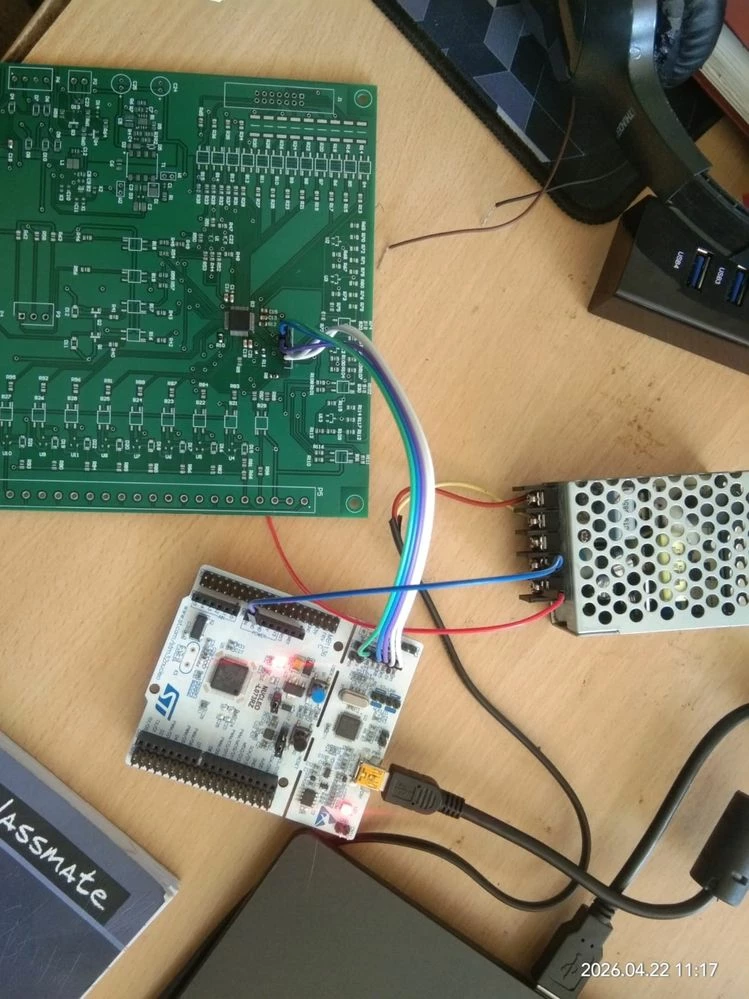
I am facing a persistent "Target no device found" error when trying to program an STM32L073CZT3 custom board using a Nucleo-L073RZ as an external ST-LINK (CN2 jumpers removed).

Hardware Setup:

  • MCU: STM32L073CZT3 (custom PCB)

  • Debugger: ST-LINK V2-1 (Nucleo-64)

  • Connection: 5-wire SWD (SWDIO, SWCLK, GND, NRST, VDD_Sensing)

  • Power: External SMPS providing 3.3V (Common Ground established between SMPS and ST-LINK).

The Issue: While the ST-LINK pins show correct voltages when floating, the SWDIO (PA13) pin drops to 0V the moment it is connected to the target board.

  • Pin 1 (VDD Sense): 3.3V

  • Pin 2 (SWCLK): 3.29V

  • Pin 4 (SWDIO):  (Measured 2.9V on ST-LINK side connection)

  • Pin 5 (NRST): 3.3V

Troubleshooting performed:

  1. Verified continuity; no physical shorts found between PA13 and GND.

  2. Attempted "Connect Under Reset" and "Hardware Reset" at 480 kHz.

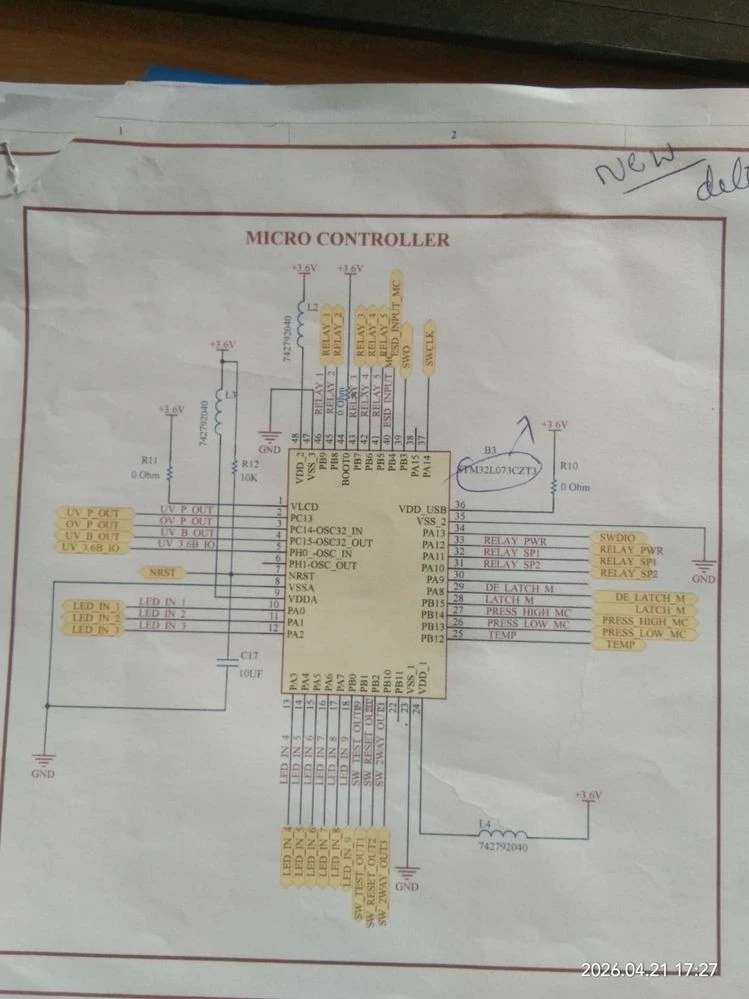
  3. Schematic Check: I have a 10uF capacitor (C17) on the NRST line—could this be preventing the debugger from catching the reset state?

  4. Verified that the ST-LINK and the software setup work perfectly on a standard Nucleo-L073RZ board.

I have attached my schematic and a photo of the physical wiring. Does the 0V on SWDIO suggest a software-locked pin or a hardware fault within the MCU?

STMicroelectronics ST-LINK GDB server. Version 7.5.0

Copyright (c) 2023, STMicroelectronics. All rights reserved.


Starting server with the following options:

Persistent Mode : Disabled

Logging Level : 1

Listen Port Number : 61234

Status Refresh Delay : 15s

Verbose Mode : Disabled

SWD Debug : Enabled

InitWhile : Enabled


Target no device found


Error in initializing ST-LINK device.

Reason: No device found on target.WhatsApp Image 2026-04-22 at 11.18.30.jpegWhatsApp Image 2026-04-21 at 17.27.43.jpeg
Best regards, VenkatesH

3 replies

mƎALLEm
Technical Moderator
April 22, 2026

Hello @VENKATESH2123 and welcome to the ST community,

Please review this knowledge base article: How to program an STM32 using the on-board ST-LINK/V2-1 of the NUCLEO-WB55RG

Also refer to this post: How to use the standalone ST-LINK capability of my nucleo after I cut the PCB?


"To give better visibility on the answered topics, please click on ""Accept as Solution"" on the reply which solved your issue or answered your question."
Associate II
April 22, 2026

Is there any mistake in our schematicWhatsApp Image 2026-04-21 at 17.27.43.jpeg

mƎALLEm
Technical Moderator
April 23, 2026

Please refer to the hardware getting started application note AN4467, especially the figure 15:

mALLEm_0-1776934486929.png

And check again this knowledge base article: How to program an STM32 using the on-board ST-LINK/V2-1 of the NUCLEO-WB55RG

Check also your hardware especially solder joints issues.


"To give better visibility on the answered topics, please click on ""Accept as Solution"" on the reply which solved your issue or answered your question."
Associate II
April 23, 2026


  • It is still not working, and I have checked all the connections.
  • Is there any mistake in my schematic?
  • Any issue in power design (VDD / VDDA)?
  • Any problem with SWD or NRST connections?
  •  


Mike_ST
Technical Moderator
April 23, 2026

Hello,

Hard to tell with not so detailed pictures.

Check for bridged pins on the STM32.

Check for rotated chip.

On your implementation of the debug connector, I maybe see that you've switched SWCK and SWIO compared to our implementation on the nucleo, please make sure this is not the problem.

Mike_ST_0-1776957074330.png 

Mike_ST_1-1776957159874.png