
Associate II
September 12, 2025
Solved

Use nucleo-64 ST-Link debugger for another MCU

  • September 12, 2025
  • 4 replies
  • 1029 views

Removed the ST-Link plastic jumpers and all four pins are free now - as shown on the blue rectangle. As well as, the yellow rectangle shows the 6 pins of CN4 on one column.
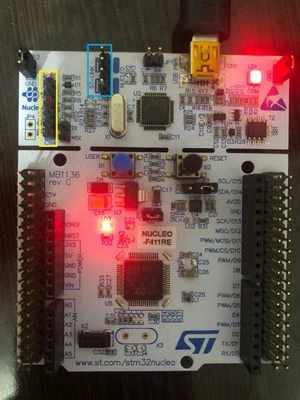
photo_2025-09-12_01-11-34.jpg

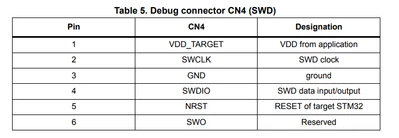
It seems that pins 1 and 3 are 3.3 V and GND respectively based on the use manual (https://www.st.com/resource/en/user_manual/um1724-stm32-nucleo64-boards-mb1136-stmicroelectronics.pdf)
Capture3.PNG

but when I check those two pins using a multimeter I get no voltage! Any idea where is the issue?

Best answer by Andrew Neil

@vernture wrote:

I don't want to break off the ST-Link part (because I have projects working with the Nucelo board);?  


You can still use it with the rest of the Nucleo board - you just have to connect via wires as with any other target.


The important thing to understand is that these 6 pins do not provide power to the external target - you will have to power the external target (your Blue Pill) separately.


I think you'll find that breaking off the ST-Link is the best option,  because there are still some other connections left to the rest of the Nucleo board - an example here.


4 replies

Associate II
September 12, 2025

VDD is not driven by the ST-Link, but has to be connected to power of the MCU to be flashed/debugged.

This might be 3.3V or another voltage, depending on your board.

ST-Link reads this voltage.


Only if the jumpers are NOT removed then the ST-Link is connected to your MCU on the NUCLEO and VDD is delivered from there (one of the removed jumpers routes VDD).

verntureAuthor
Associate II
September 12, 2025

@mfgkw wrote:

Only if the jumpers are NOT removed then the ST-Link is connected to your MCU on the NUCLEO and VDD is delivered from there (one of the removed jumpers routes VDD).


That's odd to me because the USB power is connected to CN1 of ST-Link part and pins 1 and 3 (from the top) give zero voltage even if I put those jumpers back.

My purpose is to make the connections below to use the Nucleo's ST-Link debugger for a code that's going to program the Blue Pill.  

Nucleo ST-Link   |   Blue Pill
--------------------------------------------
VDD_TARGET  =>   3.3V
SWCLK             =>   PA14
GND                 =>    GND      
SWDIO             =>    PA13
NRST               =>     NRST

When I connect these, the blue pill's power LED doesn't turn on so it doesn't receive power from the ST-Link. 

My board, as shown from the image in the first post, is Nucleo-64 STM32F411RE. 

Andrew Neil
Super User
September 12, 2025

As @mfgkw said, and as shown in the table you quoted, pin 1 is VDD from the target - it does not supply power to the target:

AndrewNeil_0-1757668763408.png

To be really sure that the ST-Link is fully disconnected from the STM32F411RE on the Nucleo board, you can break-off the ST-Link part:

AndrewNeil_1-1757668983963.png

Picture credit: @MM..1 via https://community.st.com/t5/stm32-mcus-products/3-3v-power-supply-for-nucleof103/m-p/657826/highlight/true#M240024


PS:


@vernture wrote:

That's odd to me because the USB power is connected to CN1 of ST-Link part . 


Not directly:

AndrewNeil_2-1757669203474.png

AndrewNeil_3-1757669253175.png


@vernture wrote:

the blue pill's power LED doesn't turn on so it doesn't receive power from the ST-Link. 


That is the expected behaviour.

A complex system that works is invariably found to have evolved from a simple system that worked.A complex system designed from scratch never works and cannot be patched up to make it work.
Associate II
September 12, 2025

There is no need to break the board off.

- Remove the two jumpers

- connect at least VDD_TARGET, GND, SWCLK, SWDIO and NRST between your blue pill board with CN4 of the ST-Link

- if you need Traces via ST-Link then connect SWO as well

- power your blue pill board from any source

- power and connect the ST-Link via USB cable to the PC

Associate II
September 12, 2025

It looks ok for me.

But keep in mind that blue pills are regularely faked STM for quite a long time now. I have one here, which does not work with STMCubeIDE. It can be flashed with via hex file with STM32CubeProgrammer, but even that is not reliable. (It came in a set along with ST-Link clone, which does not work either...)

Black pills where usually better when they appeared. But I assume the situation with black pill is not really better meanwhile.

As long as you have no original STM product you will find not much help here. And to be honest it is wasted time to save a few bucks. Maybe you have more fun with real hardware. Switch to a NUCELO board or a naked CPU from a trustworthy source.

verntureAuthor
Associate II
September 12, 2025

OK. 

Yeah seems it's failing to work. I got that from years ago. 

I have a Nucelo board but my project only uses I2C and PWM and that nucelo is rather big. 
What is the cheapest and smallest original ST board to purchase?   

Associate II
September 12, 2025

There are some light weight NUCLEO-32 boards.

The minimum board from ST I ever had is a STM32G0316-DISCO for ~ 12€.

https://www.st.com/en/evaluation-tools/stm32g0316-disco.html

If this has not enough IOs then look for NUCLEO-32...

Andrew Neil
Super User
September 12, 2025

@mfgkw wrote:

 NUCLEO-32 ..


+1.

Also, I think SMT32-based boards from Adafruit or Sparkfun should be trustworthy - and at least you will get support from them:

https://www.adafruit.com/category/52 - but note that the ST-Link shown there is a clone.

https://www.sparkfun.com/sparkfun-thing-plus-stm32.html 


Also Olimex.


A complex system that works is invariably found to have evolved from a simple system that worked.A complex system designed from scratch never works and cannot be patched up to make it work.