
Associate
February 12, 2025
Solved

W25Q16JV Flash Memory - no response on STM32G474 QSPI

  • February 12, 2025
  • 4 replies
  • 1301 views

Hi,

I am trying to read device id of the W25Q16JV Flash Memory (3V 16M-BIT SERIAL FLASH MEMORY WITH DUAL/QUAD SPI) using the STM32G474RBT4 Nucleo board via QSPI lines.

I hereby attach the ioc settings and the code used:

static void MX_QUADSPI1_Init(void)

{

/* QUADSPI1 parameter configuration*/

hqspi1.Instance = QUADSPI;

hqspi1.Init.ClockPrescaler = 1;

hqspi1.Init.FifoThreshold = 4;

hqspi1.Init.SampleShifting = QSPI_SAMPLE_SHIFTING_HALFCYCLE;

hqspi1.Init.FlashSize = 20;

hqspi1.Init.ChipSelectHighTime = QSPI_CS_HIGH_TIME_1_CYCLE;

hqspi1.Init.ClockMode = QSPI_CLOCK_MODE_0;

hqspi1.Init.FlashID = QSPI_FLASH_ID_1;

hqspi1.Init.DualFlash = QSPI_DUALFLASH_DISABLE;

if (HAL_QSPI_Init(&hqspi1) != HAL_OK)

{

Error_Handler();

}

}


Code to read Device ID:

HAL_StatusTypeDef QSPI_ReadID( uint8_t *id)

{

sCommand.InstructionMode = QSPI_INSTRUCTION_1_LINE;

sCommand.Instruction = READ_JEDEC_ID_CMD; // 0x9F

sCommand.AddressMode = QSPI_ADDRESS_NONE;

//sCommand.Address = 0x000000;

sCommand.AlternateByteMode = QSPI_ALTERNATE_BYTES_NONE;

sCommand.DataMode = QSPI_DATA_1_LINE;

sCommand.DummyCycles = 0;

sCommand.DdrMode = QSPI_DDR_MODE_DISABLE;

sCommand.DdrHoldHalfCycle = QSPI_DDR_HHC_ANALOG_DELAY;

sCommand.SIOOMode = QSPI_SIOO_INST_EVERY_CMD;

sCommand.NbData = 3;


if (HAL_QSPI_Command(&hqspi1, &sCommand, HAL_QSPI_TIMEOUT_DEFAULT_VALUE) != HAL_OK)

{

return HAL_ERROR;

}

if (HAL_QSPI_Receive(&hqspi1, id, HAL_QSPI_TIMEOUT_DEFAULT_VALUE) != HAL_OK)

{

return HAL_ERROR;

}

return HAL_OK;

}

The Flash memory is connected to 3.3V from external custom board. When I run the above function

there is no error and there is no response from the flash memory. The board to flash memory pin connections are correct.
The clock to the QSPI is SYSCLK (16MHz). The same ioc settings and code when used in STM32L412 nucleo board, I am
able to read the device ID. What might be the reason for getting the response using the STM32G474 board ?
If you further need any information, let me know.

Thanks.


Best answer by VSASI1

Hi @KDJEM.1 @Tesla DeLorean ,
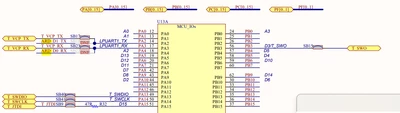
It seems like the issue is in the Nucelo board pin connections, refer to the schematics for this. PA2 and PA3 are not connected to the MCU, there is no resistor connected across that pin signal.

VSASI1_0-1739538072012.png

So we have mounted the SB17 and SB23 across the ARD_D0 and ARD_D1 pins. And now it is working fine, we were able to read the Device ID.

Thank you.

4 replies

KDJEM.1
Technical Moderator
February 12, 2025

Hello @VSASI1;


Does the BUSY flag of the QUADSPI_SR register remain high?

I recommend you to take look at the STM32G474 errata sheet and precisely QUADSPI section for QUADSPI errata. And check if you have a case of limitation.

Could you please use </> button to paste your code? 


I hope this help you.

Thank you.

Kaouthar

To give better visibility on the answered topics, please click on Accept as Solution on the reply which solved your issue or answered your question.
VSASI1Author
Associate
February 13, 2025

Hi @KDJEM.1 ,

I have checked the QSPI section in the errata sheet and my problem is not listed in it. The Busy flag of QUADSPI_SR is not always high. While executing the instruction and the receiving the data using quad lines, I get some response, but it is not the expected. It is not the same when the Instruction and data are sent and received using single line, no response from the Flash memory.

QSPI Initialization:
static void MX_QUADSPI1_Init(void)
{

 /* USER CODE BEGIN QUADSPI1_Init 0 */

 /* USER CODE END QUADSPI1_Init 0 */

 /* USER CODE BEGIN QUADSPI1_Init 1 */

 /* USER CODE END QUADSPI1_Init 1 */
 /* QUADSPI1 parameter configuration*/
 hqspi1.Instance = QUADSPI;
 hqspi1.Init.ClockPrescaler = 1;
 hqspi1.Init.FifoThreshold = 4;
 hqspi1.Init.SampleShifting = QSPI_SAMPLE_SHIFTING_HALFCYCLE;
 hqspi1.Init.FlashSize = 20;
 hqspi1.Init.ChipSelectHighTime = QSPI_CS_HIGH_TIME_1_CYCLE;
 hqspi1.Init.ClockMode = QSPI_CLOCK_MODE_0;
 hqspi1.Init.FlashID = QSPI_FLASH_ID_1;
 hqspi1.Init.DualFlash = QSPI_DUALFLASH_DISABLE;
 if (HAL_QSPI_Init(&hqspi1) != HAL_OK)
 {
 Error_Handler();
 }
 /* USER CODE BEGIN QUADSPI1_Init 2 */

 /* USER CODE END QUADSPI1_Init 2 */

}

Code for Reading Device ID:

#define READ_JEDEC_ID_CMD 0x9F 
uint8_t id[3]; // Recieve buffer
QSPI_CommandTypeDef sCommand;
QSPI_HandleTypeDef hqspi1;
HAL_StatusTypeDef QSPI_ReadID( uint8_t *id)
{

 sCommand.InstructionMode = QSPI_INSTRUCTION_1_LINE;
	sCommand.Instruction = READ_JEDEC_ID_CMD; // 0x9F
	sCommand.AddressMode = QSPI_ADDRESS_NONE;
	//sCommand.Address = 0x000000;
	sCommand.AlternateByteMode = QSPI_ALTERNATE_BYTES_NONE;
	sCommand.DataMode = QSPI_DATA_4_LINES;
	sCommand.DummyCycles = 2;
	sCommand.DdrMode = QSPI_DDR_MODE_DISABLE;
	sCommand.DdrHoldHalfCycle = QSPI_DDR_HHC_ANALOG_DELAY;
	sCommand.SIOOMode = QSPI_SIOO_INST_EVERY_CMD;
	sCommand.NbData = 3;


	if (HAL_QSPI_Command(&hqspi1, &sCommand, HAL_QSPI_TIMEOUT_DEFAULT_VALUE) != HAL_OK)
	{
		return HAL_ERROR;
	}


 if (HAL_QSPI_Receive(&hqspi1, id, HAL_QSPI_TIMEOUT_DEFAULT_VALUE) != HAL_OK)
 {
 	return HAL_ERROR;
 }
 return HAL_OK;

 
}

Picture 1:

VSASI1_0-1739453427602.png

This shows the register values after QSPI Init.

Picture 2: 

VSASI1_1-1739453483707.png

This is after the QSPI_Command is passed.

Picture 3:

VSASI1_2-1739453522607.png

This is after the QSPI_Receive function.

The same code gives the output when tested with STM32L412 Nulceo board. But no response when tested with the STM32G474 Nucleo board.

 Thanks.

Tesla DeLorean
Guru
February 13, 2025

Try doing this WITHOUT doing LIVE inspection of the QSPI registers, likely to mess with status, data and FIFO operations. It's very invasive. If you need to understand flow, and internal state, print diagnostic/telemetry to a terminal.

I'd recommend consistent/complete initialization of sCommand structures, ie use local/auto, clear it, and make sure all the fields needs for the current/specific operation are set.

I can't say I can see anything egregiously wrong, but this will save a lot of time tracking down random/odd behaviour

Tips, Buy me a coffee, or three.. PayPal VenmoUp vote any posts that you find helpful, it shows what's working..
KDJEM.1
Technical Moderator
February 13, 2025

Hello @VSASI1;


-> While executing the instruction and the receiving the data using quad lines, I get some response, but it is not the expected.

Could please share what have you received and what data you are expected to receive?


Thank you.

Kaouthar


To give better visibility on the answered topics, please click on Accept as Solution on the reply which solved your issue or answered your question.
Tesla DeLorean
Guru
February 13, 2025

Duplicative post  https://community.st.com/t5/stm32-mcus-products/nucleo-g474re-couldn-t-establish-qspi-connection-with-external/td-p/772517

If this is a school assignment indicate. For work assignments, work with your supervisor, or most senior colleagues.

Tips, Buy me a coffee, or three.. PayPal VenmoUp vote any posts that you find helpful, it shows what's working..
VSASI1AuthorBest answer
Associate
February 14, 2025

Hi @KDJEM.1 @Tesla DeLorean ,
It seems like the issue is in the Nucelo board pin connections, refer to the schematics for this. PA2 and PA3 are not connected to the MCU, there is no resistor connected across that pin signal.

VSASI1_0-1739538072012.png

So we have mounted the SB17 and SB23 across the ARD_D0 and ARD_D1 pins. And now it is working fine, we were able to read the Device ID.

Thank you.

Associate II
February 13, 2025

Hi @KDJEM.1 ,

Data expected is three bytes 0xEF 0x40 0x15,when using single line no data received ,when using quad lines 0x99 for all the three bytes

Thanks