
Explorer
December 11, 2025
Question

Can't Communicate With Board Anymore But Code Still Runs Fine

  • December 11, 2025
  • 1 reply
  • 162 views

Hello everyone,

Working on the STM32U5G9ZJT6Q on a custom board.
On STM32CubeProgrammer (V2.20), I face an unexpected issue when trying to program my board.
The ST-Link (official, V3PWR, power not used) simply cannot communicate anymore with the mcu with BOOT0=0 (tied with gnd). The stlink isn't broken as it still works on other custom boards.
Error: Unable to get core ID
Error: No STM32 target found! [...]

With the USB and PH3 BOOT0=1 (tied to Vdd), I can erase the chip and program it, however, when trying to run the program, the mcu resets and gets back into the idle usb waiting mode.
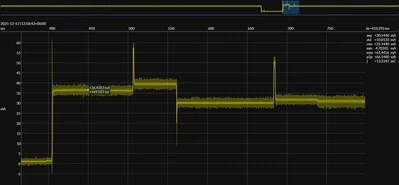
Here is the current consumption diagram without running after programming (left) and with running after programming (right). The base reset pattern for reference is the 3rd image.
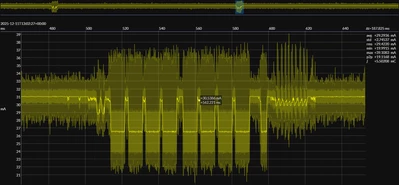
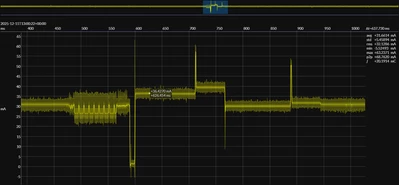
prog_no_run.png prog_and_run.png

simple_reset.png

The run seems to trigger the reset and put it back to idle/wait for device at the bootloader base address.

It's worth noting that with BOOT0=1, stlink still doesn't work. 

I tried all possibilities to communicate with the board from stlink BOOT0=0, especially under reset.
I never had short-circuit on the board or at least not a prolonged one as I monitored the current consumption the whole time.The voltages are correct at the intended levels (VDDA, VDD, VDD core, ...).
It had been working before for weeks, and when I lost the possibility to communicate with the board (BOOT0=0, ST-LINK), the previous uploaded program was still running perfectly fine on the board (a simple internal DAC/VREF). I erased the memory from usb today so no code isn't running anymore.

The whole situation should mean (I hope) that the mcu in itself is not broken, or only the reset/run part, which I find difficult to believe.

    This topic has been closed for replies.

    1 reply

    Super User
    December 15, 2025

    If you can connect over USB DFU, the chip is the in the bootloader which means the SWD pins are active. If SWD still can't connect, this suggests a wiring issue. Perhaps a solder joint finally failed.

    gorgababAuthor
    Explorer
    December 16, 2025

    Hello,

    Thanks for your answer, I checked the continuity between the st-link header and the respective stm SWDIO and SWCLK pins and all are ok, they are also quite close from their pin (<2cm).

    gorgabab_0-1765882325402.png

    As a workaround, I installed a 3-pin header tied to VDD and GND on my board to select the BOOT option. I upload the code on BOOT=1, then changing to 0 while reset the chip to run the code. It works but is nowhere near the comfort brought by the st-link and the debugging options.

    I still would like to understand (if anyone went through this situation) what kind of failure can bring the st-link interface not work anymore on my chip as this is the only failure i experience on the board.

    The odds for an static choc to break only the st-link part of the chip seem little.

    Super User
    December 16, 2025

    @gorgabab wrote:

    what kind of failure can bring the st-link interface not work anymore .


    1st two not  "failures" as such, but:

    1. Reconfiguring the SWD pins - see:
      How to solve debugger connection issues
      How to solve connection errors when connecting and programming the STM32 target board.
    2. Protection options:
      A mass erase should fix that.

    3. As @TDK said, physical faults - broken/loose connectors, solder joints failed, etc