
Visitor II
December 14, 2025
Solved

Genuine STLINK/V2 does not work, but genuine V3MINIE does

  • December 14, 2025
  • 2 replies
  • 119 views

Heya!

I've been borrowing an STLINKV3MINIE and today my own (legitimate) STLINK/V2 arrived today, but I haven't been able to detect it. I purchased the product from Mouser (https://au.mouser.com/ProductDetail/STMicroelectronics/ST-LINK-V2?qs=H4BOwPtf9MC1sDQ8j3cy4w%3D%3D&srsltid=AfmBOooS1jAwuhdu3ZF7xo5hJ7OWAqrWYGnkUSL7hzKZPl6fvURN-Hnq).

You can see in device manager, when I have the V3MINIE connected, it shows in the DM panel:

f3l1xa88077_0-1765711759959.png

When I connect with the V2, my computer does recognise it:
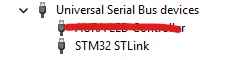
f3l1xa88077_0-1765715966833.png

I have been using the same USB port on my computer, and I am using the cable that arrived with the V2 to connect it. The red LED on the V2 is on (remains red, no flashing), but I'm getting nothing.

When I try connecting to it via STM32CubeProgrammer with the V2, I get nothing (Verb level 3):

f3l1xa88077_2-1765711932632.png

It does not detect the Serial Number and doesn't show up as something to connect to in the cfg panel:
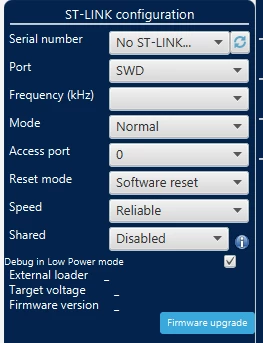
f3l1xa88077_3-1765712038816.png

It works A-OK with the V3 as soon as I plug that back in (same settings), but not with my V2.

I had downloaded the V2 driver from here (https://www.st.com/en/development-tools/stsw-link009.html) and followed the README.txt, but nothing had changed.

Any help would be much appreciated.


    This topic has been closed for replies.
    Best answer by f3l1xa88077

    Solution:

    The original cable packaged with the board was not holding a stable connection. I used a different cable and updated the firmware. Then the original cable worked fine.

    2 replies

    Visitor II
    December 14, 2025

    Sorry, I had not realised the V2 did not appear as a COM port. I can confirm that it appears in the USB section of DM:

    f3l1xa88077_0-1765713170379.png

    Not a solution, just something I had realised afterwards.


    Super User
    December 14, 2025

    Hi,

    on which system ? Win ? (btw   Never seen this problem.)

    Maybe some kind of "rights" is a problem, so check /disable firewall, virus scan, owner etc. - then try.

    Super User
    December 14, 2025

    ... Or try Menu - update st-link in Cube Programmer , maybe this helps.

    f3l1xa88077AuthorAnswer
    Visitor II
    December 14, 2025

    Solution:

    The original cable packaged with the board was not holding a stable connection. I used a different cable and updated the firmware. Then the original cable worked fine.