Explorer II
December 16, 2025
Question

Programming the board using a USB connection. (at Nucleo-G491RE)

  • December 16, 2025
  • 4 replies
  • 96 views

Hello,

First, I would like to express my deepest gratitude for your assistance.

I intend to update the firmware using STM32CubeProgrammer with the following hardware configuration
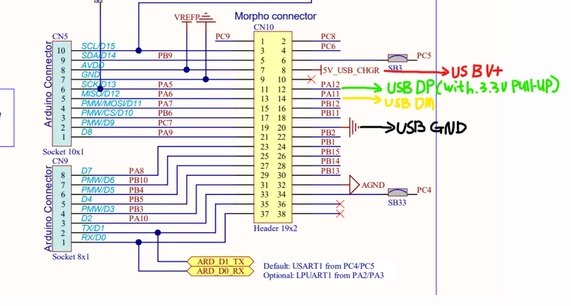
 

ParkPork_0-1765883915496.png

Additionally, I have set the Boot0 pin to High using a jumper.

However, my PC is not detecting DFU mode.

Additionally, the programmer is not recognizing the USB connection.
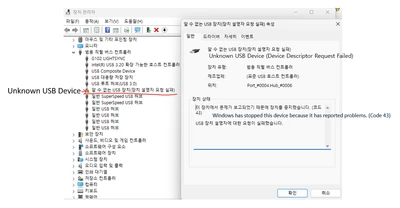
ParkPork_1-1765884511107.pngParkPork_2-1765884522001.png


Did I miss anything?


PS. The board has undergone a full chip erase.


    This topic has been closed for replies.

    4 replies

    Graduate
    December 16, 2025

    You've missed the fact that the pullup is already present in STM32G. No need for an external one. ;)

    ParkPorkAuthor
    Explorer II
    December 16, 2025

    The same problem occurs even in situations without pull-ups.

    I am checking what I might be missing.

    Graduate
    December 16, 2025

    Just noticed that you are powering your board from USB. have you set the power jumpers correctly? What happens if you power it from ST-Link instead?

    Also, if you use USB-C connector on the MCU side and C-to-C cable, make sure that 5k1 pulldowns are present on both CC lines.

    ParkPorkAuthor
    Explorer II
    December 16, 2025

    I hadn't considered using the St-link power supply. I'll double-check this part.

    The current connection interface uses a cable similar to the one in the attached photo.

    IMG_3679.png

    Super User
    December 16, 2025

    If the ST-link chip on the board is not powered, it can keep the target chip in reset by keeping NRST low.

    ParkPorkAuthor
    Explorer II
    December 16, 2025

    The board's 5V LED lights up normally. Even if the LED is lit normally, could the board still not be receiving power?

    I'm a beginner developer and there's a lot I don't know. Thank you.