
Associate
October 23, 2025
Solved

Breakpoints no longer working after freeRTOS osKernelStart() called

  • October 23, 2025
  • 2 replies
  • 369 views

Hello Everyone,

Am looking for a little help on what I hope is a simple issue. 

A quick summary is when I use freeRTOS + STM32Cube and set a breakpoint in one of the default task lines it never triggers.  Breakpoints enabled before the scheduler is started work ok.

Can anyone point me in a direction to remedy this?  Will provide more details below.

BTW, I'm new to the community and this is my first time posting.  Happy to hear any suggestions from any of you that will improve my posts.

Details

  • purchased a STM32F769I-DISCO eval board.
  • I have a simple project that blinks the DISCO board LEDS
  • originally it was done without the RTOS enabled.  Breakpoints and all worked great
  • added the FreeRTOS and moved the blinking code over to use OS related stuff in the default task. 
  • the program ran ok. 
  • however, when a breakpoint is set it never pauses the app
  • i configured the RTOS proxy and that all appears to be working fine if I manually pause the app.
  • i also found a suggestion of adding a __asm("bpnt"); line in default task.  This did halt the processor.
  • have tried many different remedies where I moved the tick to TMR7 and others.  Did all the config and code changes etc.  Code still runs ok but no BP's.
  • have tried using openOCD instead of STLink.  no joy
  • have followed a couple of different STMicro videos related to this topic without success.  the only one I haven't tried yet is the SWT variation i found in one video.
  • have tried the system init additions of APB1FZ = 0x7E01BFF, APB2F2 = 0x70003 with no luck
  • not sure where to go now.  I did find something indicating the M7 Core has an issue in some of the early versions and could be causing the issue.
  • I currently believe i have just missed something in setup/config but can't find it. 
  • would really appreciate some advice / help on this one.
  • can provide code blocks if that would help.

Cheers,

MC
 

Best answer by mƎALLEm

Hello,

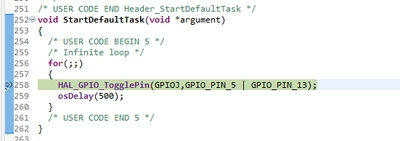
Attached a project where the on board (STM32F769I-DISCO) LEDs are toggling in the default task.

I can set a break point and reach the GPIO toggle here:

void StartDefaultTask(void *argument)
{
 /* USER CODE BEGIN 5 */
 /* Infinite loop */
 for(;;)
 {
 HAL_GPIO_TogglePin(GPIOJ,GPIO_PIN_5 | GPIO_PIN_13);
 osDelay(500);
 }
 /* USER CODE END 5 */
}

mALLEm_0-1761249864166.png

Hope that helps

2 replies

mƎALLEm
Technical Moderator
October 23, 2025

Hello @MCENG and welcome to the community,

Did you select another timeer for the system (HAL) and kept the FreeRTOS time base with the system tick?

See this video: FreeRTOS on STM32 v2 - 01 Preparation - lab

Slide at @4:05 it indicates that the "Time base source" needs to be changed to another timer like TIM6 and System tick needs to be reserved for FreeRTOS scheduler time base:

mALLEm_0-1761244652630.png


"To give better visibility on the answered topics, please click on ""Accept as Solution"" on the reply which solved your issue or answered your question."
MCENGAuthor
Associate
October 23, 2025

Hi,

Thanks, glad to be here.

Yes I did take care of the Timers in a similar fashion to that shown in the video.

The difference being my debugger shows the only viable option as Serial Wire and all wakeup selections are highlighted

MCENG_0-1761247468973.png

But, I will re-do them just to be sure.

Cheers,

MC

mƎALLEm
mƎALLEmBest answer
Technical Moderator
October 23, 2025

Hello,

Attached a project where the on board (STM32F769I-DISCO) LEDs are toggling in the default task.

I can set a break point and reach the GPIO toggle here:

void StartDefaultTask(void *argument)
{
 /* USER CODE BEGIN 5 */
 /* Infinite loop */
 for(;;)
 {
 HAL_GPIO_TogglePin(GPIOJ,GPIO_PIN_5 | GPIO_PIN_13);
 osDelay(500);
 }
 /* USER CODE END 5 */
}

mALLEm_0-1761249864166.png

Hope that helps

"To give better visibility on the answered topics, please click on ""Accept as Solution"" on the reply which solved your issue or answered your question."
mƎALLEm
Technical Moderator
October 23, 2025

Were you able to set a break point and reach it before adding FreeRTOS?

"To give better visibility on the answered topics, please click on ""Accept as Solution"" on the reply which solved your issue or answered your question."
MCENGAuthor
Associate
October 23, 2025

Hi,

It's been solved.  A case of user stupidity on my part :)

One of the other devs ran your project and BP's work for him.

I started looking around and realized a while back I had used the skip all breakpoint toggle.  it appears that controls scope is the IDE rather than a specific project and apparently persistent.  In any case my mistake was not checking / turning it back off.

I'm good to go now.

Thanks for the help.

MC