
Associate II
May 28, 2025
Solved

Can't make Ethernet work for STM32H757I-EVAL

  • May 28, 2025
  • 3 replies
  • 1536 views

Hello,

I followed https://community.st.com/t5/stm32-mcus/how-to-create-a-project-for-stm32h7-with-ethernet-and-lwip-stack/ta-p/49308 tutorial from the scratch to the end, including the Hello UDP part, and adding the "ETH CODE" code.
However, I can't ping my board.


After some debug, I found that I am locked in HAL_MspInit. 

I tried this on 2 eval boards, with same results. I do not have further ideas to try.

Please find attached my projects.

Also, I wanted to know if FreeRTOS is mandatory for a project using Ethernet ? 

If somebody have a "plug and play" project for STM32H757, I would be happy to try it out.

Thank you very much,

Matteo
Best answer by mƎALLEm

Hello,

0x1ff0a754 is at the bootloader range.

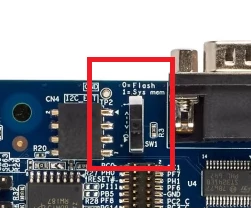
Check the SW1 switch position on the board:

mALLEm_0-1749127812599.png

Put it at the position 0

And with cube programmer check the Boot address in options bytes:

mALLEm_2-1749128079385.png

Mainly for BOOT=0 for CM7.


3 replies

Pavel A.
Super User
May 28, 2025
Matteo-uCAuthor
Associate II
June 2, 2025

Hello @Pavel A. 

I still can't ping my device, even with STM32H747-DISCO project.

I changed values in IP_ADDR4 function to put my computer address, and in LWIP init I changed the address to put an adress in the same network as my computer.

I have the green led next to my ethernet link, both in my computer and in the board, and when typing ipconfig in my cmd, it looks connected. 

However, when trying to ping the board, I have impossible to join the board. I don't have any UDP signal, I looked on wireshark and have nothing sent by the board. 

I added the Hello UDP part, and it still doesn't work. 

I don't know if it is relevant, but I don't have the master output on the board when looking with an oscilloscope.

Tried on different boards and computer.

Best Regards,

Matteo

mƎALLEm
Technical Moderator
June 2, 2025

Hello,

If you can't ping the board even with the example provided in STM32CubeH7 package you need to check your network and your ETH cables.

So try to ping other devices on the network with the same Host, the same cables, same switch (if available) ..

"To give better visibility on the answered topics, please click on ""Accept as Solution"" on the reply which solved your issue or answered your question."
Matteo-uCAuthor
Associate II
June 3, 2025

@Andrew Neil @mƎALLEm 

Hello,

I can't answer these questions, because when doing step by step debug and "go into", I can finish HAL_InitTick, and then, when doing step over with HAL_MspInit  the IDE is showing

Break at address "0x1ff0a752" with no debug information available, or outside of program code.

 I can finish HAL_MspInit if I do step by step, but then, the next function where I will make a step over will show me "break at address..."

That's why I only identified I have an issue with HAL_InitTick, because when debugging through breakpoint, I reach the breakpoint before HAL_InitTick, and not the breakpoint after, but I can't see what is happening inside.

Thank you

mƎALLEm
Technical Moderator
June 3, 2025

Hello,

I was able to step into your code and reached StartDefaultTask().

I don't know what happens on your board. As you are using only CM7, I suggest to comment these lines in your code:

 timeout = 0xFFFF;
 while((__HAL_RCC_GET_FLAG(RCC_FLAG_D2CKRDY) != RESET) && (timeout-- > 0));
 if ( timeout < 0 )
 {
 Error_Handler();
 }
timeout = 0xFFFF;
while((__HAL_RCC_GET_FLAG(RCC_FLAG_D2CKRDY) == RESET) && (timeout-- > 0));
if ( timeout < 0 )
{
Error_Handler();
}

and retry ..

"To give better visibility on the answered topics, please click on ""Accept as Solution"" on the reply which solved your issue or answered your question."
Matteo-uCAuthor
Associate II
June 3, 2025

Hello @mƎALLEm ,

I commented these lines, and exactly same issues.

Indeed, when I am not flashing CM4 before flashing CM7, I need to comment these lines.

Thank you

mƎALLEm
Technical Moderator
June 3, 2025

Used the same board as yours: STM32H757I-EVAL.

For jumper positions I suggest you to check the user manual of the board.


"To give better visibility on the answered topics, please click on ""Accept as Solution"" on the reply which solved your issue or answered your question."
Matteo-uCAuthor
Associate II
June 3, 2025

@mƎALLEm 

Ok, thanks. I already checked it.
Other than the jumper position, do you have any idea ?

mƎALLEm
Technical Moderator
June 3, 2025

At this stage I suggest to run a very simple project from the STM32CubeH7 package: https://github.com/STMicroelectronics/STM32CubeH7/tree/master/Projects/STM32H747I-EVAL/Examples/GPIO/GPIO_EXTI

At least to be sure you can pass the system clock configuration stage. 

"To give better visibility on the answered topics, please click on ""Accept as Solution"" on the reply which solved your issue or answered your question."
