
Solved
Cannot get SPI communication with SD Card to work (but works on arduino)
Hi everyone,
I'm trying to interface an SD card over SPI with an STM32F411. However, I cannot even initialize it. My current sequence is:
Wait 20 ms after power-on.
Send 10 clock cycles with CS high.
Pull CS low and send CMD0 and wait for a reponse.
Instead, I only ever receive 0xFF instead of 0x01.
My SPI configuration looks like this:
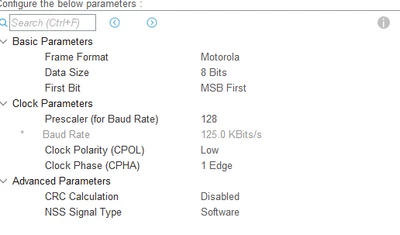
Here is the relevant code:
 MY_DEBUG_PRINTLN("Hello World");

 uint8_t txBuf[6];
 uint8_t resp = 0x00;
 uint8_t dummy = 0xFF;

 HAL_Delay(20);

 MY_DEBUG_PRINT("Raw SD SPI test:\n");

 // send 80 clocks with CS high
 HAL_GPIO_WritePin(GPIOB, GPIO_PIN_1, GPIO_PIN_SET);
 for (int i = 0; i < 10; i++) {
 HAL_SPI_Transmit(&hspi2, &dummy, 1, HAL_MAX_DELAY);
 }
 HAL_GPIO_WritePin(GPIOB, GPIO_PIN_1, GPIO_PIN_RESET);

 // CMD0 frame
 txBuf[0] = 0x40;
 txBuf[1] = 0x00;
 txBuf[2] = 0x00;
 txBuf[3] = 0x00;
 txBuf[4] = 0x00;
 txBuf[5] = 0x95;

 // send command
 HAL_SPI_Transmit(&hspi2, txBuf, 6, HAL_MAX_DELAY);

 // wait for response
 for (int i = 0; i < 30; i++) {
 HAL_SPI_TransmitReceive(&hspi2, &dummy, &resp, 1, HAL_MAX_DELAY);
 MY_DEBUG_PRINTF("resp = 0x%02X\r\n", resp);
 if ((resp & 0x80) == 0) break;
 }

 HAL_GPIO_WritePin(GPIOB, GPIO_PIN_1, GPIO_PIN_SET);

 MY_DEBUG_PRINTF("CMD0 resp = 0x%02X\r\n", resp);
Output:
Hello World
Raw SD SPI test:
resp = 0xFF
... (30 times)
resp = 0xFF
CMD0 resp = 0xFF
On arduino if I execute the "same" code it works:
 Serial.begin(115200);
 while (!Serial) {}

 Serial.println("Hello World");

 uint8_t txBuf[6];
 uint8_t resp = 0x00;
 uint8_t dummy = 0xFF;

 // SPI init
 SPI.begin();
 SPI.beginTransaction(SPISettings(100000, MSBFIRST, SPI_MODE0));

 pinMode(SD_CS_PIN, OUTPUT);
 digitalWrite(SD_CS_PIN, HIGH);

 delay(20);

 Serial.println("Raw SD SPI test:");

 // send 80 clocks with CS high
 for (int i = 0; i < 10; i++) {
 SPI.transfer(dummy);
 }

 digitalWrite(SD_CS_PIN, LOW);

 // CMD0 frame
 txBuf[0] = 0x40;
 txBuf[1] = 0x00;
 txBuf[2] = 0x00;
 txBuf[3] = 0x00;
 txBuf[4] = 0x00;
 txBuf[5] = 0x95;

 // send the command frame
 for (int i = 0; i < 6; i++) {
 SPI.transfer(txBuf[i]);
 }

 // wait for response (max 30 tries)
 for (int i = 0; i < 30; i++) {
 resp = SPI.transfer(dummy);
 Serial.print("resp = 0x");
 Serial.println(resp, HEX);
 if ((resp & 0x80) == 0) break;
 }

 digitalWrite(SD_CS_PIN, HIGH);
 SPI.transfer(dummy);

 Serial.print("CMD0 resp = 0x");
 Serial.println(resp, HEX);

 SPI.endTransaction();
Output is:
Hello World
Raw SD SPI test:
resp = 0xFF
resp = 0x1
CMD0 resp = 0x1
I am running out of Ideas :(.