

DPiór.1
Associate III
April 10, 2025
Solved

ITM printf trace

  • April 10, 2025
  • 6 replies
  • 1657 views

I have a STM32L432 Nucleo-32 board and I'm trying to use ITM printf trace. 

I created new project with configuration: "Targeted Project type: Empty" "targeted language: C++". I'm not using HAL libraries.

In the syscalls.c I added following code:

//Debug Exception and Monitor Control Register base address
#define DEMCR 			*((volatile uint32_t*) 0xE000EDFCU )

/* ITM register addresses */
#define ITM_STIMULUS_PORT0 	*((volatile uint32_t*) 0xE0000000 )
#define ITM_TRACE_EN 	*((volatile uint32_t*) 0xE0000E00 )

void ITM_SendChar(uint8_t ch)
{

	//Enable TRCENA
	DEMCR |= ( 1 << 24);

	//enable stimulus port 0
	ITM_TRACE_EN |= ( 1 << 0);

	// read FIFO status in bit [0]:
	while(!(ITM_STIMULUS_PORT0 & 1));

	//Write to ITM stimulus port0
	ITM_STIMULUS_PORT0 = ch;
}

__attribute__((weak)) int _write(int file, char *ptr, int len)
{
 (void)file;
 int DataIdx;

 for (DataIdx = 0; DataIdx < len; DataIdx++)
 {
	 ITM_SendChar(*ptr++);
 }
 return len;
}

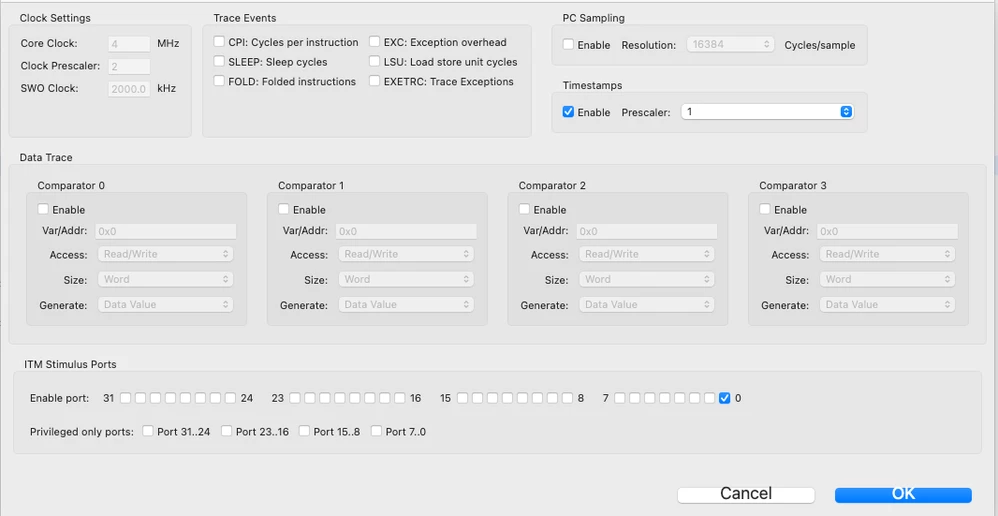
I didn't make any changes to the Clock and as far as I know the default clock for STM32L432 is 4MHz. Here is the debug and ITM configuration:
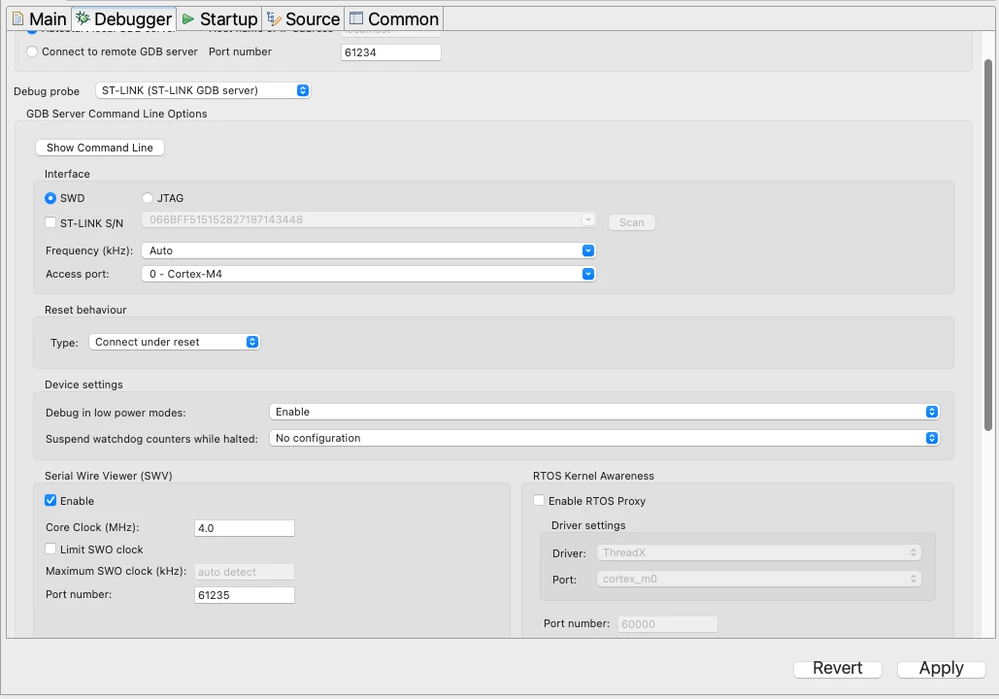
debugger configuration.png

ITM configuration.png

I also started recording in ITM Data Console window.


I don't see any traces in the SWV ITM Data Console window. Any ideas why? What am I doing wrong?

Best answer by DPiór.1

Looking at the Nucleo board's schematics I found out that ST-Link is not connected to MCU's SWO. Hence using ITM printf trace is not possible.

6 replies

Andrew Neil
Super User
April 10, 2025

https://community.st.com/t5/stm32-mcus/using-the-itm-console-for-printf-redirects-and-lwip-debug/ta-p/723472

As for doing printf via UART, I would strongly suggest that you get this going direct first.


A complex system that works is invariably found to have evolved from a simple system that worked.A complex system designed from scratch never works and cannot be patched up to make it work.
DPiór.1
DPiór.1Author
Associate III
April 10, 2025

@Andrew Neil I read that post already before. I did the same steps as in that post. However I'm not using CubeMX, I'm not using STM32Cube as Project Type.

Andrew Neil
Super User
April 10, 2025

So what are you using?

If it's GCC-based, it should be the same.

Again, try to get the ITM output to work direct first - before adding the complications of printf, etc ...

A complex system that works is invariably found to have evolved from a simple system that worked.A complex system designed from scratch never works and cannot be patched up to make it work.
DPiór.1
DPiór.1Author
Associate III
April 10, 2025

I am using STM32CubeIDE, but when creating the project I select "empty" project type. With this configuration, the CubeMX file is not created, neither HAL/configuration files related to CubeMX.

What do you mean by "get the ITM output to work direct"?

I tried also to use SWV trace log and SWV statistical profiling, following the STM's instructions from this video but also without success.

Pavel A.
Super User
April 11, 2025

Please start from some "UART printf" example for your board/MCU, or generate a new project with Cube (yes, with HAL,  you will remove unneeded later). Especially do not add any code to touch the DBG and ITM. Let the host (debugger) to configure DBG. Make sure the ITM prints work. Then play with the code and change it as you like.


CTapp.1
Senior III
April 11, 2025

Have you enabled SWO? This is the initialisation code I use for a G4 device.

 // enable the SWO pin in async. mode
 DBGMCU->CR &= ~DBGMCU_CR_TRACE_MODE;
 DBGMCU->CR |= DBGMCU_CR_TRACE_IOEN;
 
 // enable DWT and ITM
 CoreDebug->DEMCR |= CoreDebug_DEMCR_TRCENA_Msk; 

 TPI->CSPSR = 1; // Port width = 1 bit
 TPI->SPPR = 2; // UART encoding
 TPI->ACPR = SystemCoreClock / 2000000 - 1; // Clock divider
 TPI->FFCR &= ~TPI_FFCR_EnFCont_Msk; // No formatter
 ITM->LAR = 0xC5ACCE55; // Unlock the ITM registers
 ITM->TCR = ITM_TCR_ITMENA_Msk // Enable the ITM
 | ITM_TCR_TraceBusID_Msk; // Set the stream identifier
 ITM->TPR = 1; // Enable unprivileged access to ports 7:0
 ITM->TER = 1; // Enable trace port 0
All posts are made in a personal capacityMISRA C++ ChairMISRA C WG MemberDirector The MISRA Consortium Limited (TMCL)
DPiór.1
DPiór.1AuthorBest answer
Associate III
May 30, 2025

Looking at the Nucleo board's schematics I found out that ST-Link is not connected to MCU's SWO. Hence using ITM printf trace is not possible.

Pavel A.
Super User
May 30, 2025

Yes... that simple. Maybe because the MCU has too few pins.

PavelA_0-1748614318287.png


DPiór.1
DPiór.1Author
Associate III
May 30, 2025

@Pavel A. wrote:

Yes... that simple. Maybe because the MCU has too few pins.

PavelA_0-1748614318287.png


I don't think it is because the MCU has too few pins, because SWO is available on pin PB3. 

CTapp.1
Senior III
May 30, 2025

Are you sure? I though that's what it used to program the target device?

On sheet 1 I can see that SWDIO of the target is connected to TMS of the ST-Link.

On sheet 3, TMS is connected to T_JTMS, with the net labelled as "TMS/SWDIO".

All posts are made in a personal capacityMISRA C++ ChairMISRA C WG MemberDirector The MISRA Consortium Limited (TMCL)
Andrew Neil
Super User
May 30, 2025

@CTapp.1 wrote:

I though that's what it used to program the target device?


SWDIO & SWCLK are used for programming and debugging.

But this thread is about using the ITM Trace output, which goes via SWO - an extra pin!

A complex system that works is invariably found to have evolved from a simple system that worked.A complex system designed from scratch never works and cannot be patched up to make it work.
CTapp.1
Senior III
June 9, 2025

Doh! I knew that, having just built a board that uses it!

Must read things properly before hitting "Reply" :)

All posts are made in a personal capacityMISRA C++ ChairMISRA C WG MemberDirector The MISRA Consortium Limited (TMCL)