Associate III
December 2, 2025
Question

no RTC wake up

  • December 2, 2025
  • 4 replies
  • 597 views

I’m working on a project with the Nucleo-L476RG. I want to perform a measurement, then put the microcontroller into Sleep Mode for 2 seconds, after which it should be woken up by the RTC clock.

I followed the tutorial:

How to configure the RTC to wake up the STM32 from Low Power modes

Unfortunately, Sleep Mode is entered but not exited properly.

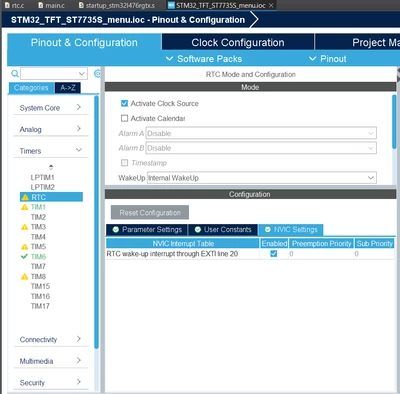
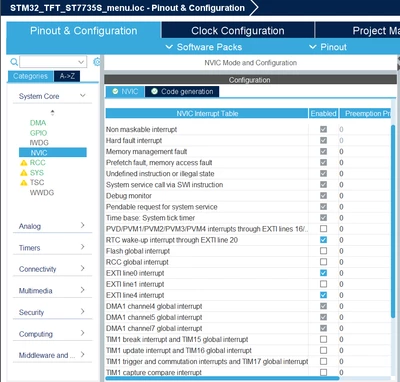
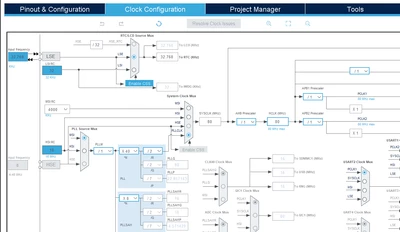
Down below are my project settings:
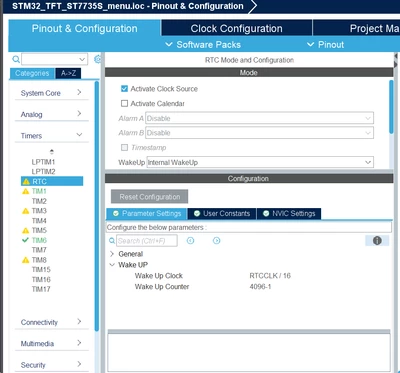
MichalPorazko_0-1764697557739.pngMichalPorazko_1-1764697599975.png

MichalPorazko_2-1764697651032.pngMichalPorazko_3-1764698784445.png


In my measurement function, I call a custom sleep() function.

void start_measurement(hx711_t *hx711){

	hx711->processed_reading = get_weight(active_hx711, 10);
	menu_refresh();
	pack_data(hx711);
	if (HAL_UART_Transmit_DMA(&huart2, (uint8_t *)( active_hx711->tx_buffer), HX711_TX_BUFFER_SIZE) == HAL_OK){
						active_hx711->measurement_count = 0U;
						active_hx711->tx_in_progress = 1U;
	}

	sleep();


}

there's the call of the sleep function:

void HAL_RTCEx_WakeUpTimerEventCallback(RTC_HandleTypeDef *hrtc)
{
	//HAL_ResumeTick();
	printf("Inside the HAL_RTCEx_WakeUpTimerEventCallback function");
	rtc_wakeup_flag = 1;
	start_measurement(active_hx711);
	HAL_GPIO_WritePin(LD2_GPIO_Port, LD2_Pin, GPIO_PIN_SET);
}


void sleep(void){

	HAL_GPIO_WritePin(LD2_GPIO_Port, LD2_Pin, GPIO_PIN_RESET);


	if (HAL_RTCEx_SetWakeUpTimer_IT(&hrtc, 4096, RTC_WAKEUPCLOCK_RTCCLK_DIV16) != HAL_OK) {
		Error_Handler();
	}
	printf("the HAL_RTCEx_SetWakeUpTimer_IT has been called \n");

	uint32_t pending = HAL_NVIC_GetPendingIRQ(RTC_WKUP_IRQn);

	printf("the pending bit for the RTC clock interrupt %lu\n", pending);

	//HAL_SuspendTick();
	counter++;

	DBGMCU->CR = 0;
	
	printf("Entering the sleep mode...");
	HAL_PWR_EnterSLEEPMode(PWR_MAINREGULATOR_ON, PWR_SLEEPENTRY_WFI);


}

void disable_wakeup(void) {
 HAL_RTCEx_DeactivateWakeUpTimer(&hrtc);
 //HAL_ResumeTick();
 rtc_wakeup_flag = 0;
}


Initially, when I used the default debugging configuration, the HAL_RTCEx_WakeUpTimerEventCallback() function was successfully entered — but only during debugging. Without the debugger attached, it was never called.

Later, I enabled SWV ITM Data printing, and observed the following:

  • HAL_RTCEx_SetWakeUpTimer_IT() was called successfully.

  • The pending bit for the RTC wake-up interrupt appeared to be set.

However, after enabling SWV/ITM, the debugger began printing the following repeatedly:


Target is not responding, retrying...

Even after I disabled SWV ITM again, the message “Target is not responding...” continued to appear. At this point, things became a bit confusing and I’m unsure what’s causing this behavior.


4 replies

December 2, 2025

I ran into this exact issue on the L476 before, and it almost drove me crazy too. Sleep Mode would enter fine but never exit unless the debugger was attached. In my case the problem was that the RTC wake-up interrupt wasn’t actually firing standalone because the clock config and NVIC settings weren’t applied properly outside debug mode. Make sure the wake up timer is re-initialized after entering low-power mode and confirm the interrupt is enabled globally. Once I fixed that, everything started working again felt like using Nebroo Hearing Aids because suddenly the MCU woke up properly.

TDK
Super User
December 2, 2025

Debugging is difficult when entering low-power modes. Typically the processor needs to remain response for about 500 ms after reset to allow the debugger to do what it needs to do. If you drop to a low-power mode before that, things can break.

If your printf statements are hooked up to ITM, they will not work unless the debugger is present. This means your code will only work with the debugger present. I recommend using UART here instead.

"If you feel a post has answered your question, please click ""Accept as Solution""."
Technical Moderator
December 3, 2025

Hello @MichalPorazko 

You can test with a simple LED toggle in the callback to confirm wakeup.

"To give better visibility on the answered topics, please click on ""Accept as Solution"" on the reply which solved your issue or answered your question.Saket_Om"
Associate III
December 3, 2025

@TDK thanks , hen I reverted to a previous version of the project (without ITM printing), the messages "Target is not responding, retrying..." stopped appearing

@Saket_Om thanks, I have it in my project, the LD2  available on the L476RG, should toggle, when the 

HAL_RTCEx_WakeUpTimerEventCallback

is entered, but it doesn't so I guess the microcontroller isn’t waking up properly from sleep mode. 


I tried observing the relevant registers during a debugging session.

According to the reference manual, when the RTC wake-up counter reaches zero, the WUTF flag (Wake-Up Timer Flag) should be set in the RTC_ISR register

MichalPorazko_4-1764799961857.png

And it is

MichalPorazko_1-1764798988479.png

As well as the WUTIE flag:

MichalPorazko_3-1764799920809.png


According to 'STM32L47xxx, STM32L48xxx, STM32L49xxx and STM32L4Axxx
advanced Arm®-based 32-bit MCUs' reference manual and STM32 Cortex®-M4 MCUs and MPUs programming manual, the interrupt pending bit for the RTC wake-up timer should be bit 10 in the ISPR0 register (in the NVIC).

MichalPorazko_5-1764800385553.pngMichalPorazko_6-1764800413258.png

MichalPorazko_7-1764800428874.png

As you can see it isn't set:

MichalPorazko_0-1764798908642.png


However the HAL_RTCEx_WakeUpTimerEventCallback is entered but just in the debug mode:

MichalPorazko_2-1764799639797.png

Without the debugger, the callback is never executed, and the LED never toggles.