
Associate II
January 16, 2026
Solved

NUCLEO-H723ZG: Can't ping LwIP example from stm32-hotspot repo

  • January 16, 2026
  • 2 replies
  • 339 views

Hi everyone,

I’m trying to get the LwIP examples from the stm32-hotspot GitHub (this one: https://github.com/stm32-hotspot/STM32H7-LwIP-Examples) running on my NUCLEO-H723ZG, but I’m hitting a wall.

The README is actually great and super clear, which is why I’m surprised I can’t get it to work. I’ve built the project and flashed it to the board, and I have it connected directly to my laptop via Ethernet.

The docs say the IP should be 192.168.1.10, but when I try to ping it, I get nothing. I also took a look at the code and it looked like the IP might be set to 192.168.1.1 instead, so I tried pinging that too, still no luck.

Am I missing something basic here? Is it enough to just build and flash the code, or do I need to tweak some jumpers on the Nucleo or change my laptop's manual IP settings to be on the same subnet?

I’d really appreciate it if someone who has used this repo could point me in the right direction.

Thanks!

mpek29
Best answer by STackPointer64

Hello @mpek29, and Welcome to ST Community!

To run the example in the hotspot, you first need to configure the STM32 to be on the same network as your computer. To do this, follow these steps:

  1. Press Windows Key + R.
  2. Type cmd and press Enter.
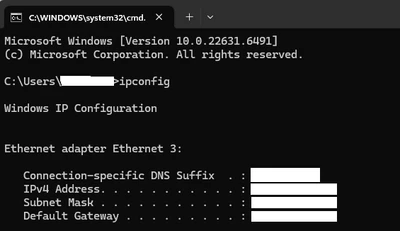
  3. Type the command ipconfig.
  4. Look for the following configuration:
     a.png
    • IPv4 Address
    • Subnet Mask
    • Default Gateway
  5. In your STM32 project, open the lwip.c file and set the same Default Gateway and Subnet Mask, but use a different IPv4 address by changing the last number.
  6. Recompile the project and flash it. If all goes well, you should be able to ping the board.

Best regards,

2 replies

mbarg.1
Senior III
January 17, 2026

STM32 is not for end users - it is for programmers ! and so are examples.

Learn how to look at global variables in real time and you will see what is your ip.

But this will not solve your problem - usually demo requires a network with a DHCP server to enable ethernet - again you must be able to understand code inside.

Also your pc must be in the same subnet, and pc did stop to work on static ip unless you can work on low level configuration.

Ever heard of Wireshark to monitor ethernet packets? It is a vital tool for troubleshooting iot.

LwIP is an unreliable library -in my experience - and I dropped a couple of years ago - see my old post.

STackPointer64Best answer
Technical Moderator
January 19, 2026

Hello @mpek29, and Welcome to ST Community!

To run the example in the hotspot, you first need to configure the STM32 to be on the same network as your computer. To do this, follow these steps:

  1. Press Windows Key + R.
  2. Type cmd and press Enter.
  3. Type the command ipconfig.
  4. Look for the following configuration:
     a.png
    • IPv4 Address
    • Subnet Mask
    • Default Gateway
  5. In your STM32 project, open the lwip.c file and set the same Default Gateway and Subnet Mask, but use a different IPv4 address by changing the last number.
  6. Recompile the project and flash it. If all goes well, you should be able to ping the board.

Best regards,

To improve visibility of answered topics, please click 'Accept as Solution' on the reply that resolved your issue or answered your question.
mƎALLEm
Technical Moderator
January 19, 2026

@STackPointer64 wrote:
  1. In your STM32 project, open the lwip.c file and set the same Default Gateway and Subnet Mask, but use a different IPv4 address by changing the last number.

And ensure that last number to be unique in the network: not used by another device on the network.

"To give better visibility on the answered topics, please click on ""Accept as Solution"" on the reply which solved your issue or answered your question."