

EasyNet
Associate III
December 15, 2025
Solved

STM32F767ZI FMC LCD initialization is failing and calling MemManage_Handler()

  • December 15, 2025
  • 1 reply
  • 408 views

Post edited by ST moderator to be inline with the community rules for the code sharing. In next time please use </> button to paste your code and a linker script content. Please read this post: How to insert source code.

Hello,
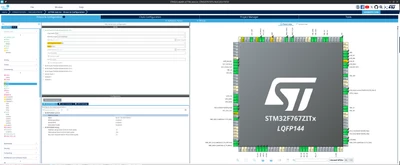
I'm trying to use an LCD with ILI9341 chip. I've connected all pins to the LCD and I've set in CubeMX the FMC like this:
EasyNet_0-1765826264263.png

But when I tried to run the program, all calls from main.c is calling MX_FMC_Init(); then is going in this function:

HAL_StatusTypeDef FMC_NORSRAM_Init(FMC_NORSRAM_TypeDef *Device,
const FMC_NORSRAM_InitTypeDef *Init)
{

..

__FMC_NORSRAM_DISABLE(Device, Init->NSBank);

..

And soon this macro is executed function MemManage_Handler() is called:


/**
* @brief This function handles Memory management fault.
*/
void MemManage_Handler(void)
{
/* USER CODE BEGIN MemoryManagement_IRQn 0 */
SerialPrint("MemManager_Handler fault..");

/* USER CODE END MemoryManagement_IRQn 0 */
while (1)
{
/* USER CODE BEGIN W1_MemoryManagement_IRQn 0 */
/* USER CODE END W1_MemoryManagement_IRQn 0 */
}
}

And I can't go over this error. I don't understand what is wrong with the FMC configuration.

Can somebody give me a help?

Best answer by mƎALLEm

Hello,

Most probably you have the MPU default configuration enabled which disables the access to all external memory regions:

static void MPU_Config(void)
{
 MPU_Region_InitTypeDef MPU_InitStruct;

 /* Disable the MPU */
 HAL_MPU_Disable();

 /* Configure the MPU as Strongly ordered for not defined regions */
 MPU_InitStruct.Enable = MPU_REGION_ENABLE;
 MPU_InitStruct.BaseAddress = 0x00;
 MPU_InitStruct.Size = MPU_REGION_SIZE_4GB;
 MPU_InitStruct.AccessPermission = MPU_REGION_NO_ACCESS;
 MPU_InitStruct.IsBufferable = MPU_ACCESS_NOT_BUFFERABLE;
 MPU_InitStruct.IsCacheable = MPU_ACCESS_NOT_CACHEABLE;
 MPU_InitStruct.IsShareable = MPU_ACCESS_SHAREABLE;
 MPU_InitStruct.Number = MPU_REGION_NUMBER0;
 MPU_InitStruct.TypeExtField = MPU_TEX_LEVEL0;
 MPU_InitStruct.SubRegionDisable = 0x87;
 MPU_InitStruct.DisableExec = MPU_INSTRUCTION_ACCESS_DISABLE;

 HAL_MPU_ConfigRegion(&MPU_InitStruct);

 /* Enable the MPU */
 HAL_MPU_Enable(MPU_PRIVILEGED_DEFAULT);
}

That default MPU configuration is to prevent the CM7 speculative access to the non configured memories especially the external ones (explanation here). So you need to configure another MPU memory region to enable the access to the LCD.

Hope that helps.

1 reply

mƎALLEm
mƎALLEmBest answer
Technical Moderator
December 16, 2025

Hello,

Most probably you have the MPU default configuration enabled which disables the access to all external memory regions:

static void MPU_Config(void)
{
 MPU_Region_InitTypeDef MPU_InitStruct;

 /* Disable the MPU */
 HAL_MPU_Disable();

 /* Configure the MPU as Strongly ordered for not defined regions */
 MPU_InitStruct.Enable = MPU_REGION_ENABLE;
 MPU_InitStruct.BaseAddress = 0x00;
 MPU_InitStruct.Size = MPU_REGION_SIZE_4GB;
 MPU_InitStruct.AccessPermission = MPU_REGION_NO_ACCESS;
 MPU_InitStruct.IsBufferable = MPU_ACCESS_NOT_BUFFERABLE;
 MPU_InitStruct.IsCacheable = MPU_ACCESS_NOT_CACHEABLE;
 MPU_InitStruct.IsShareable = MPU_ACCESS_SHAREABLE;
 MPU_InitStruct.Number = MPU_REGION_NUMBER0;
 MPU_InitStruct.TypeExtField = MPU_TEX_LEVEL0;
 MPU_InitStruct.SubRegionDisable = 0x87;
 MPU_InitStruct.DisableExec = MPU_INSTRUCTION_ACCESS_DISABLE;

 HAL_MPU_ConfigRegion(&MPU_InitStruct);

 /* Enable the MPU */
 HAL_MPU_Enable(MPU_PRIVILEGED_DEFAULT);
}

That default MPU configuration is to prevent the CM7 speculative access to the non configured memories especially the external ones (explanation here). So you need to configure another MPU memory region to enable the access to the LCD.

Hope that helps.

"To give better visibility on the answered topics, please click on ""Accept as Solution"" on the reply which solved your issue or answered your question."
EasyNet
EasyNetAuthor
Associate III
December 16, 2025

Thanks. After I disabled MPU, I could able to boot my firmware. I wall check the link you gave me.

mƎALLEm
Technical Moderator
December 16, 2025

@EasyNet wrote:

Thanks. After I disabled MPU, I could able to boot my firmware. I wall check the link you gave me.


Better to add another MPU region for LCD memory range to enable the CPU access instead of disabling the background MPU config.

"To give better visibility on the answered topics, please click on ""Accept as Solution"" on the reply which solved your issue or answered your question."