
Senior
September 30, 2025
Solved

STM32H753I-EVAL2 - Using Ux_Device_Audio2.0_Playback does not work

  • September 30, 2025
  • 12 replies
  • 2756 views

I have STM32H753I-EVAL2 board and I want to set it up as an USB Speaker device. 


I see 3 protect that can make this as such, which are:

NameBoardBoard TypeSTM32CubeMX VersionSW Package Installed
Ux_Device_Audio_2.0STM32N6570-DKNucleo-64NATRUE
Ux_Device_Audio_2.0_StandaloneSTM32N6570-DKNucleo-64NATRUE
Ux_Device_Audio2.0_PlayBackSTM32H743I-EVALNucleo-646.15.0TRUE


Two things...

1) I don't want RTOS, but STM32H743I-EVAL has RTOS, and the one I'm looking for is on the wrong board. So... What advantage do I have using RTOS? Can I use the Standalone one and change the board somehow in the code? I haven't done much comparison to know, I've been overwhelmed trying to understand the organization of the project. 

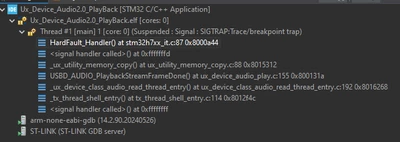
2) When I do download, install and run the Ux_Device_Audio2.0_PlayBack anyway, the program is running. I see the USB being enumerated as a speaker on my laptop. Issue is, everything is fine, but when I try to play an audio, it runs into a fault -- > `void HardFault_Handler(void))`

I can't tell where it's being called, but the stack is as such:
audio_0-1759261272122.png

Any idea why I can't play audio out?


Best answer by audio

@FBL answered this standalone issue in the other question - click here to see the post and for the zip file.

The zip file is a STM32 project which is a standalone USBX device audio that works for H757, and will need adjustments to get the audio working well, but it solves the standalone question.

Please refer to first post @FBL made in this thread for summary of changing from Azure RTOS to Standalone (Standalone means no RTOS/Threading, even though you're using USBX from Azure) - click here to see this post. 

I'll reattach here in case you don't want to go to the other question. 

As for the second question I asked in the post, I branched it off to a new question, see here.

12 replies

Technical Moderator
October 30, 2025

Hi @audio

I have a better approach to address the echo (looping noise) issue effectively. I implemented a double-buffering approach where we clear (zero out) one half of the SAI audio buffer while writing to the other half, then swap the operation accordingly. This ensures that old audio data is removed before new data is processed, minimizing unwanted noise. It works on my end ! Add between /* USER CODE BEGIN 1 */ and /* USER CODE END1 */
in ux_device_audio_play.c


uint32_t half = AUDIO_TOTAL_BUF_SIZE/2;

void BSP_AUDIO_OUT_HalfTransfer_CallBack(uint32_t Instance)
{
 memset(&BufferCtl.buff[0], 0, AUDIO_TOTAL_BUF_SIZE/2);
}

void BSP_AUDIO_OUT_TransferComplete_CallBack(uint32_t Instance)
{
 memset(&BufferCtl.buff[AUDIO_TOTAL_BUF_SIZE/2], 0, AUDIO_TOTAL_BUF_SIZE/2);
}


To give better visibility on the answered topics, please click on Accept as Solution on the reply which solved your issue or answered your question.Best regards,FBL
audioAuthorBest answer
Senior
November 28, 2025

@FBL answered this standalone issue in the other question - click here to see the post and for the zip file.

The zip file is a STM32 project which is a standalone USBX device audio that works for H757, and will need adjustments to get the audio working well, but it solves the standalone question.

Please refer to first post @FBL made in this thread for summary of changing from Azure RTOS to Standalone (Standalone means no RTOS/Threading, even though you're using USBX from Azure) - click here to see this post. 

I'll reattach here in case you don't want to go to the other question. 

As for the second question I asked in the post, I branched it off to a new question, see here.