
Associate
May 22, 2025
Solved

SysTick_Handler crashes when incrementing static variable using ++

  • May 22, 2025
  • 6 replies
  • 1369 views

Hi all,

I'm working on an STM32F411 project using STM32CubeIDE (bare-metal, no HAL). I'm setting up a 1ms tick using SysTick_Config() and defining my own SysTick_Handler() to keep a millisecond counter. Here's the issue:

When I increment a static volatile global counter inside the handler using '++', the system crashes and ends up in Default_Handler. But strangely, if I assign a constant (e.g. millis = 123;), it works perfectly fine. Moreover, if I increment a local temp variable and increment millis, it'll take it just fine. Here's my code snippet. I'm not using the HAL library for this. Would you know why this would be? I'm using an STM32F411CE6 black pill.

Thanks!


static volatile uint32_t millis = 0;

void SysTick_Handler(void)
{
// This works:
// millis = 123;

// This works as well:
uint32_t tmp = millis;
tmp++;
millis = tmp;

// This causes a crash into a forever loop in default handler:
millis++;

(void)(SysTick->CTRL); // Clear COUNTFLAG
}


// SysTick is initialized like this in main, got all the clocks, etc, working. Running at 75MHz PLL, 25MHZ external crystal.
SysTick_Config(SystemCoreClock / 1000); // 1ms tick
 

Best answer by drdrone

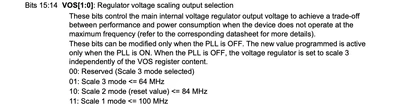
Yup, hard fault, thanks for all your help. Seems like I had an issue with my clock setup - when I ran it at 75MHz, I think I was supposed to set the power control scaling for it to be able to go that high. The system defaults to scale 2, which supports only lower clock frequencies; anything greater would need this code to be put before the PLL setup. 

The reference manual doesn't really state that you have to do this for 75MHz, it says only if you run less than 100MHz, but I guess I needed it. 

 Enable interface clock and set the internal voltage regulator scale to scale 1
 RCC->APB1ENR |= RCC_APB1ENR_PWREN;
 PWR->CR |= PWR_CR_VOS;

 drdrone_0-1747934735778.png

6 replies

mbarg.1
Senior III
May 22, 2025

Problem is in 

static volatile

declaration.

If you want more help, post the assembler code generated, the memory address of millis variable, and (if you do not see yourself ) we will show the problem.

Ozone
Principal
May 22, 2025

> ...post the assembler code generated, the memory address of millis variable, ...

Switching debugging to assembler level (AFAIK "instruction stepping" in Eclipse lingo) and making a screenshot including the line where it crashes should do the trick.

I think there is something else, outside the code you have shown.

Andrew Neil
Super User
May 22, 2025

@Ozone wrote:

I think there is something else, outside the code you have shown.


Indeed.

@drdrone please post a minimum but complete example which demonstrates the issue.

A complex system that works is invariably found to have evolved from a simple system that worked.A complex system designed from scratch never works and cannot be patched up to make it work.
Andrew Neil
Super User
May 22, 2025

@drdrone wrote:

 a static volatile global counter 


If it's static, then it's not global - at most, it's file-scope.


@drdrone wrote:

the system crashes and ends up in Default_Handler.


On debugging Hard Faults:

https://community.st.com/t5/community-guidelines/how-to-write-your-question-to-maximize-your-chances-to-find-a/tac-p/708193/highlight/true#M51


A complex system that works is invariably found to have evolved from a simple system that worked.A complex system designed from scratch never works and cannot be patched up to make it work.
Ozone
Principal
May 22, 2025

> If it's static, then it's not global - at most, it's file-scope.

That should be ok, I often use similiar definitions without problems. Although not with theCube IDE / toolchain.
A common example is a wait / delay routine based upon such a counter, implemented in the same module.


Andrew Neil
Super User
May 22, 2025

@Ozone wrote:

> If it's static, then it's not global - at most, it's file-scope.

That should be ok,


But the point is it's not a global variable - as the OP said - so checking if that was just a typo...


@drdrone - does it make any difference if you make it truly global (ie, remove static)?

Also if you remove volatile?

And what if you use:

millis += 1;


What optimisation level are you using?

A complex system that works is invariably found to have evolved from a simple system that worked.A complex system designed from scratch never works and cannot be patched up to make it work.
Technical Moderator
May 22, 2025

Hello @drdrone 

Could you try the config below please:

void SysTick_Handler(void) {
 __disable_irq(); // Disable interrupts
 millis++;
 __enable_irq(); // Enable interrupts
}
"To give better visibility on the answered topics, please click on ""Accept as Solution"" on the reply which solved your issue or answered your question.Saket_Om"
mbarg.1
Senior III
May 22, 2025

This is not a solution nor an explanation !

Solution is in generated assembler ...

TDK
Super User
May 22, 2025

If it's in Default_Handler, that is not a crash, but indicates an interrupt fired which you have not implemented.

The issue has to be elsewhere, no way incrementing a variable is the root cause here.

"If you feel a post has answered your question, please click ""Accept as Solution""."
Andrew Neil
Super User
May 22, 2025

@TDK wrote:

If it's in Default_Handler, that is not a crash,


Is that necessarily true in a bare-metal (not HAL) setup?

Using HAL, you get a distinct Hard Fault handler - but maybe not in the OP's case?

@drdrone you do need to determine what, exactly, is calling your "Default_Handler" 

A complex system that works is invariably found to have evolved from a simple system that worked.A complex system designed from scratch never works and cannot be patched up to make it work.
Andrew Neil
Super User
May 22, 2025

Have you determined yet what is causing it to enter your default handler?

Is it a Hard Fault, or not?

A complex system that works is invariably found to have evolved from a simple system that worked.A complex system designed from scratch never works and cannot be patched up to make it work.
drdroneAuthorBest answer
Associate
May 22, 2025

Yup, hard fault, thanks for all your help. Seems like I had an issue with my clock setup - when I ran it at 75MHz, I think I was supposed to set the power control scaling for it to be able to go that high. The system defaults to scale 2, which supports only lower clock frequencies; anything greater would need this code to be put before the PLL setup. 

The reference manual doesn't really state that you have to do this for 75MHz, it says only if you run less than 100MHz, but I guess I needed it. 

 Enable interface clock and set the internal voltage regulator scale to scale 1
 RCC->APB1ENR |= RCC_APB1ENR_PWREN;
 PWR->CR |= PWR_CR_VOS;

 drdrone_0-1747934735778.png

Tesla DeLorean
Guru
May 22, 2025

Check RCC setting for PLL, confirm execution speed.

Check FLASH wait states.

Check VCAP capacitors and voltage. 4u7 total, 1.25V. Issues here often result in Hard Faults due to read failures.

Tips, Buy me a coffee, or three.. PayPal VenmoUp vote any posts that you find helpful, it shows what's working..